



Strong customer authentication with FIDO2
This page covers integrating the Thales FIDO SDK with the OneWelcome Identity Platform Mobile (OMI) SDK to enable FIDO2-based strong customer authentication (SCA) via the custom authenticator flow and extension engine. This pattern relays WebAuthn challenges between the Thales FIDO server and the mobile FIDO SDK, providing standards-based biometric authentication for compliance with the Revised Payment Services Directive (PSD2).
Prerequisites
-
The user has registered a FIDO credential via the FIDO SDK. See FIDO SDK Registration.
-
The OMI SDK is integrated with custom authenticator support enabled. See custom authenticators.
-
A custom authenticator is configured in the OneWelcome Identity Platform console. See custom authenticator configuration.
-
Extension engine scripts are deployed for the custom authenticator. See extension engine scripts for FIDO2 SCA.
-
The Thales FIDO server is configured and accessible from the extension engine.
-
The FIDO server URL and API key are stored as extension engine properties. See extension engine properties.
Note
If your organization does not yet have access to the FIDO SDK, contact your Thales account team. If you are using the FIDO SDK standalone and want to explore OMI SDK integration, see the OMI SDK.
Architecture overview
The OMI SDK custom authenticator bridges the FIDO SDK with the Thales FIDO server via the extension engine, as shown in the sequence diagram below.
Both the OMI SDK and FIDO SDK run in-process on the mobile device. The custom authenticator mechanism provides the server-side orchestration bridge.
Sequence diagram
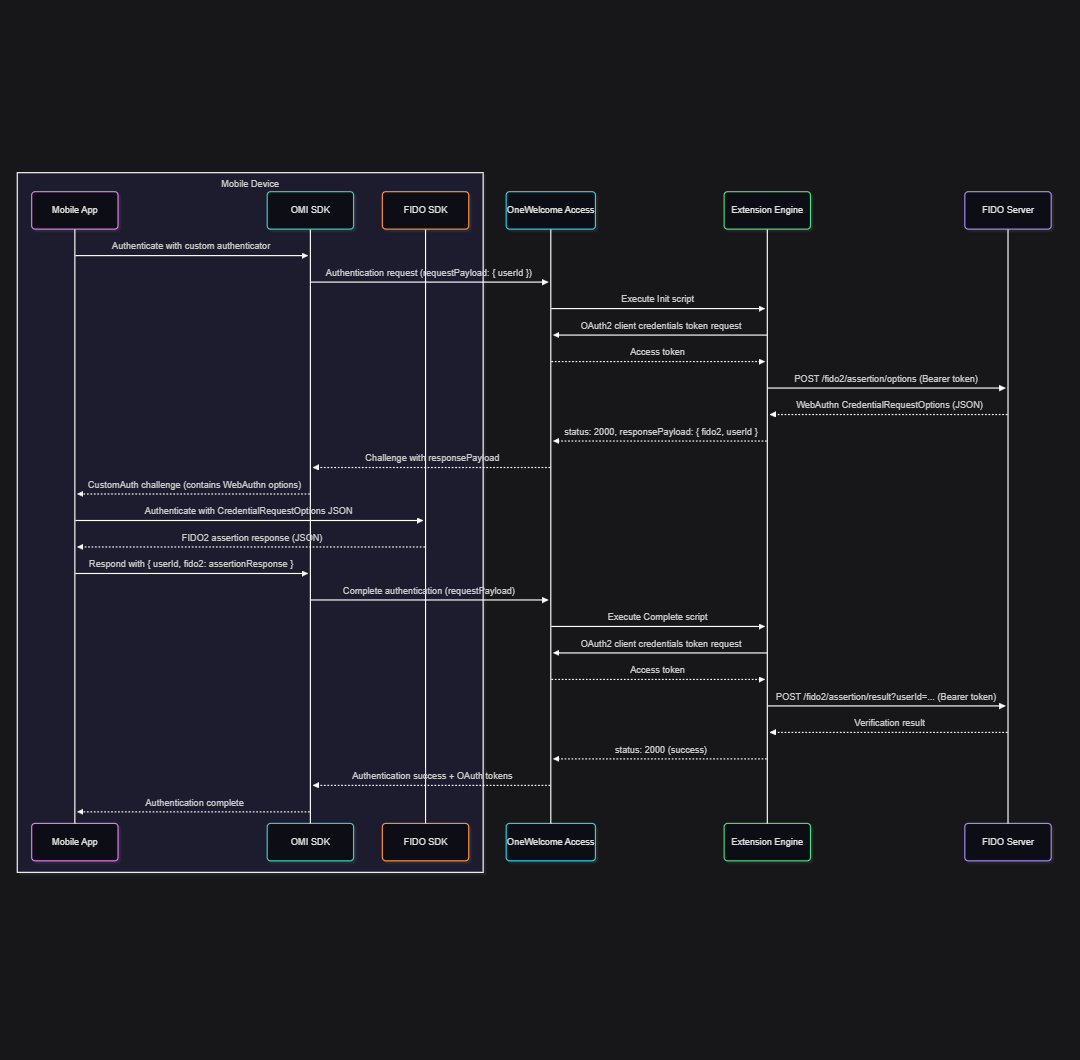
Initiate the authentication flow
The OMI SDK delivers the extension engine init script's responsePayload to the app via the custom authentication delegate (iOS) or action callback (Android). The payload contains { fido2: <CredentialRequestOptions>, userId: "<fido2UserId>" }.
For detailed FIDO SDK authentication setup, including UI delegates and callbacks, see authenticate an authenticator.
To initiate the authentication flow, extract the fido2 object, pass it to the FIDO SDK, then wrap the assertion response back with the userId for the complete script:
func userClient(_ userClient: UserClient,
                didReceiveCustomAuthFinishAuthenticationChallenge challenge: CustomAuthFinishAuthenticationChallenge) {

    // responsePayload from extension engine init script: { fido2: {...}, userId: "..." }
    guard let responseJson = challenge.info?.data,
          let responseData = responseJson.data(using: .utf8),
          let payload = try? JSONSerialization.jsonObject(with: responseData) as? [String: Any],
          let fido2Options = payload["fido2"],
          let userId = payload["userId"] as? String else {
        challenge.sender.cancel(challenge, underlyingError: nil)
        return
    }

    do {
        // Extract the WebAuthn CredentialRequestOptions and pass to FIDO SDK
        let fido2OptionsData = try JSONSerialization.data(withJSONObject: fido2Options)
        let fido2OptionsString = String(data: fido2OptionsData, encoding: .utf8)!

        let fidoRequest = try TGFFido2RequestFactory.request(withJsonString: fido2OptionsString)
        let respondArgsBuilder = TGFFido2RespondArgsBuilder(request: fidoRequest, uiDelegate: fidoUiDelegate)
        respondArgsBuilder.uiBiometricAuthenticatorDelegate = fidoUiDelegate
        respondArgsBuilder.uiPasscodeAuthenticatorDelegate = fidoUiDelegate
        respondArgsBuilder.passcodeAuthenticator = TGFPasscodeAuthenticator(delegate: fidoUiDelegate)
        let respondArgs = respondArgsBuilder.respondArgs()

        fido2Client.respond(with: respondArgs) { response, error in
            if let error = error {
                challenge.sender.cancel(challenge, underlyingError: error)
            } else if let fidoResponseJson = response?.raw() {
                // Wrap FIDO2 assertion with userId for the Complete script
                let completePayload: [String: Any] = [
                    "userId": userId,
                    "fido2": fidoResponseJson
                ]
                if let data = try? JSONSerialization.data(withJSONObject: completePayload),
                   let payloadString = String(data: data, encoding: .utf8) {
                    challenge.sender.respond(with: payloadString, to: challenge)
                }
            }
        }
    } catch {
        challenge.sender.cancel(challenge, underlyingError: error)
    }
}
public class FidoScaAuthenticationAction implements OneginiCustomAuthAuthenticationAction {

    private final Activity activity;
    private final Fido2UiCallback uiCallback;

    // Constructor initializing activity and UI callbacks...

    @Override
    public void finishAuthentication(final OneginiCustomAuthAuthenticationCallback callback,
                                     final String data) {
        try {
            // responsePayload from Extension Engine Init: { fido2: {...}, userId: "..." }
            JSONObject payload = new JSONObject(data);
            final String userId = payload.getString("userId");
            JSONObject fido2Options = payload.getJSONObject("fido2");

            // Extract WebAuthn CredentialRequestOptions and pass to FIDO SDK
            Fido2Request fido2Request = Fido2Request.jsonText(fido2Options.toString());

            PasscodeAuthenticatorCallback passcodeCallback = new SamplePinPadAuthenticatorCallback(activity);
            PasscodeAuthenticator passcodeAuthenticator = PasscodeAuthenticator.of(activity, passcodeCallback);
            BiometricAuthenticatorCallback biometricCallback = new SampleBiometricAuthenticatorCallback();

            Fido2RespondArgs args = new Fido2RespondArgs.Builder()
                .setFido2Request(fido2Request)
                .setUiCallback(uiCallback)
                .setPasscodeAuthenticatorCallback(passcodeCallback)
                .setPasscodeAuthenticator(passcodeAuthenticator)
                .setBiometricAuthenticatorCallback(biometricCallback)
                .build();

            Fido2Client client = Fido2ClientFactory.createFido2Client(activity);
            client.setActivity(activity);

            client.respondWithArgs(args, new Fido2ResponseCallback() {
                @Override
                public void onResponded(Fido2Response response) {
                    // Wrap FIDO2 assertion with userId for the Complete script
                    try {
                        JSONObject completePayload = new JSONObject();
                        completePayload.put("userId", userId);
                        completePayload.put("fido2", response.toJson());
                        callback.returnSuccess(completePayload.toString());
                    } catch (JSONException e) {
                        callback.returnError(e);
                    }
                }

                @Override
                public void onError(Fido2Exception exception) {
                    callback.returnError(exception);
                }
            });
        } catch (JSONException e) {
            callback.returnError(e);
        }
    }
}
Complete the authentication
The app returns the FIDO assertion response through the OMI SDK custom authenticator challenge. The extension engine complete script forwards it to the FIDO server for verification. On success (status 2000), the user receives OAuth tokens.
For the extension engine scripts that handle FIDO server communication, see extension engine scripts for FIDO2 SCA.
Set up FIDO credentials
Users must have a registered FIDO credential before using SCA.
-
For mobile-side setup, see FIDO SDK registration.
-
For server-side coordination, see the extension engine scripts for FIDO2 SCA.
Extension engine scripts for FIDO2 SCA
The FIDO2 strong customer authentication (SCA) scripts run in the OneWelcome Identity Platform extension engine as part of the custom authenticator configuration. They bridge the OMI SDK authentication flow with the Thales FIDO server for WebAuthn assertion challenge and response. For the full integration, see strong customer authentication with FIDO2.
The scripts authenticate to the FIDO server using OAuth2 client credentials and use the extension engine's Spring REST_TEMPLATE for HTTP calls.
Extension engine properties required
Set the extension engine properties on the Access admin console: Configuration > System > Extension Engine > Properties.
| Property identifier | Description | Example | Sensitive |
|---|---|---|---|
tenant_base_url |
Base URL of the OneWelcome Identity Platform tenant hosting the FIDO server | https://login.customer.onewelcome.com |
No |
client_id |
OAuth client ID for client credentials grant | fido2-sca-client |
No |
client_secret |
OAuth client secret | Yes |
Custom authentication scripts
For the full request and response payload structure of the FIDO server endpoints used below, see the authenticator assertion API reference.
Init script
The init script obtains an access token, calls the FIDO server authenticator assertion API for a WebAuthn assertion challenge, and returns it as a responsePayload to the mobile app.
The mobile app sends { userId: "<fido2UserId>" } as the requestPayload. The response wraps the FIDO2 challenge: { fido2: <CredentialRequestOptions>, userId: "<fido2UserId>" }.
var configMap = configuration.getAll();

function execute(requestPayload) {
  try {
    var accessToken = getAccessToken("fido2_server-assertion_options");

    var jsonObject = JSON.parse(requestPayload);
    var fido2UserId = jsonObject.userId;
    var initResponse = callAssertionOptionsAPI(accessToken, fido2UserId);

    return {
      status: 2000,
      responsePayload: JSON.stringify({ fido2: initResponse, userId: fido2UserId })
    };
  } catch (e) {
    LOG.error("FIDO2 SCA Init error: " + (e.message || e));
    return { status: 5000, responsePayload: JSON.stringify({ message: e.message }) };
  }
}

function getAccessToken(scope) {
  var baseUrl = configMap["tenant_base_url"];
  var headers = new org.springframework.http.HttpHeaders();
  headers.add("Content-Type", "application/x-www-form-urlencoded");

  var formData = "grant_type=client_credentials"
    + "&client_id=" + encodeURIComponent(configMap["client_id"])
    + "&client_secret=" + encodeURIComponent(configMap["client_secret"])
    + "&scope=" + encodeURIComponent(scope);

  var entity = new org.springframework.http.HttpEntity(formData, headers);
  var response = REST_TEMPLATE.exchange(
    baseUrl + "/oauth/v1/token",
    org.springframework.http.HttpMethod.POST, entity, java.lang.String.class
  );
  return JSON.parse(response.getBody()).access_token;
}

function callAssertionOptionsAPI(accessToken, fido2UserId) {
  var baseUrl = configMap["tenant_base_url"];
  var headers = new org.springframework.http.HttpHeaders();
  headers.add("Authorization", "Bearer " + accessToken);
  headers.add("Content-Type", "application/json");

  var body = JSON.stringify({
    userId: fido2UserId,
    userVerification: "required",
    relyingPartyOptions: {
      rp: {
        origins: ["https://your.origin.com", "android:apk-key-hash:..."],
        id: "your.origin.com",    // Replace with your Relying Party ID
      },
      authenticationTimeout: 30000
    },
    extensions: {}
  });

  var entity = new org.springframework.http.HttpEntity(body, headers);
  var response = REST_TEMPLATE.exchange(
    baseUrl + "/fido2/assertion/options",
    org.springframework.http.HttpMethod.POST, entity, java.lang.String.class
  );
  return JSON.parse(response.getBody());
}
Complete script
The complete script obtains an access token, then forwards the FIDO2 assertion response to the FIDO server authenticator assertion API for verification.
The mobile app sends { userId: "<fido2UserId>", fido2: <assertionResponse> } as the requestPayload. On success, returns the user identifier and verification result.
var configMap = configuration.getAll();

function execute(requestPayload) {
  try {
    var accessToken = getAccessToken("fido2_server-assertion_result");

    var jsonObject = JSON.parse(requestPayload);
    var fido2UserId = jsonObject.userId;
    var fido2Response = jsonObject.fido2;
    var result = callAssertionResultAPI(accessToken, fido2UserId, fido2Response);

    return {
      status: 2000,
      user: { id: fido2UserId },
      responsePayload: JSON.stringify({ fido2: result })
    };
  } catch (e) {
    LOG.error("FIDO2 SCA Complete error: " + (e.message || e));
    return { status: 5000, responsePayload: JSON.stringify({ message: e.message }) };
  }
}

function getAccessToken(scope) {
  var baseUrl = configMap["tenant_base_url"];
  var headers = new org.springframework.http.HttpHeaders();
  headers.add("Content-Type", "application/x-www-form-urlencoded");

  var formData = "grant_type=client_credentials"
    + "&client_id=" + encodeURIComponent(configMap["client_id"])
    + "&client_secret=" + encodeURIComponent(configMap["client_secret"])
    + "&scope=" + encodeURIComponent(scope);

  var entity = new org.springframework.http.HttpEntity(formData, headers);
  var response = REST_TEMPLATE.exchange(
    baseUrl + "/oauth/v1/token",
    org.springframework.http.HttpMethod.POST, entity, java.lang.String.class
  );
  return JSON.parse(response.getBody()).access_token;
}

function callAssertionResultAPI(accessToken, fido2UserId, fido2Response) {
  var baseUrl = configMap["tenant_base_url"];
  var headers = new org.springframework.http.HttpHeaders();
  headers.add("Authorization", "Bearer " + accessToken);
  headers.add("Content-Type", "application/json");

  var jsonString = fido2Response instanceof java.lang.String
    ? fido2Response
    : JSON.stringify(fido2Response);

  var entity = new org.springframework.http.HttpEntity(jsonString, headers);
  var response = REST_TEMPLATE.exchange(
    baseUrl + "/fido2/assertion/result?userId=" + fido2UserId,
    org.springframework.http.HttpMethod.POST, entity, java.lang.String.class
  );
  return JSON.parse(response.getBody());
}
Status codes reference
The extension engine scripts use the standard custom authenticator status codes.
Troubleshooting
-
Ensure that the
tenant_base_urldoes not have a trailing slash. -
Verify that the OAuth client has both required scopes:
-
fido2_server-assertion_options(Init) -
fido2_server-assertion_result(Complete) -
In the init script, replace the
idandoriginsplaceholders insiderelyingPartyOptions.rpwith your relying party configuration.

