



Security guidelines
While Mobile FIDO SDK is created to be as secure as possible, the application bears the final responsibility to ensure that the application is secure.
General security requirements
The following list shows the general security requirements that the application must follow:
GEN01. Obfuscated code
To increase the difficulty of reverse engineering the application:
-
An Android application must be obfuscated to sufficiently hide the classes and function names, including the public APIs of Mobile FIDO SDK. Sensitive strings used in the application must be obfuscated.
-
An iOS application must be obfuscated, but because the tooling is less mature, this is not a hard requirement.
GEN02. Reject invalid SSL certificates
HTTPS communication is required to communicate with the FIDO authentication servers. The application must reject invalid SSL certificates.
The certificate's revocation status must be checked against the Certificate Revocation List (CRL) retrieval or Online Certificate Status Protocol (OCSP).
Ensure that the certificate is issued by a valid Certificate Authority (CA) and SSL chain verification is done. Do not use self-signed certificates.
GEN03. No debug symbols
The application must not contain any debug symbols. This increases the complexity of reverse engineering efforts and prevents trivial identification of sensitive variables, structures, and logic.
GEN04. Prevent sensitive data leaks
You must actively manage the life cycle of your application to prevent sensitive data from being leaked while in the background.
It is recommended that any sensitive data displayed in the UI is removed before moving to a background state. All sensitive data must be wiped or encrypted until the application is restored to the foreground. Do not log any sensitive data.
GEN05. Ensure application origin
Mobile FIDO SDK registration might contain sensitive data relating to the origin. It is a potential target for an attacker to register a user account on a non-legitimate device. You must put this into consideration and offer a way to minimize risk of application spoofing.
GEN06. Secure coding practices
Follow the known secure coding practices. This includes performing input validation, proper memory management, using secure C functions, avoiding the use of immutable containers when storing sensitive data, and so on.
For reference, see OWASP Secure Coding Practices Quick Reference Guide.
GEN07. Audits and penetration testing
Architecture and source code audits are highly recommended to evaluate the security of the mobile application.
Moreover, having a penetration test is recommended because it simulates an attack primarily on the application and also on the device, the network, and other layers of the system. This helps to determine the feasibility of an attack, identify vulnerabilities, and provide other security related benefits for the application.
For reference, see OWASP Web Application Penetration Testing
GEN08. Application skin modification
Applications that support skin modifications must offer simple customizations that may fool users with fake screens.
GEN09. Wipe assets
The application must wipe the enrollment token as soon as the enrollment is completed.
GEN10. Jailbreak and root detection
It is recommended that the application use the jailbreak and root detection services provided by Mobile FIDO SDK.
A device that is jailbroken or rooted presents increased opportunities for other applications to access private files without authorization. Therefore, if the application detects that the device is jailbroken or rooted, the application must limit its capabilities or silently notify the server to assess the risk of authentication from such a device.
When the device is jailbroken or rooted, it is also recommended not to rely only on the root detection service, but to also consider the following options:
-
You are encouraged to follow a uniform set of rules and guidelines for design and coding, to create a secure application.
-
Equip the end users with the security awareness to keep their devices up-to-date and to use them in a safe manner.
Security countermeasures
Mobile FIDO SDK is designed to provide countermeasures against security threats. These security countermeasures are present throughout the SDK and are invoked automatically during the normal usage of the SDK. App integrators are not required to call any detection APIs.
The following table shows the list of the known security threats and their corresponding SDK behaviors.
If a detection occurs, the executed SDK operation is aborted and an unsafe-environment error is raised: on Android a Fido2Exception carrying Fido2ErrorCode.ERROR_UNSAFE_ENVIRONMENT_DETECTED (0x0d), and on iOS a TGFError with code TGFErrorUnsafeEnvironmentDetected (0x0d) in the TGFErrorDomain.
| SECURITY THREAT | DESCRIPTION | PLATFORM | BUILD TYPE |
|---|---|---|---|
| Root or jailbreak detection | A rooted or jailbroken device is used to run the application. | Android, iOS | Debug and Release |
| Hook detection | An attempt is made to hook (intercept) method calls, to monitor or modify the behavior of the methods. | Android, iOS | Debug and Release |
| Tamper detection | An attempt is made to tamper with the binary data. | Android, iOS | Debug and Release |
| Emulator detection | An Android emulator is used to run the application. | Android | Debug and Release |
| Debugger detection | An attempt is made to reverse engineer the application by attaching a debugger. | Android, iOS | Release |
| Malware detection | Checks if any user-configured or pre-configured malware is present on the device. | Android | Debug and Release |
| Environment detection | Checks if a compromised runtime environment is present on the device, for example a hooking framework (such as Frida), thread tracing, an unlocked bootloader, or other insecure system settings. | Android, iOS | Debug and Release |
Environment detection coverage
Environment detection checks for different conditions on each platform:
- Hooking framework — the application connects to a network port commonly used by Frida, or a hooking framework (such as Frida or Xposed) is loaded into the application process.
- Device state — the device's boot state (Verified Boot). An unlocked bootloader, an invalid attestation challenge, or an invalid certificate signature is treated as compromised.
- Hooking framework — Frida is attached through one of its known network ports.
- Thread tracing — the calling thread is being traced by a tracing tool, such as the Frida stalker.
- Debugging vulnerability — the application binary is signed with the
get-task-allowentitlement, which would allow a debugger to attach.
Device state (bootloader) checking is not available on iOS.
Tamper Detection and DexGuard
If you are using DexGuard to protect and obfuscate your application, DexGuard aggressively strips native library sections by default. To prevent it from stripping sections required by the SDK's tamper detection (libbiometriccore.so and libjnidispatch.so), you must add the following exclusion rule to your application's dexguard-project.txt file:
-stripnativelibrarysections !jni/**/libbiometriccore.so,!jni/**/libjnidispatch.so
Do not add this rule to a standard ProGuard or R8 configuration file (proguard-rules.pro).
Certificate pinning
Certificate pinning ensures that your application only connects to your legitimate Relying Party (RP) server.
Instead of matching the full certificate binaries, the Mobile FIDO SDK performs Subject Public Key Info (SPKI) pinning under the hood. It compares the public key of the server-presented certificates against the public keys of the local reference certificates provided by the app.
This feature is only available for the Biometric and PIN authenticators.
SDK configuration
The application should provide at least two certificates to the SDK (a Primary active certificate and an offline Backup certificate) to support smooth certificate rotation and prevent outages in case of server key compromise.
The SDK tries to match any of these configured public keys with the public keys present in the server's certificate chain (Leaf/Intermediate/Root).
Never Pin Public Root CAs
Pinning public root certificates (e.g., DigiCert or Let's Encrypt roots) is highly discouraged. Doing so allows your app to trust any certificate issued by that CA for any domain, defeating the security of certificate pinning. Always pin your specific leaf or dedicated intermediate certificates.
Rotation and Backup Strategy
Always ship your application with at least one backup certificate corresponding to a standby private key kept securely offline. If your primary private key is compromised, you can safely deploy the backup certificate on your server without requiring an emergency app store update.
// Load the leaf certificate from res/raw
int leafResId = R.raw.leaf_cert;
InputStream leafInputStream = new BufferedInputStream(context.getResources().openRawResource(leafResId));
CertificateFactory certFactory = CertificateFactory.getInstance("X.509");
X509Certificate leafCertificate = (X509Certificate) certFactory.generateCertificate(leafInputStream);
leafInputStream.close();

// Load the intermediate certificate from res/raw
int intermediateResId = R.raw.intermediate_cert;
InputStream intermediateInputStream = new BufferedInputStream(context.getResources().openRawResource(intermediateResId));
X509Certificate intermediateCertificate = (X509Certificate) certFactory.generateCertificate(intermediateInputStream);
intermediateInputStream.close();

// Store certificates in an array
X509Certificate[] certificates = new X509Certificate[]{leafCertificate, intermediateCertificate};

// Set the certificates
Fido2Config.setTlsCertificates(certificates);
// Load the leaf and intermediate certificates
if let leafCertURL = Bundle.main.url(forResource: "<leaf_cert_file_name>", withExtension: "cer"),
let intermediateCertURL = Bundle.main.url(forResource: "<intermediate_cert_file_name>", withExtension: "cer") {
    do {
        let leafCertData = try Data(contentsOf: leafCertURL)
        let intermediateCertData = try Data(contentsOf: intermediateCertURL)

        // Pass both leaf and intermediate certificates in the array
        TGFFido2Config.setTlsCertificates([leafCertData, intermediateCertData])
    } catch {
        print("Failed to load certificates: \(error)")
    }
}
Note
Regularly update pinned certificates to avoid service disruptions.
Retrieve certificates
-
Launch the browser on your machine. The example below uses Google Chrome.
-
Go to the website that you want to get the certificate from.
-
In the address bar on the left side of the URL, select View site information.
-
Select the Connection is secure option.
-
On the new menu that opens, select Certificate is valid.
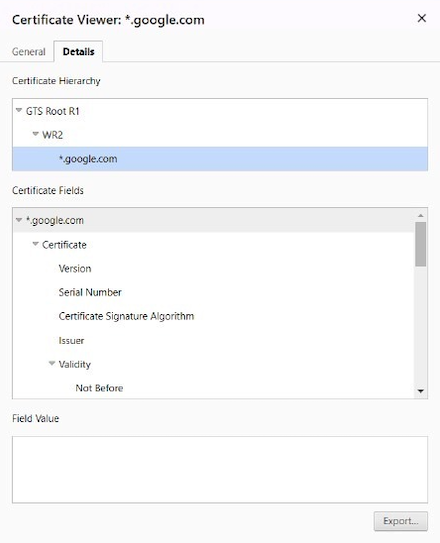
The Certificate Viewer opens.
-
Select the certificate to download.
-
Select the Export button at the bottom, to save the certificate to your desired location.
-
For iOS use
.cerformat.
Platform-specific security guidelines
AND01. Prevent sensitive data leaks
For background information, see GEN04. Prevent Sensitive Data Leaks.
You must prevent screenshots and override the onPause() method (see this Android developer reverence) to prevent sensitive data from being leaked.
To prevent sensitive data leaks, use the app's Activity.onCreate method with the following code:
getWindow().setFlags(LayoutParams.FLAG_SECURE, LayoutParams.FLAG_SECURE);.
AND02. Prevent excessive permissions
It is recommended that an application does not enable Android permissions that are not required to prevent an attacker from retrieving certain information.
AND03. Prevent logging services
It is recommended that an application keeps Android logging services at the minimum level and avoid logging any sensitive information to prevent the enabling of excessive permissions if it does not require them.
AND04. Android security tips
Be aware of and follow the Android Security Tips.
AND05. Prevent text cut, copy, paste
Starting from Android API 18 (also available for previous versions of Android through the Android Support Library), the new APIs provided by AccessibilityNodeInfo allow AccessibilityService to select, cut, copy, and paste text in a node.
It is recommended to not use these APIs on screens with sensitive data, to prevent an attacker from retrieving certain information.
AND06. Prevent application tampering
To prevent malicious hacking into the application code, it is recommended to verify the application's signing certificate signature hash at run time. This signature cannot be replicated by attackers when they sign the application after tampering the code or manifest file. However, a strong obfuscation is required to protect the signing certificate hash from modification.
String encryption can be applied to the hash through tools such as Dexguard or Arxan.
AND07. Verify the installer
If you are distributing the app via the Google Play Store, it is recommended to check if the installer of the application corresponds to the Play Store package (com.android.vending).
AND08. Prevent execution on an emulator
In a normal scenario, your app runs on the device except during development environment. It is recommended to check whether the app is running on a device or emulator.
AND09. Enable touch filtering on View
Sometimes it is essential that an application is able to verify whether an action is performed with the full knowledge and consent of the user, such as granting a permission request, making a purchase, or tapping an advertisement. Unfortunately, a malicious application might try to spoof the user into performing these actions, unaware, by concealing the intended purpose of the view.
As a solution, the Android framework offers a touch filtering mechanism that you can use to improve the security of views that provide access to sensitive functionality.
The APIs for enabling touch filtering are as follows:
java
setFilterTouchesWhenObscured(boolean);
onFilterTouchEventForSecurity(MotionEvent);
AND10. Binary obfuscation guidelines
Mobile FIDO SDK is delivered with all internal implementations obfuscated. However, public APIs are preserved for SDK integrator usage.
It is required to perform obfuscation on the final application, for example, using Proguard, DexGuard, or other obfuscation tools. Due to the use of advanced obfuscation features and Android native code implementation, there are packages that have to be preserved during application obfuscation.
It is extremely important to follow the obfuscation recommendations provided and pay special attention to:
-flattenpackagehierachy util
Using package name util is recommended to ensure obfuscation consistency. The preserved package from Mobile FIDO SDK contains sensitive classes that should not stand out in the final binary.
AND11. Private space
Notification
If the application is running in the private space and the private space is locked, push notifications are not displayed. To receive notifications, make sure the private space is unlocked.
Authentication
When the private space is protected by the device's screen lock, biometric authentication is not available. In this case, the platform and platform-local authenticators use the private space PIN instead.
When the private space is not protected by the device's screen lock, biometric authentication is available. However, it must use the biometric authentication configured specifically for the private space.
Refer to more information on behavior changes in the private space.
IOS01. Prevent sensitive data leaks
Use the following methods to manage sensitive data in the application life cycle (see the Apple developer site):
-
applicationWillResignActive: To clear the display of and encrypt any sensitive data. To clear the display, the following code can be used to hide the displayed content:[UIApplication sharedApplication].keyWindow.hidden = YES; -
applicationDidBecomeActive: To display and decrypt sensitive data.
IOS02. Remove symbols from Xcode output
The application must remove all symbols from the final release binary.
It's recommended to set the following settings in the Xcode project, to remove debug information and other symbols:
DEPLOYMENT_POSTPROCESSING = YES
GCC_GENERATE_DEBUGGING_SYMBOLS = NO
STRIP_INSTALLED_PRODUCT = YES
STRIP_STYLE = all
COPY_PHASE_STRIP = YES
IOS03. Objective-C instance variable vulnerability
The application must not store sensitive assets (such as pointers to encryption keys) in Objective-C instance variables, because it is possible to reference these variables by using the Objective-C runtime.
Automatic and dynamically allocated variables that are not Objective-C variables are safer.
IOS04. Disable auto-correction cache for sensitive input
The application must disable the auto-correction cache for inputs that request sensitive data. This prevents an attacker with access to the device from using the autocomplete suggested strings to view the sensitive text input data.
The application can perform one of the following actions to disable the auto-correction cache:
-
Set the text field's
secureTextEntrytoYES. -
Set the text field's
autoCorrectionTypetoUITextAutocorrectionTypeNo.
IOS05. Disable data copy/paste for sensitive data
The application must disable the copy/paste menu for sensitive data. This prevents an attacker with access to the device from pasting and viewing the copied data. The following sample code disables the copy/paste menu:
swift
-(BOOL)canPerformAction:(SEL)action withSender:(id)sender {
    UIMenuController *menuController = [UIMenuController sharedMenuController];
    if (menuController) {
        [UIMenuController sharedMenuController].menuVisible = NO;
    }
    return NO;
}
IOS06. Manage app versions in the App Store
It is possible for users to re-download previous versions that were previously purchased or installed, allowing customers to use apps with older devices that the current version of your application might no longer support. If you do not want to make these versions available, you can manage the availability of your apps' previous versions in the Rights and Pricing section of the Manage Your Apps module in AppStore Connect.
For details, refer to AppStore Connect.
From a security standpoint, it is recommended to keep attack surfaces as small as possible. While keeping older versions provides a much wider audience, it can also expose the solution to old firmware whose security might have already been compromised. Instead, it is best to have one version of your application (the latest one) available at one time, and to configure your to build settings to support wider iOS versions.
IOS07. About Touch ID accuracy
According to Apple's security document, the Touch ID probability of a false positive is 1/50000 and enforces a maximum of five tries before blocking this authentication method (the device passcode is needed to unblock thereafter). The probability that at least one try successfully authenticates a person not enrolled is:
p=1-(1-1/50000)5, which is equivalent to 9.99 x 10<sup>-5</sup>
This result is better than a PIN of four digits with three tries.
IOS08. About Face ID accuracy
According to Apple, the probability that a random person in the population could look at your iPhone or iPad Pro and unlock it using Face ID is approximately 1 in 1,000,000 with a single enrolled appearance. As an additional protection, Face ID allows only five unsuccessful match attempts before a passcode is required. The statistical probability is different for twins and siblings who look like you, and among children under the age of 13, because their distinct facial features might not have fully developed.
IOS09. Prevent application tampering
To prevent malicious hacking into the application code, it is recommended to verify the integrity of the application’s binary at runtime. This can be implemented in the application by calculating the checksum of the __text section of __TEXT segment.
For implementation details, refer to iOS Anti-Reversing Defenses. A strong obfuscation is required to protect the code calculating checksum.
For the risks associated with tampering attacks, check out OWASP Top 10 Mobile Risks.
IOS10. Xcode compiler security and obfuscation options
The application must use Xcode options that increase the security and provide obfuscation by complicating disassembly.
The following settings are recommended to set in the Xcode project:
GCC_UNROLL_LOOPS = YES
GCC_OPTIMIZATION_LEVEL = 3
OTHER_CFLAGS = -fstack-protector-all -finline-functions
CLANG_ENABLE_OBJC_ARC = YES
GCC_DYNAMIC_NO_PIC = NO
LD_NO_PIE = NO
RUN_CLANG_STATIC_ANALYZER = YES
CLANG_ANALYZER_SECURITY_FLOATLOOPCOUNTER = YES
CLANG_ANALYZER_SECURITY_INSECUREAPI_RAND = YES
CLANG_ANALYZER_SECURITY_INSECUREAPI_STRCPY = YES
CLANG_ANALYZER_SECURITY_INSECUREAPI_GETPW_GETS = YES
CLANG_ANALYZER_SECURITY_INSECUREAPI_MKSTEMP = YES
CLANG_ANALYZER_SECURITY_INSECUREAPI_VFORK = YES

