



Hybrid transport
Hybrid transport, also known as cross-device authentication, is one of the standard FIDO transport protocols supporting the WebAuthn specifications. This transport protocol enables users on their computer's web browser to register and authenticate with device-bound passkeys stored on their mobile device, without any physical connection or wireless pairing. This is achieved by creating a secure communication channel between both devices using a combination of a QR code, Bluetooth (without pairing), and internet communication. The required Bluetooth communication ensures the two devices are in proximity, which strengthens the phishing resistance of the authentication.
Mobile FIDO SDK provides support for this hybrid transport, enabling app integrators to expose their application to the mobile operating system as a provider for our device-bound passkeys.
Cross-device registration
As an alternative to registration from the mobile application itself, hybrid transport can initiate registration from a computer's web browser.
Note
A device-bound passkey registered through hybrid transport can be used to authenticate both from the mobile application or cross-device.
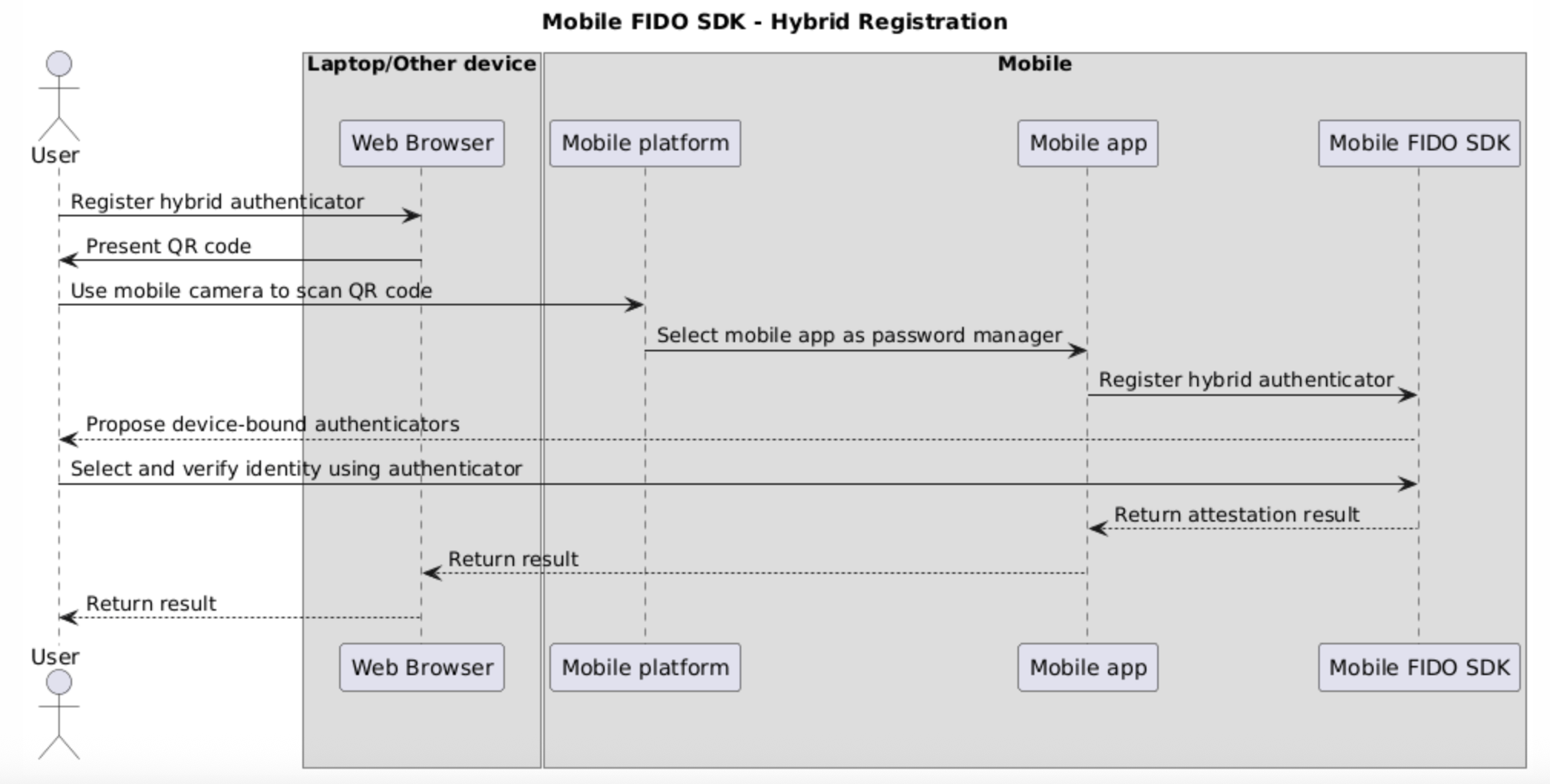
Typically, the cross-device registration flow is as follows:
-
The user requests to register a passkey with a website.
-
Via the web browser dialogs, the user chooses to store the passkey on another device.
-
A QR code is presented to the user, who scans it using the mobile device camera.
-
The mobile platform might ask the user to select which application should handle the registration. When the user selects your application, it forwards the request to the Mobile FIDO SDK, which performs user authentication via the chosen authenticator (PIN or biometric).
-
The SDK then creates and stores the device-bound passkey, and provides the response for the web browser.
-
The web browser receives and relays the response to the website for verification. The device-bound passkey is now registered.
The following sequence diagram summarizes the registration flow:
Cross-device authentication
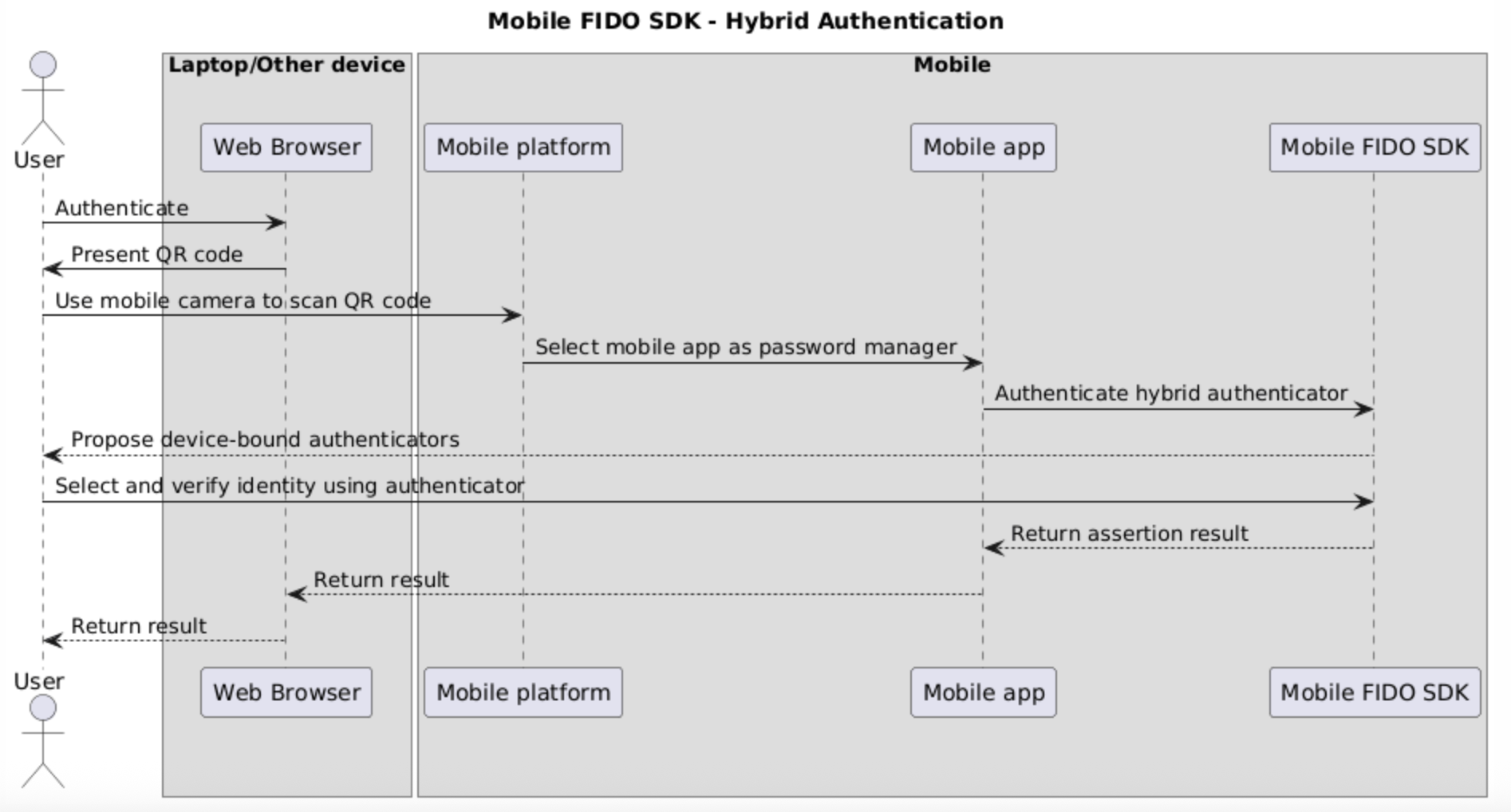
To authenticate with a device-bound passkey from a computer's web browser, the flow is typically as follows:
-
The user requests to authenticate with a passkey to a website via a web browser.
-
Via the web browser dialogs, the user chooses to authenticate with a passkey from another device.
-
A QR code is presented to the user, who scans it using the mobile device camera.
-
The mobile platform forwards the request to your application because it hosts the targeted passkey.
-
Your application forwards the request to the Mobile FIDO SDK, which performs user authentication via the passkey authenticator (PIN or biometric).
-
The SDK generates the authentication response for the web browser.
-
The web browser receives and relays the response to the website for verification. If verified, the authentication process succeeds.
The following sequence diagram summarizes the authentication flow:
Web browser compatibility
| Tested | iOS | Android |
|---|---|---|
| Safari (PC) | ✔️ | ✔️ |
| Chrome (PC) | ✔️ | ✔️ |
| Safari (Mobile) | ✔️ | N/A |
| Chrome (Mobile) | ✔️ | ✔️ |
For more details on hybrid flow support, see iOS limitations.
Next
Proceed to set up your app for hybrid transport:

