



JWT Secured Authorization Response Mode
JWT Secured Authorization Response Mode for OAuth 2.0 (JARM) is a security enhancement that protects authorization responses by encoding them as signed JSON Web Tokens (JWTs). This feature implements JWT Secured Authorization Response Mode for OAuth 2.0 (JARM) and provides integrity protection and authenticity verification for authorization code responses.
What is JARM?
In standard OAuth 2.0 authorization flows, authorization responses (containing the authorization code, state, and other parameters) are returned as plain query parameters or form data. While these responses use HTTPS for transport security, they can be vulnerable to certain attacks:
- Parameter manipulation: Authorization response parameters could potentially be modified in transit.
- Response injection: Malicious actors could attempt to inject forged authorization responses.
- Lack of authenticity: The client cannot cryptographically verify that the response came from the legitimate authorization server.
To addresses these security concerns, JARM encodes the entire authorization response as a signed JWT, which provides greater protections:
- Integrity protection: Any tampering with the response is detectable through signature verification.
- Authenticity verification: Clients can verify that the response was issued by the trusted authorization server.
- Non-repudiation: The signed JWT provides proof of the authorization server's response.
The authorization server advertises JARM support through the OpenID Connect Discovery endpoint.
Benefits of JARM
-
Enhanced security:
- Prevents response tampering: Signed JWTs make any modification immediately detectable.
- Protection against injection attacks: Clients can verify the authorization server issued the response.
- Defense in depth: Adds an additional security layer beyond HTTPS transport security.
-
Compliance and assurance:
- Meets advanced security requirements: Satisfies regulatory and compliance frameworks that require signed authorization responses.
- Cryptographic proof: Provides verifiable proof of authorization server responses.
- Audit trail: Signed responses can be logged and verified later for audit purposes.
How JARM works
Standard OAuth 2.0 flow (without JARM)
In a typical authorization code flow, the authorization response is returned as query parameters:
HTTP/1.1 302 Found
Location: https://client.example.com/callback?code=SplxlOBeZQQYbYS6WxSbIA&state=af0ifjsldkj
JARM flow
With JARM, the same response is encoded as a signed JWT:
    HTTP/1.1 302 Found
    Location: https://client.example.com/callback?response=eyJhbGciOiJSUzI1NiIsImtpZCI6InNlcnZlci1rZXktMSJ9...
The response parameter contains a JWT with the authorization response parameters as claims.
Authorization flow with JARM
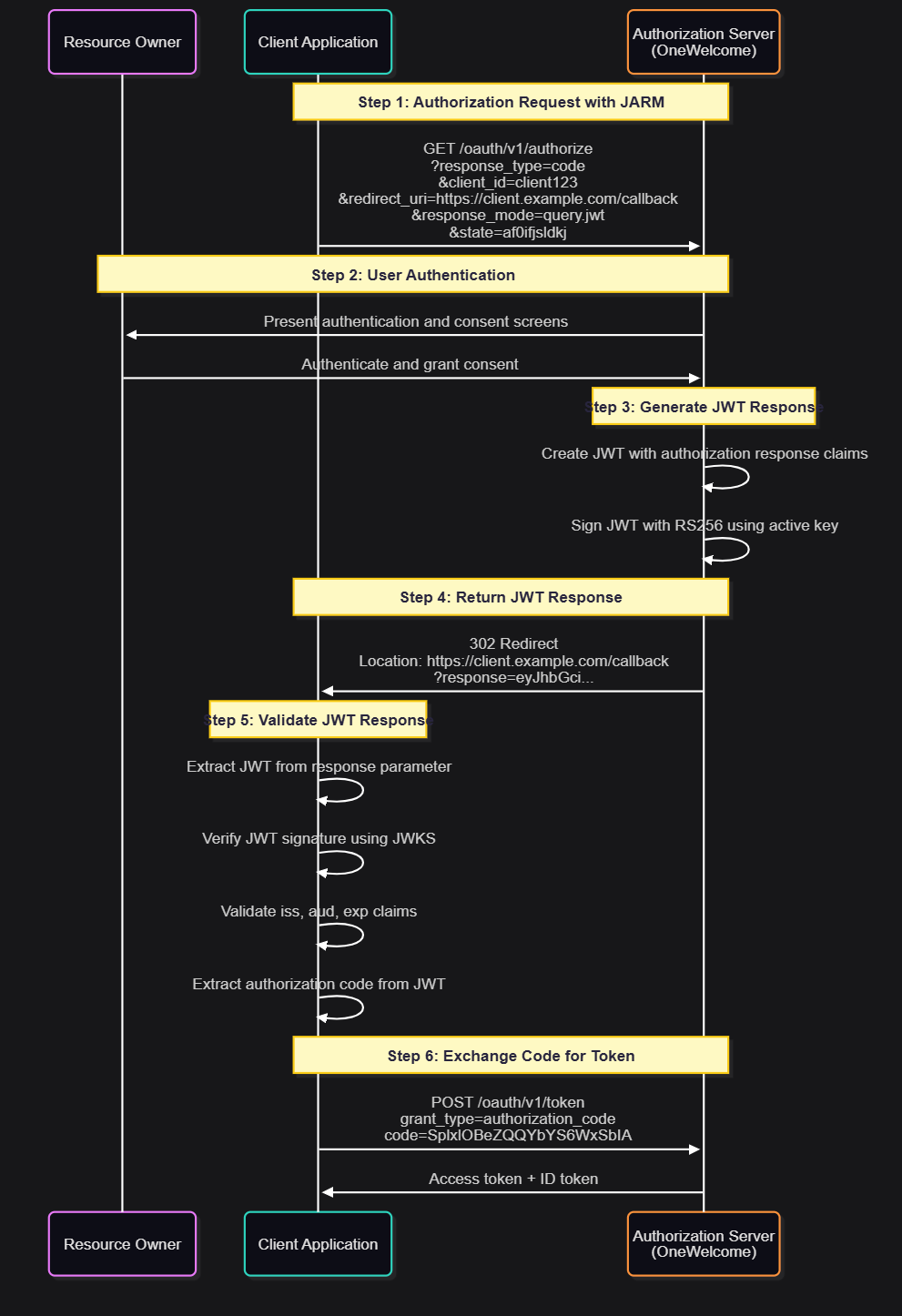
Response modes
JARM introduces two new response modes for returning authorization responses as JWTs:
| Response mode | Description | Response location | Use case |
|---|---|---|---|
query.jwt |
JWT returned in query parameter | Query parameter response |
Explicitly requests query parameter delivery |
jwt |
Shortcut - defaults to response type's standard encoding | Query parameter response for authorization code flow |
Simplified syntax - defaults to query.jwt for code flow |
JWT structure
JWT header
The JARM response JWT header includes the signature algorithm and key identifier:
{
  "alg": "RS256",
  "kid": "server-key-1",
  "typ": "JWT"
}
| Claim | Description |
|---|---|
alg |
Signature algorithm (always RS256) |
kid |
Key ID identifying the signing key that the authorization server used |
typ |
Token type (always JWT) |
JWT payload: Success response
For successful authorization responses, the JWT payload contains the following:
{
  "iss": "https://oauth.example.com/oauth",
  "aud": "client123",
  "exp": 1640995200,
  "iat": 1640991600,
  "code": "SplxlOBeZQQYbYS6WxSbIA",
  "state": "af0ifjsldkj"
}
| Claim | Required | Description |
|---|---|---|
iss |
Yes | Issuer: The authorization server's URL (dynamically determined) |
aud |
Yes | Audience: The client_id of the requesting client |
exp |
Yes | Expiration time: Matches the authorization code validity period |
iat |
Yes | Issued at: Timestamp when the JWT was created |
code |
Yes | Authorization code to exchange for tokens |
state |
Conditional | State parameter if provided in the authorization request |
scope |
Conditional | Granted scope if different from the requested scope |
JWT payload: Error response
For authorization errors, the JWT payload contains error information:
{
  "iss": "https://oauth.example.com/oauth",
  "aud": "client123",
  "exp": 1640995200,
  "iat": 1640991600,
  "error": "access_denied",
  "error_description": "The resource owner denied the authorization request",
  "state": "af0ifjsldkj"
}
| Claim | Required | Description |
|---|---|---|
iss |
Yes | Issuer: The authorization server's URL |
aud |
Yes | Audience: The client_id of the requesting client |
exp |
Yes | Expiration time |
iat |
Yes | Issued at timestamp |
error |
Yes | OAuth 2.0 error code (for example, access_denied, invalid_request) |
error_description |
No | Human-readable error description |
error_uri |
No | URI with error information |
state |
Conditional | State parameter if provided in the authorization request |
Signing
All JARM responses are signed using the following:
- Algorithm: The authorization server's active signing algorithm, such as
RS256: RSASSA-PKCS1-v1_5 using SHA-256 (default) - Key: The authorization server's active signing key
- Key identifier: The
kidclaim in the JWT header identifies which key was used
The same keys used for signing ID tokens and JWT access tokens are used for JARM responses.
Configure JARM
Prerequisites
JARM is automatically available for all authorization code flow clients. No special configuration is required on the authorization server side.
Requirements:
- The client must be configured for authorization code grant type (
response_type=code). - The authorization server must have RS256 signing keys configured (standard configuration).
Making a JARM authorization request
To use JARM, include the response_mode parameter in your authorization request:
Example: JARM authorization request
GET /oauth/v1/authorize?response_type=code
  &client_id=client123
  &redirect_uri=https://client.example.com/callback
  &response_mode=query.jwt
  &state=af0ifjsldkj
  &scope=openid%20profile%20email HTTP/1.1
Host: oauth.example.com
You can also use response_mode=jwt, which behaves identically to query.jwt for the authorization code flow:
GET /oauth/v1/authorize?response_type=code
  &client_id=client123
  &redirect_uri=https://client.example.com/callback
  &response_mode=jwt
  &state=af0ifjsldkj
  &scope=openid%20profile%20email HTTP/1.1
Host: oauth.example.com
Response handling
For the authorization code flow, both query.jwt and jwt response modes return the JWT in the query parameter:
HTTP/1.1 302 Found
Location: https://client.example.com/callback?response=eyJhbGciOiJSUzI1NiIsImtpZCI6InNlcnZlci1rZXktMSIsInR5cCI6IkpXVCJ9.eyJpc3MiOiJodHRwczovL29hdXRoLmV4YW1wbGUuY29tL29hdXRoIiwiYXVkIjoiY2xpZW50MTIzIiwiZXhwIjoxNjQwOTk1MjAwLCJpYXQiOjE2NDA5OTE2MDAsImNvZGUiOiJTcGx4bE9CZVpRUVliWVM2V3hTYklBIiwic3RhdGUiOiJhZjBpZmpzbGRraiJ9.signature
The JWT is included in the response query parameter, and clients extract it from req.query.response (or equivalent in their framework).
Client-side JWT validation
Clients must validate the JARM response JWT before using the authorization code.
Limitation: Supported grant types
JARM is supported for only the authorization code flow (response_type=code). The following flows are not supported:
- ❌ Implicit flow (
response_type=tokenorresponse_type=id_token) - ❌ Hybrid flow (combinations like
response_type=code token)
Grant Type Restriction
If a client requests JARM with the implicit or hybrid flow, the authorization server returns an error response with error=unsupported_response_type and a description indicating that JARM is supported for only the authorization code flow.

