



Demonstrating Proof of Possession (DPoP)
OAuth 2.0 Demonstrating Proof of Possession (DPoP) is a mechanism to sender-constrain OAuth tokens by binding them to a public key that is held by the client.
DPoP is standardized in RFC 9449 and helps prevent token theft and replay attacks for both access tokens and refresh tokens.
In the OneWelcome Identity Platform, DPoP can be enforced per web client. When enabled, the client must send a DPoP proof to the token endpoint, and then receive DPoP-bound tokens.
What is DPoP?
In bearer token OAuth, anyone who obtains a token can use it until it expires. DPoP adds an application-level proof-of-possession step:
- The client generates a key pair.
- For token requests and (optionally) API requests, the client signs a DPoP proof JSON Web Token (JWT) using its private key.
- The authorization server validates the proof and binds the issued token to the public key.
- Resource servers can then validate that the token is only used by the client that possesses the matching private key.
The authorization server advertises DPoP support via the discovery endpoint:
dpop_signing_alg_values_supported
Benefits of DPoP
-
Prevents token replay after theft: If an attacker steals an access token, they cannot successfully use it without the private key that matches the token binding.
-
Works without X.509 client certificates: DPoP provides sender-constraining without requiring a PKI, TLS client certificates, or mTLS endpoint separation.
How DPoP works
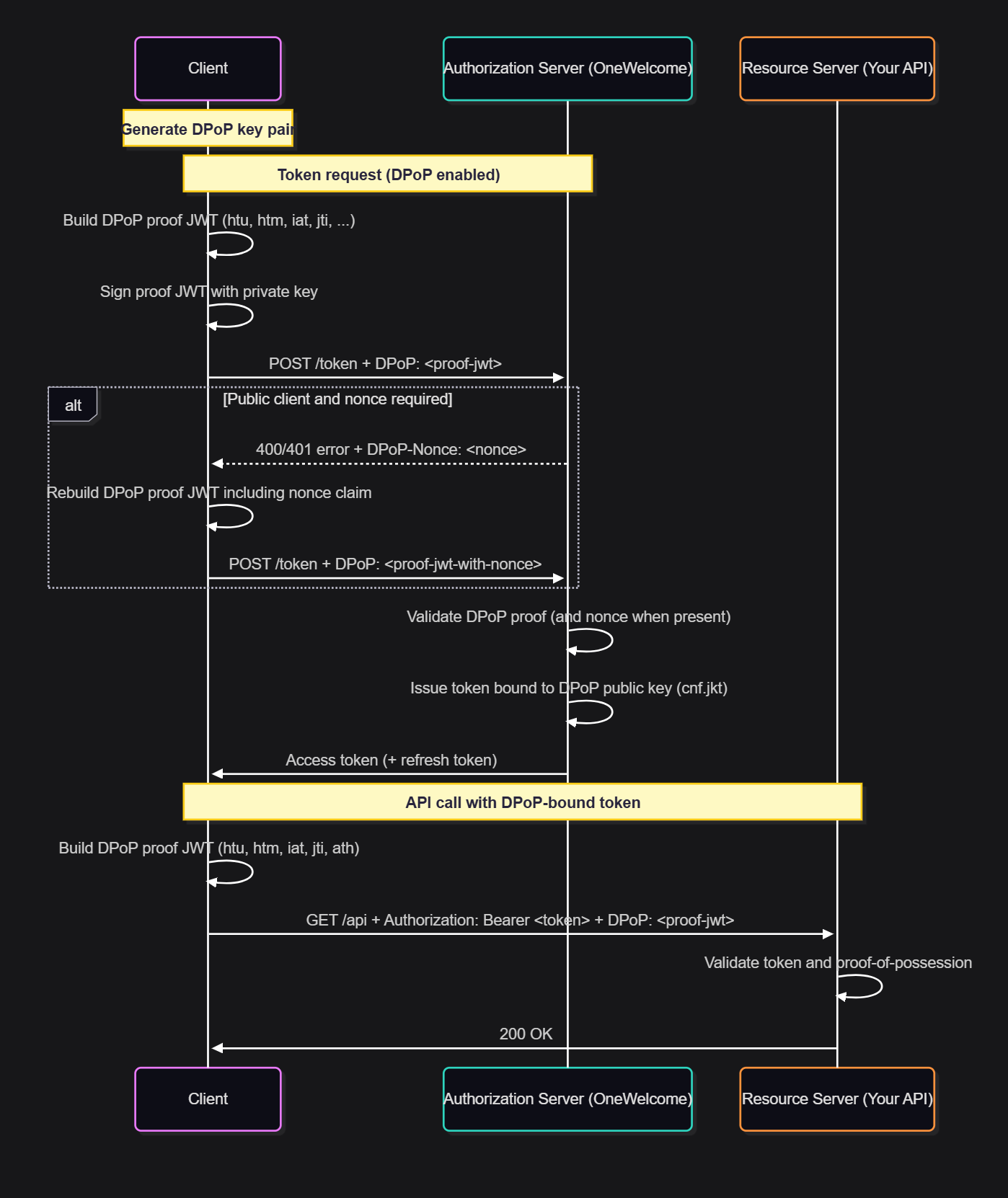
DPoP proof JWT
The client sends a DPoP proof in the HTTP DPoP header:
- It is a signed JWT.
- The public key is included in the JWT header (
jwk). - The JWT payload includes claims that bind the proof to the HTTP request.
Typical DPoP proof structure
Header (example)
{
  "typ": "dpop+jwt",
  "alg": "ES256",
  "jwk": {
    "kty": "EC",
    "crv": "P-256",
    "x": "...",
    "y": "..."
  }
}
Payload (example)
{
  "htu": "https://tenant.example.com/oauth/v1/token",
  "htm": "POST",
  "iat": 1735570000,
  "jti": "b0b4f5b7-0a58-4e1a-a07c-6a03c3e8c8d8",
  "nonce": "server-provided-nonce"
}
Key claims:
(See RFC 9449 for full details.)
| Claim | Required | Description |
|---|---|---|
htu |
yes | The HTTPS URI of the target endpoint (no fragment) |
htm |
yes | The HTTP method (for example, POST) |
iat |
yes | The issued-at time is used for replay prevention. |
jti |
yes | Unique proof identifier (JWT ID) |
nonce |
conditional | A server-provided nonce is required for some clients. |
ath |
conditional | The access token hash is required when proving possession for a request that uses an access token. |
DPoP-bound tokens
When DPoP is enabled for a web client:
- The client must send a valid DPoP proof with token requests.
- The issued access token is bound to the DPoP key.
- The binding is expressed via the
cnf(confirmation) claim usingjkt.
cnf.jkt
For JWT access tokens, the DPoP key binding is represented in the token as follows:
{
  "cnf": {
    "jkt": "<JWK-thumbprint>"
  }
}
For opaque access tokens, the DPoP binding is not visible in the token itself. It can be returned from the token introspection endpoint as cnf.jkt.
Configure DPoP for a web client
DPoP is configured per web client.
Prerequisites
- Your client is able to generate and store a signing key pair (recommended:
ES256/ P-256). - Your client can construct and sign DPoP proof JWTs.
Add DPoP to a web client
- On the Access Admin console, go to Configuration > Web Clients.
- Create a new web client or open an existing one.
-
Under OAuth settings, select the Use DPoP-bound access tokens check box.
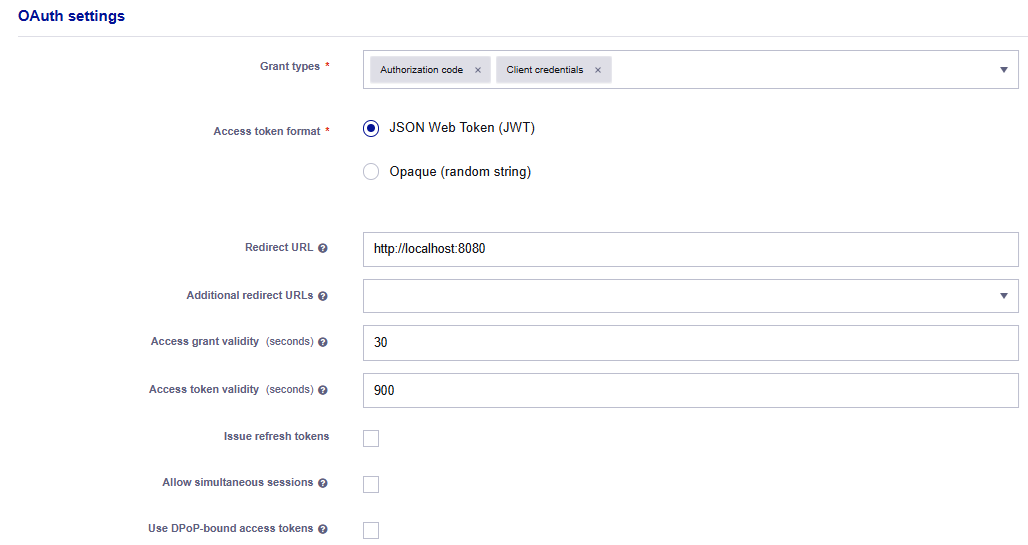
DPoP becomes mandatory
When a web client uses DPoP-bound access tokens, DPoP is mandatory for this client.
Token requests without a valid DPoP proof are rejected.
-
Save the web client.
Public clients and server-provided nonce
If DPoP is enabled and the web client is a public client (no authentication method is set), the OneWelcome Identity Platform mandates the use of a server-generated nonce:
- The server provides a nonce to the client as specified in RFC 9449.
- The client must include that nonce in the
nonceclaim of every DPoP proof.
This provides additional replay protection for public clients.
Example: How to use DPoP
This example shows the authorization code flow token request with DPoP.
1. Obtain an authorization code
Perform the normal authorization request (for example, response_type=code) and receive a code at the redirect URI.
2. Exchange the code for tokens using a DPoP proof
Send a token request that includes a DPoP proof in the DPoP header.
curl --request POST \
  --url https://tenant.example.com/oauth/v1/token \
  --header 'Content-Type: application/x-www-form-urlencoded' \
  --header 'DPoP: <signed-dpop-proof-jwt>' \
  --data-urlencode 'grant_type=authorization_code' \
  --data-urlencode 'client_id=web-client-123' \
  --data-urlencode 'code=abc123...' \
  --data-urlencode 'redirect_uri=https://client.example.com/callback'
Success response (excerpt)
{
  "access_token": "...",
  "token_type": "DPoP",
  "expires_in": 3600,
  "refresh_token": "..."
}
All grant types
The OneWelcome Identity Platform supports DPoP for all supported grant types (for example: authorization_code, refresh_token, client_credentials, password, urn:ietf:params:oauth:grant-type:device_code, and urn:ietf:params:oauth:grant-type:token-exchange).
The DPoP pattern stays the same: Include a valid DPoP proof in token requests for clients where DPoP is enabled.
DPoP compared to mTLS certificate-bound tokens
Both DPoP and mutual TLS (mTLS) can be used to sender-constrain tokens.
General guidance:
- Thales advises Private Key JWT + DPoP over mTLS with self-signed certificates, because the configuration experience is typically simpler.
- For clients that already operate a PKI and can use PKI-issued certificates, mTLS certificate-bound tokens provide similar security properties and are considered comparable to DPoP.
Limitations
- DPoP must be implemented by the client: Enabling DPoP for a web client breaks existing integrations until the client starts sending DPoP proofs.
- Time synchronization matters: DPoP relies on timestamps (
iat). Significant clock skew can cause failures. - Resource server responsibilities: For full sender-constraining, resource servers must validate the DPoP proof and enforce that the access token is used with proof-of-possession.
Troubleshooting DPoP
Token request fails after enabling DPoP
- Ensure that the web client sends the
DPoPheader in token requests. - Validate your DPoP proof JWT:
- correct
htuandhtm - unique
jti - recent
iat - valid signature
- correct
- If the client is public, ensure that the server-provided nonce is included in
nonce.
Nonce errors for public clients
- Fetch and use the latest server-provided nonce as defined in RFC 9449.
- Include the nonce in every proof.

