



Configure security policies
Mobile FIDO SDK allows you to configure security-related policies based on your own security requirements.
Warning
-
These functions are not persisted in Mobile FIDO SDK. You are required to invoke this method prior to the first FIDO2 feature call.
-
These functions can be invoked only once per application life cycle. Subsequent calls are ignored.
Maximum retry count
This is the maximum number of retries a Thales proprietary FIDO2 authenticator is allowed to attempt before it triggers a lockout.
val count: Int = /* Retry count */
Fido2Config.setMaximumRetryCount(count)
let count = /* Retry count */
TGFFido2Config.setMaximumRetryCount(count)
Base lockout duration
This is the minimum base lockout duration a Thales proprietary FIDO2 authenticator can specify during user identity verification. This value is doubled with each subsequent failure attempt.
val duration: Int = /* Lockout duration in seconds */
Fido2Config.setBaseLockoutDuration(duration);
let timeInterval: TimeInterval = /* Value in seconds */
TGFFido2Config.setBaseLockoutDuration(timeInterval)
Disable passcode keypad scrambling
For security purposes, Mobile FIDO SDK generates a scrambled keypad layout on every use, by default. You can disable the keypad scrambling feature using the following method:
PasscodeConfig.disableScramble();
TGFPasscodeConfig.disableScrambled()
Passcode rules
The Mobile FIDO SDK supports the configuration of passcode rules to restrict the usage for simplistic passcodes.
The following configurations of the passcode rules are supported:
-
Length (the minimum and maximum PIN length)
-
Series (for example, 123456)
-
Uniform (for example, 11111, 222222)
-
Palindrome (for example, 123321, 1234321)
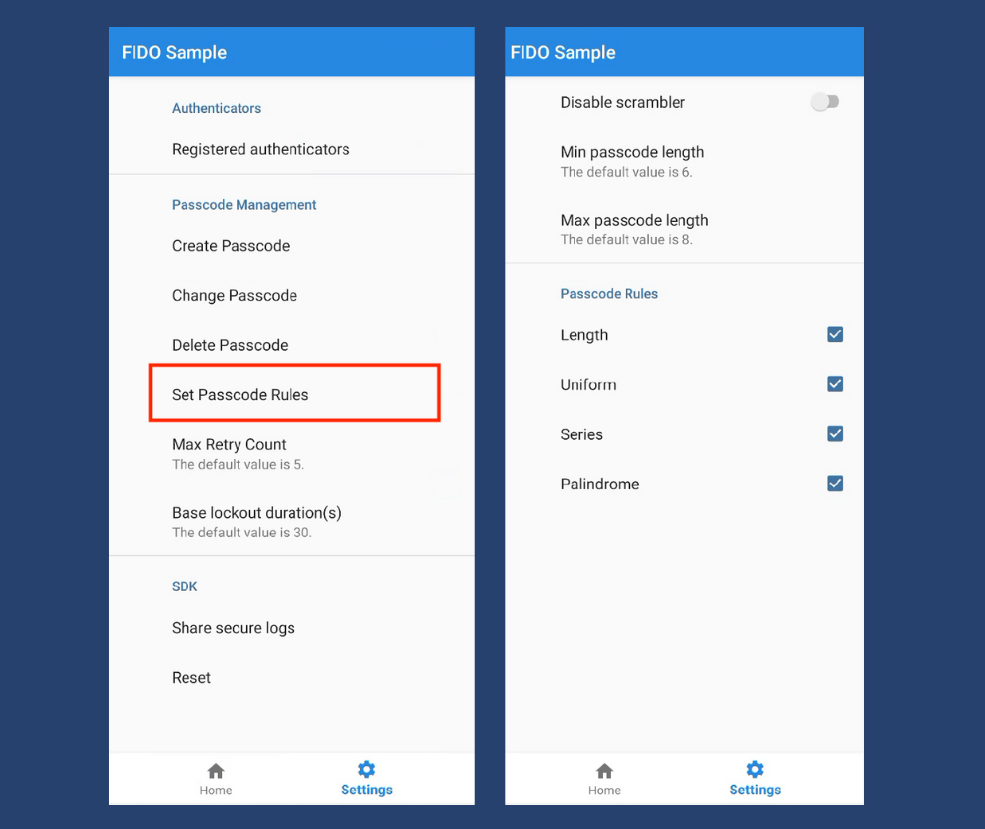
This can be configured using the following code snippets:
/* Configure min/max PIN length */
val passcodeRuleLength = PasscodeRuleLength().apply {
    setMinimumLength(4)
    setMaximumLength(10)
}

/* Set Passcode Rules */
try {
PasscodeConfig.setPasscodeRules(
        arrayOf(
        passcodeRuleLength,
        PasscodeRulePalindrome(),
        PasscodeRuleSeries(),
        PasscodeRuleUniform()
        )
)
} catch (e: Fido2Exception) {
// handle error
}
/* Configure min/max PIN length */
TGFPasscodeRuleLength.setMinimumLength(4)
TGFPasscodeRuleLength.setMaximumLength(10)

/* Set Passcode Rules */
var passcodeRules: Set<TGFPasscodeRule> = [
                TGFPasscodeRuleLength(),
                TGFPasscodeRulePalindrome(),
                TGFPasscodeRuleSeries(),
                TGFPasscodeRuleUniform()]
do {
TGFPasscodeConfig.setPasscodeRules(passcodeRules)
} catch let error {
//handle error
}
For additional information on the security policies, refer to the API documentation.
Configure a custom AAGUID
The authenticator attestation GUID (AAGUID) is a 128-bit identifier that uniquely identifies the type of authenticator. By default, the Mobile FIDO SDK uses built-in AAGUIDs for each authenticator type. You can use the Thales FIDO authenticator policy to allow or deny authenticators based on AAGUID.
When you set a custom AAGUID, new enrollments that use the specified verify method embed the provided AAGUID in their attestation data. Previously completed enrollments remain unaffected. This method is intended to be called at application startup, before initiating any registration.
These APIs allow you to configure custom AAGUIDs for both biometric and passcode authentication.
val biometricAaguid = /* AAGUID */
val passcodeAaguid = /* AAGUID */
try {
    // Configure custom AAGUID for biometric authenticator
    Fido2Config.setAuthenticatorAaguid(biometricAaguid, VerifyMethod.BIOMETRIC)

    // Configure custom AAGUID for passcode authenticator
    Fido2Config.setAuthenticatorAaguid(passcodeAaguid, VerifyMethod.PASSCODE)
} catch (e: Fido2Exception) {
    // Handle invalid AAGUID or verify method
}
let biometricAaguid = /* AAGUID */
let passcodeAaguid = /* AAGUID */

// Configure custom AAGUID for biometric authenticator
TGFFido2Config.setAuthenticatorAaguid(biometricAaguid, forVerifyMethod: .biometric)

// Configure custom AAGUID for passcode authenticator
TGFFido2Config.setAuthenticatorAaguid(passcodeAaguid, forVerifyMethod: .passcode)

