



App constraints and prerequisites
Application constraints
Thread safety
Mobile FIDO SDK APIs are not thread-safe unless explicitly stated. Therefore, the application must take special care to ensure that it explicitly protects concurrent access or modification to any SDK object or data. If multiple threads use the SDK's features, then it is recommended to check the pertinent concurrency features of each platform.
Certificate signing identity
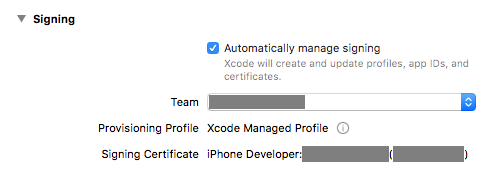
When using an iOS simulator, apart from having the application bundle ID consistent in the earlier and updated version, ensure that the certificate signing identity is also consistent for both app versions. This is because even if the simulator does not require certificate signing, part of the certificate information is used in one of the keychain properties. This constraint is not an issue when using an actual device, because the device disallows the upgrading of an application signed with a different certificate.
On Xcode, go to Project > Target > General > Signing, and set the settings to either automatic or manual required. It is important to ensure that the settings are consistent in both app versions.
Mobile SDK prerequisites
Before setting up the mobile application, complete these settings for Mobile FIDO SDK:
Host an asset links or app site association file
The platform authenticator requires an online verification of your application's digital asset links prior to enrollment and authentication operations. The assetlinks.json file must be hosted in the following location:
https://[your-rp-id]/.well-known/assetlinks.json
Sample assetlinks.json file
Note
-
Platform authenticators can be linked to more than one application.
-
You can link more than one fingerprint to an application.
-
The
package_nameshould be your application ID with a suffix. For example,applicationIdSuffix.
The following is a sample assetlinks.json file:
[
  {
    "relation": [
      "delegate_permission/common.handle_all_urls",
      "delegate_permission/common.get_login_creds"
    ],
    "target": {
      "namespace": "web",
      "site": "https://[your-rp-id]"
    }
  },
  {
    "relation": [
      "delegate_permission/common.handle_all_urls",
      "delegate_permission/common.get_login_creds"
    ],
    "target": {
      "namespace": "android_app",
      "package_name": "com.your.first.apps.application.id",
      "sha256_cert_fingerprints": [
        "2A:15:28:60:AD:40:06:91:9A:79:BE:96:07:32:CC:BE:1B:A6:C8:33:1B:8B:34:F7:9D:F3:56:35:91:FD:10:B4"
      ]
    }
  },
  {
    "relation": [
      "delegate_permission/common.handle_all_urls",
      "delegate_permission/common.get_login_creds"
    ],
    "target": {
      "namespace": "android_app",
      "package_name": "com.your.second.apps.application.id",
      "sha256_cert_fingerprints": [
        "10:B5:E0:68:63:C4:B3:1A:E0:A5:30:49:E1:82:AE:0E:F3:DD:7A:C3:4F:BF:AD:95:16:A8:49:A2:8B:3B:1F:D6",
        "YOU CAN HAVE MORE THAN ONE CERT FINGERPRINT"
      ]
    }
  }
]
Useful links
Refer to the following pages for additional information regarding the asset links:
To support the platform authenticator that Apple provides, you need to establish a secure association between the web domain and your application.
To associate a website with your app, you need to host the associated domain file on your website at the following location:
https://[your-rp-id]/.well-known/apple-app-site-association
You also need to enable the Associated domains entitlement for your application to the corresponding service:

Sample apple-app-site-association snippet
To enable the platform authenticator, the webcredentials service is required.
{
  "webcredentials": {
    "apps": [
      "ABCDE.com.company_name.app.demo"
    ]
  }
}
Note
-
Platform authenticators can be linked to more than one application.
-
The expected value is an
appIDin the<Application Identifier Prefix>.<Bundle Identifier>format. -
This file can contain information pertaining to other services as well.
Useful links
Refer to the following pages for additional information regarding the asset links:
App-domain binding
Note
This mandatory feature is available since Mobile FIDO SDK 4.0.0
Mobile FIDO SDK requires an established association between your application and web domain when using the device-bound biometric and PIN authenticators. This prevents unauthorized applications from being able to use your FIDO service.
To associate a website with your app, you need to host the associated domain file on your website at the following location:
https://[your-rp-id]/.well-known/idcloud-site-links
Sample idcloud-site-links snippet
The structure of the idcloud-site-links file is similar to the counterpart assetlinks.json and apple-app-site-association files defined by Google and Apple respectively.
The following snippet represents the contents of this file:
{
  "android": {
    "apps": [
      {
        "package_name": "com.company_name.app.demo",
        "sha256_cert_fingerprints": [
          "2A:15:28:60:AD:40:06:91:9A:79:BE:96:07:32:CC:BE:1B:A6:C8:33:1B:8B:34:F7:9D:F3:56:35:91:FD:10:B4"
        ]
      }
    ]
  },
  "ios": {
    "webcredentials": {
      "apps": [
        "ABCDE.com.company_name.app.demo"
      ]
    }
  }
}
-
On Android: The
package_namemust be yourapplicationIdconfigured in the applicationbuild.gradle. For the application build with different flavors, thepackage_namemust be<applicationId>.<applicationIdSuffix>. -
On iOS: The expected value is an
appIDin the<Application Identifier Prefix>.<Bundle Identifier>format.

