



Levels of authentication
SafeNet Trusted Access (STA) supports Authentication Context Class Reference (ACR) and Authentication Methods Reference (AMR) in OpenID Connect (OIDC) authentication flows. This capability enables applications to request, enforce, and validate specific authentication assurance levels as part of their access policies.
This feature improves interoperability with identity-driven applications and strengthens overall security by allowing services to verify not only that the user authenticated, but also how and at what assurance level the authentication was performed.
When ACR values are provided in an authentication request, STA evaluates them against the configured authentication policies to determine the effective Level of Authentication (LoA). If multiple ACR values are requested, STA enforces only those that the applicable policies permit.
-
If the request includes
urn:safenetid.com:acr:fidoandurn:safenetid.com:acr:grid, but the STA policy allows only OTP-based authentication, all non-OTP ACR values are ignored and authentication proceeds using OTP. -
If the request specifies an ACR value that the configured policies do not permit (for example, only
urn:safenetid.com:acr:fidowhen OTP is the only allowed method), the authentication request fails due to an unmet LoA requirement.
Note
To use ACR and AMR during user authentication, you must create a new application with the upgraded generic template.
What is ACR?
ACR is an OIDC mechanism that allows a client application to request a specific LoA when initiating an authentication request. By including the acr_values parameter in an authorization request, the application can indicate the assurance level required to access the service.
STA evaluates the requested ACR value and ensures that the resulting authentication meets the specified LoA.
To include multiple ACR values in the authentication request, pass them in the acr_values query parameter. Separate multiple values with a URL-encoded space (%20), to ensure that the server interprets the request correctly.
What is AMR?
AMR provides detailed information about the authentication mechanisms that are used during the user’s login session. These values are returned in the ID token and access token, and reflect the specific authentication steps that were executed.
Supported ACR values
AMR values are specific to each identity provider (IDP) and can vary across different IDPs. Refer to the corresponding template documentation for the list of supported AMR values.
| ACR value (request) | Authenticator | AMR value (response) |
|---|---|---|
urn:safenetid.com:acr:pwd |
Password (LDAP) | pwd |
urn:safenetid.com:acr:grid |
GrIDsure | otp |
urn:safenetid.com:acr:sms |
SMS | sms |
urn:safenetid.com:acr:mpPlus |
MobilePASS+ | otp |
urn:safenetid.com:acr:hwk |
eToken (111 and 112) | hwk |
urn:safenetid.com:acr:fido |
FIDO | fido |
urn:safenetid.com:acr:sc |
Certificate-based Authentication/Smartcard | sc |
urn:safenetid.com:acr:knowledge |
Password/Kerberos | pwd |
urn:safenetid.com:acr:possession |
All OTP-type authenticators (eToken, GrIDsure, MobilePASS+) | otp |
| FIDO | fido | |
| Certificate-based Authentication/Smartcard | sc |
|
urn:safenetid.com:acr:inherence |
FIDO | fido |
| Certificate-based Authentication/Smartcard | sc |
|
urn:safenetid.com:acr:possessionorinherence |
Authenticators from possession or inherence | AMR from possession or inherence according to authenticator usage |
urn:safenetid.com:acr:knowledgeorpossession |
Authenticators from knowledge or possession | AMR from knowledge or possession according to authenticator usage |
urn:safenetid.com:acr:knowledgeorinherence |
Authenticators from knowledge or inherence | AMR from knowledge or inherence according to authenticator usage |
urn:safenetid.com:acr:knowledgeorpossessionorinherence |
All authenticators | AMR from knowledge, possession, or inherence according to authenticator usage |
OIDC use cases using ACR and AMR
This section describes use cases that demonstrate how OIDC clients can use ACR and AMR with STA.
These use cases show how relying parties can:
-
Use ACR values to request specific authentication methods for a transaction.
-
Use AMR claims to verify the authentication methods that STA performs.
When you combine these OIDC features with STA authentication policies, you can enforce authentication requirements dynamically, while maintaining standards-based interoperability and centralized policy control.
The following examples use the Postman application for describing use cases that show how ACR and AMR values are received in the generated ID token, and for use cases related to multi-factor authentication (MFA).
Use case 1: ACR-based authentication enforcement with multiple OTP authenticators
This use case demonstrates how STA enforces authentication based on the acr_values parameter provided in an OIDC authentication request, even when multiple OTP-type authenticators are configured for a user.
Configuration
-
Create an OIDC application using the generic template.
-
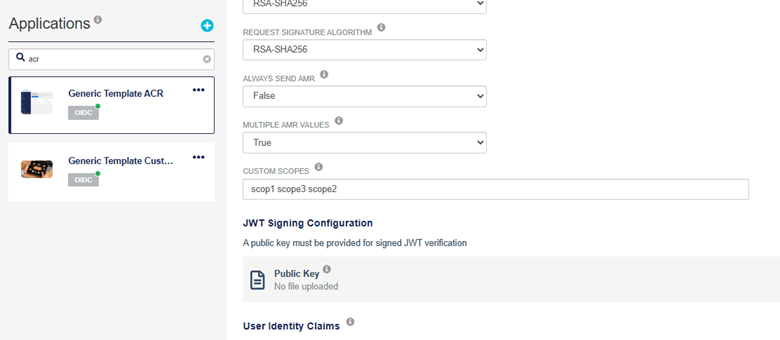
Configure a custom OIDC scope for the application.
-
-
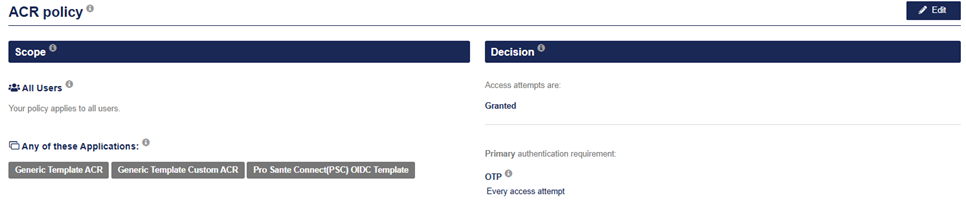
Configure multiple STA authentication policies (primary only for this use case).
-
Assign multiple authenticators of type OTP (MobilePass+, GrIDsure) to the user.
Flow
-
The OIDC client initiates an authentication request containing a specific
acr_value:urn:safenetid.com:acr:grid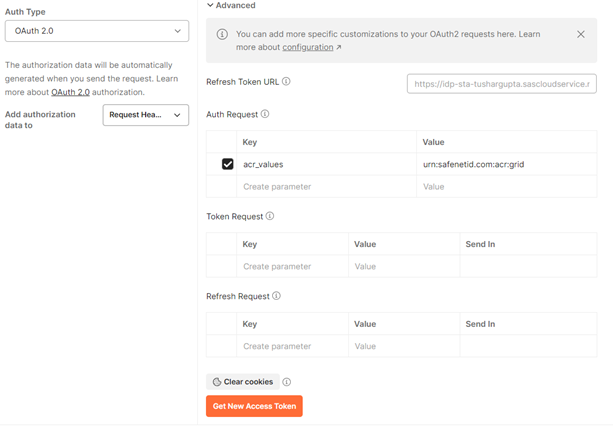
-
STA evaluates the applicable primary authentication policies to determine the authentication flow.
-
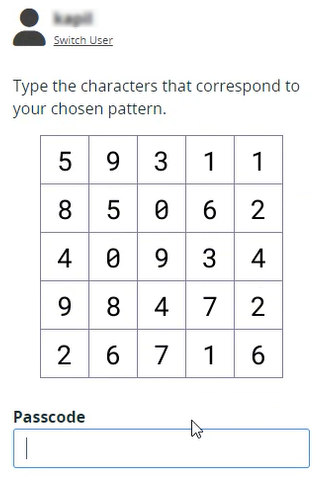
STA enforces the authentication method flow based on STA policies and aligns it with the ACR value that is provided, regardless of other authenticators assigned to the user.
In this case, MobilePass+ and GrIDsure tokens are already assigned to the user, however the application forces the user to authenticate using the GrIDsure authenticator, because the STA OTP policy is filtered using the ACR value that is provided.
-
The user completes the requested authentication method driven by the STA policies and filtered by the ACR values that are provided.
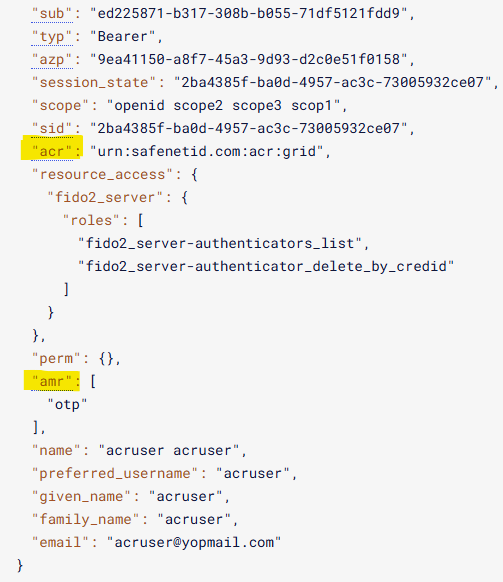
-
STA returns a successful authentication response, including any custom scopes requested by the client.
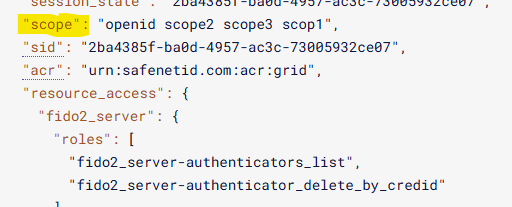
Result
Authentication is enforced according to the requested ACR value, while the overall authentication flow remains governed by the STA policy configuration.
Use Case 2: MFA and assurance validation using ACR and AMR
This use case demonstrates how multiple ACR values can be used to enforce MFA, and how the achieved authentication methods are reflected in the AMR claim.
Configuration
-
Create an OIDC application using the generic template.
- Configure the application to support ACR and AMR claims.
-
For achieving MFA, assign the user with authenticators, such as LDAP password, GrIDsure, MobilePass+, and FIDO token.
-
Configure STA policies as follows:
-
Primary: FIDO + OTP (GrIDsure)
-
Secondary: LDAP + OTP
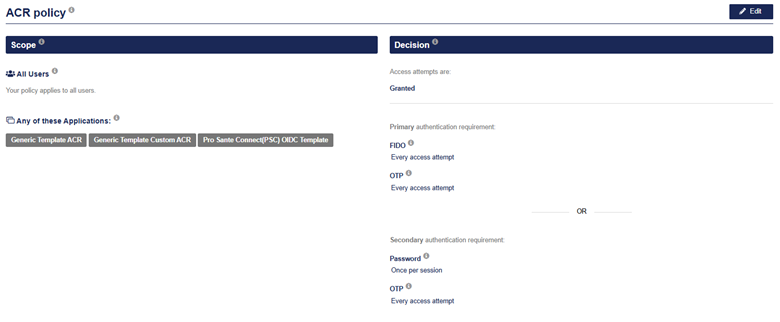
-
Flow
-
The OIDC client initiates an authentication request with multiple ACR values.
urn:safenetid.com:acr:gridurn:safenetid.com:acr:fido
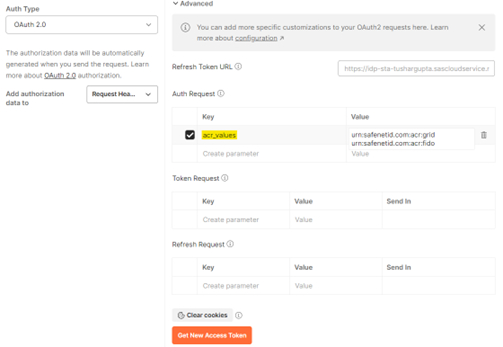
-
STA evaluates the request and enforces each authentication method as required. (Suppose the user is performing login using the primary authentication flow, which is FIDO+OTP.)
-
It first asks the user for FIDO authentication, and then the next authenticator is enforced according to the policy and ACR combination.
-
The ACR is
urn:safenetid.com:acr:gridandurn:safenetid.com:acr:fido, which means that GrIDsure token validation is enforced for second factor authentication as OTP, even if the user already has other types of OTP token assigned.
Even if only one
urn:safenetid.com:acr:gridACR is provided in the authentication request, the authentication flow works as FIDO+OTP because the flow is derived from STA policies and ACR only does the filtering. -
-
The user completes all required authentication steps.
-
After successful authentication, STA issues an ID token that contains the AMR claim, which consists of the following:
fidootpmfa
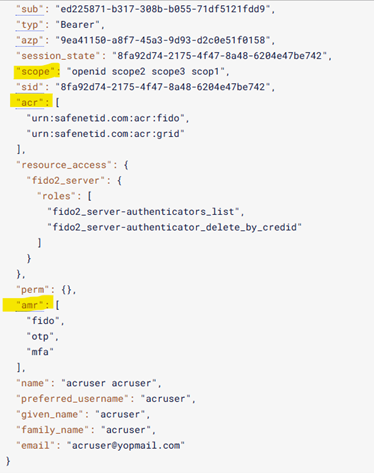
Result
The ID token accurately reflects the authentication methods used during the transaction through the AMR claim. Relying parties can validate the actual authentication assurance level achieved during login and make informed authorization decisions based on standardized AMR values.
ACR-AMR mapping table
The following table provides an overview of the options:
| ACR value | STA policy | User authenticated using | AMR value | Comments |
|---|---|---|---|---|
urn:safenetid.com:acr:grid |
Primary: OTP Secondary: FIDO |
GrIDsure | otp |
Passed |
urn:safenetid.com:acr:mpPlus |
Primary: FIDO Secondary: N/A |
FIDO | N/A | Failed (The STA policy does not match the ACR.) |
urn:safenetid.com:acr:hwk |
Primary: OTP + FIDO Secondary: N/A |
eToken 112 + FIDO | fidootpmfa |
Passed (The STA policy filters the ACR value.) |
urn:safenetid.com:acr:gridurn:safenetid.com:acr:fido |
Primary: OTP Secondary: FIDO |
FIDO | fido |
Passed |
urn:safenetid.com:acr:gridurn:safenetid.com:acr:fido |
Primary: OTP + FIDO Secondary: CBA |
GrIDsure + FIDO | otpfidomfa |
Passed (MFA executes in this case because the ACR matches the STA policy) |
urn:safenetid.com:acr:gridurn:safenetid.com:acr:fido |
Primary: CBA Secondary: N/A |
CBA | N/A | Failed (The STA policy does not match the ACR.) |
urn:safenetid.com:acr:knowledge |
Primary: Password Secondary: OTP |
MobilePASS+ | N/A | Failed (ACR: Knowledge accepts only password and Kerberos.) |
urn:safenetid.com:acr:inherence |
Primary: FIDO Secondary: CBA |
FIDO | fido |
Passed |
urn:safenetid.com:acr:inherence |
Primary: CBA Secondary: OTP |
GrIDsure | N/A | Failed (It accepts only FIDO and CBA.) |
urn:safenetid.com:acr:possession |
Primary: CBA Secondary: OTP |
CBA | sc |
Passed (Smart Card) |
urn:safenetid.com:acr:possession |
Primary: CBA Secondary: OTP + FIDO |
GrIDsure + FIDO | otpfidomfa |
Passed (It accepts all OTP tokens including FIDO and CBA.) |

