


Risk Management Javascript web SDK
This section describes how to embed the Risk Management signal collection scripts into your web application. In other words, it focuses on steps 1 and 2 of the evaluation use case.
Use cases
You can use Risk Management to analyze and provide decision recommendations for several use cases inside your website, such as login and account creation.
During a web session (between user login and logout), your customer can browse through different use cases on which you want to perform a getDecision.
View
A use case, such as login, is usually composed of a single view, which is a screen where the user enters their username and password, then clicks a login button.
Sometimes, a use case can include several views, such as the first view where the user enters their username and clicks a Next button, then a second view, where the user enters their password and clicks Login.
Signal collection
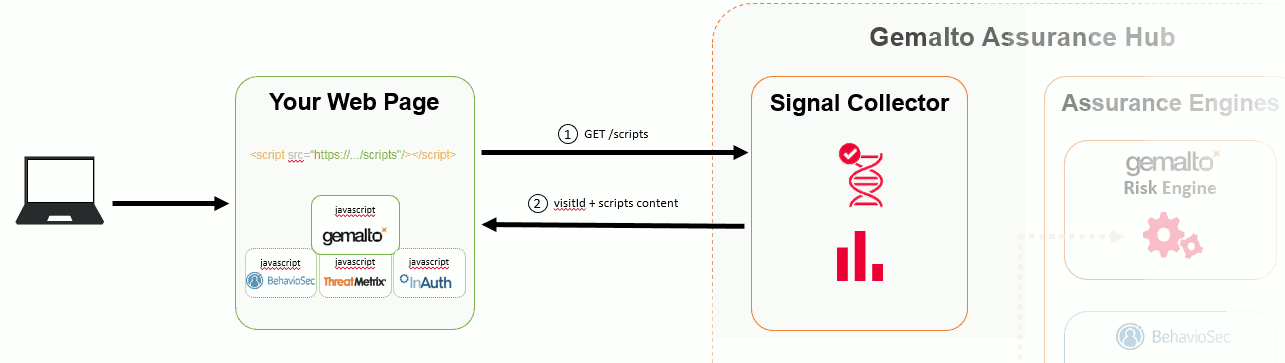
Risk Management and its partner integrations are compatible with current versions of Google Chrome, Microsoft Edge, and Mozilla Firefox.
The next section describes how CORS is used by Risk Management to enable your cross-origin HTTP requests made during signal collection.
CORS
Embedding the Risk Management script in your web page causes the browser to send cross-origin HTTP requests to the Signal Collector API. For security reasons, browsers restrict cross-origin requests unless the server explicitly authorizes them.
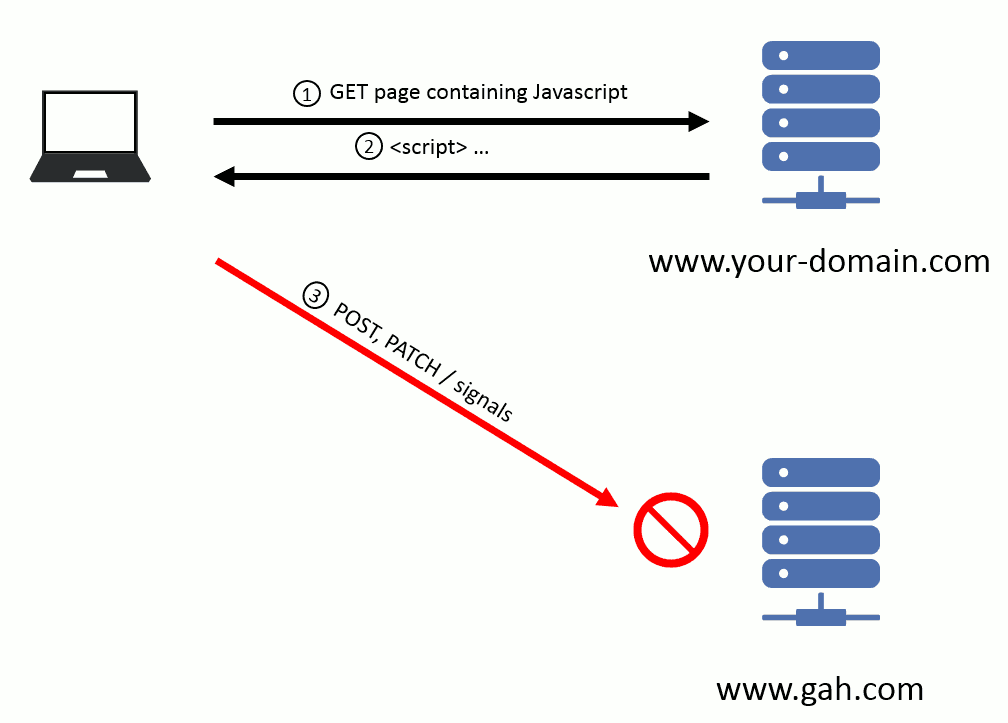
Without configuration, the browser blocks the POST and PATCH signals requests. Risk Management uses the CORS protocol to authorize requests from your declared domains:
- Before sending a POST or PATCH signals request, the browser sends a CORS preflight request (HTTP OPTIONS) to the Signal Collector.
- Risk Management checks the
Originheader of the preflight request against the list of declared domains (for example,www.your-domain.com). If the domain is not declared, Risk Management does not authorize the origin, and the browser blocks all POST and PATCH signals requests from that domain.
Every domain from which your website sends risk signals to Risk Management must be declared in the product configuration.
Note
If you are implementing a risk assessment on your login page, and this page is delegated to an identity provider, the domain name of the server hosting the identity provider must be declared in Risk Management.

