


Evaluate risk with decision feedback
This page provides an end-to-end scenario that explains how to request a risk-based decision, enforce authentication, and report the result back to Risk Management with the decision feedback API.
In this scenario, the user wants to access or use some tenant resources, such as log in to the portal, perform some action, and so on. The tenant wants to make this as easy as possible for the user, while ensuring a good level of security.
The scenario allows the tenant to request a risk evaluation for the operation based on one or more risk management technologies. The result is a decision from the policy manager: allow, challenge, or reject.
The tenant is in charge of enforcing this decision. If the decision is to challenge the user, the tenant chooses the authentication method and can request a stronger method than usual.
After the user is authenticated, the tenant must provide the result of this authentication back to Risk Management. To improve the quality of the risk evaluations, historical data on past authentication results plays an important role and allows the system to provide better decisions and improve the user experience.

The following sequence diagram shows the steps to execute this scenario.
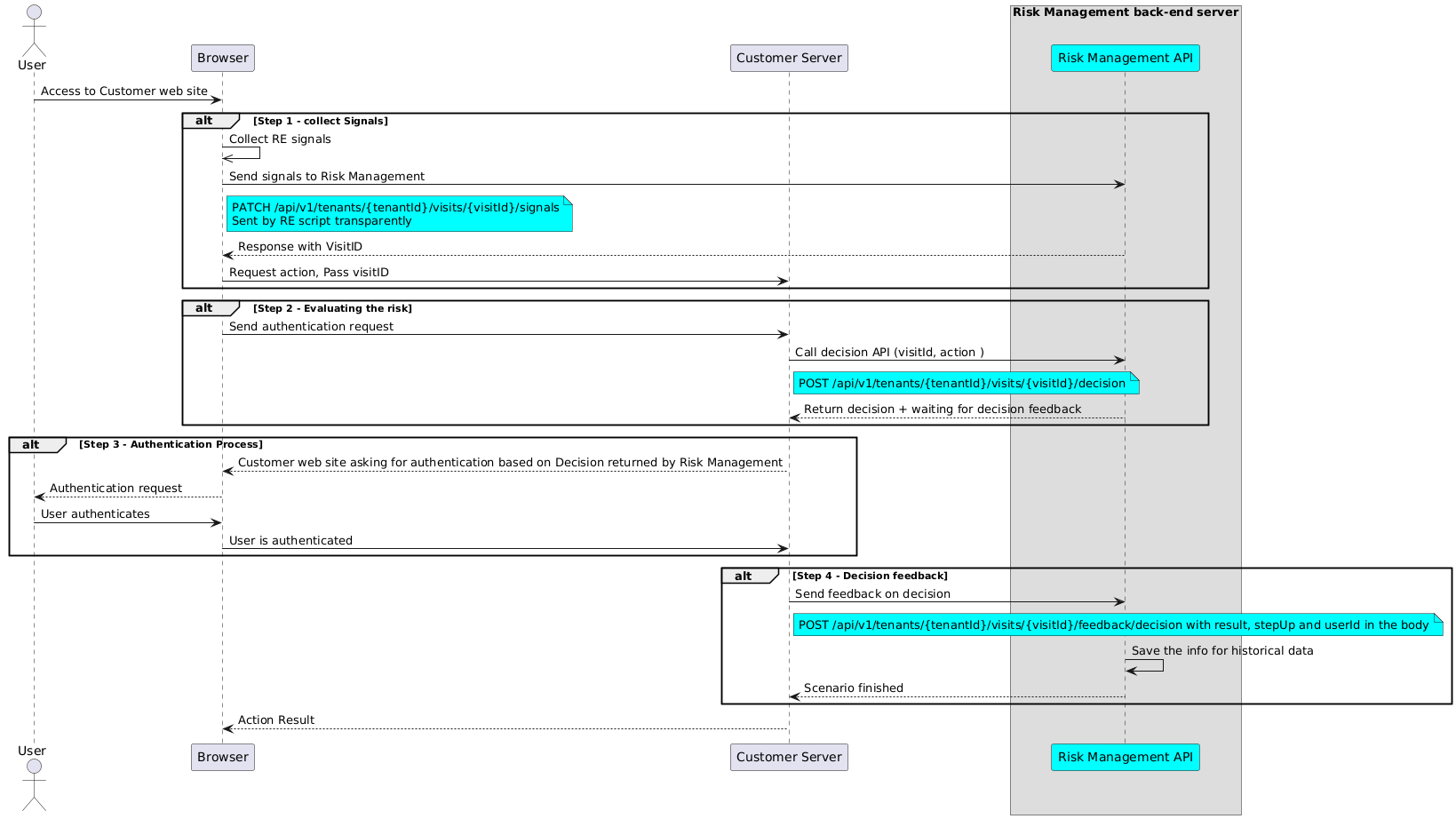
Collect signals
The first step requires you to modify a web or mobile application to collect signals from the user.
Risk Management offers three options that cover most use cases. You can choose to do one or more of the variants, depending on your needs and resources:
-
Integrate signal collection into a web page flow. See the web tutorial.
-
Integrate signal collection into an Android or iOS application. See the mobile tutorials.
The signal collection returns a visitId that you use in the next steps.
Evaluate risk
This request asks for the risk evaluation of the user's operation. In the example below, several values need to be updated with your configuration.
- eyJ0…3jig is the Base64-encoded JWT used to authorize the request to the Risk Management service. See API authentication and authorization.
- mybank is your tenant ID.
- visitId (in the URL) must be the value returned by the signal collection.
- userId and the other context properties provide the context of the operation, used to match the scope of the policy.
POST /api/v1/tenants/mybank/visits/123e4567-e89b-12d3-a456-426614174000/decision
Accept: application/json
Content-Type: application/json
Authorization: Bearer eyJ0...3jig

{
  "userId": "testUser",
  "event": "login",
  "category": "bill",
  "responseLevel": "medium"
}
The response contains several important values that must be parsed:
- HTTP/1.1 200: The evaluation succeeded. Other values mean an error happened (400 Bad Request: the body is invalid; 422: no policy was found for the tenant).
- status:
SUCCESSmeans the evaluation completed.INVALID_OR_MISSING_VISITIDmeans thevisitIdis wrong. - decision: The decision from the policy manager.
decision.access.resultdictates the next steps for the tenant. See Authenticate. - decision.access.policy and decision.access.scenario: The policy (and scenario, if any) that matched.
HTTP/1.1 200
Content-Type: application/json;charset=UTF-8

{
  "status": "SUCCESS",
  "tenantId": "mybank",
  "decision": {
    "access": {
      "policy": "Login policy",
      "scenario": "Unrecognised device, step-up required",
      "result": "challenge"
    }
  },
  "client": "web",
  "input": {
    "responseLevel": "medium",
    "client": "web",
    "userId": "testUser",
    "event": "login",
    "category": "bill",
    "visitId": "123e4567-e89b-12d3-a456-426614174000"
  },
  "ddp": {
    "request_id": "123e4567-e89b-12d3-a456-426614174001",
    "policy_score": "5",
    "reason_code": ["known device for user", "Device Inconsistency OS", "Hosting Facility Detected"],
    "digital_id": "0123456789abcdef0123456789abcdef",
    "device_id": "fedcba9876543210fedcba9876543210",
    "fuzzy_device_id": "fedcba9876543210fedcba9876543210",
    "input_ip_address": "203.0.113.10",
    "true_ip": "203.0.113.10"
  },
  "tre": {
    "rules": {
      "browser edge": "true",
      "os windows": "true",
      "network tor": "false",
      "device new": "false"
    },
    "score": 0
  }
}
See the REST API reference for POST /api/v1/tenants/{tenantId}/visits/{visitId}/decision.
Authenticate
In the previous step, Risk Management returned a decision object. The decision returned by the policy manager is one of the following:
- Allow: The operation can proceed.
- Challenge: The operation can proceed only if the tenant successfully challenges the user. The tenant is in charge of choosing and enforcing the method.
- Reject: The operation should be blocked.
It is up to your tenant to decide what to do next. It should follow the decision and, for a Challenge, request the proper level of authentication from the user. Your tenant can also decide to use a higher level of authentication than recommended because, for example, the user does not have that exact authentication method available.
After the operation is handled, provide feedback on the decision to Risk Management.
Decision feedback
The decision feedback is called by the tenant back end after the authentication is complete. Its purpose is to give Risk Management feedback about the result of the user authentication that just took place: whether it was successful or not.
Risk Management uses this data to keep a record of the authentications for devices and users. This log allows the use of conditions based on authentication history.
The authentication method is not supplied by the caller. Risk Management derives it from the stepUp flag:
stepUpfalse (or omitted): the method is considered password.stepUptrue: the method is considered 2FA.
Caution
The userId field must not contain any sensitive personal data, because its value is processed and stored without additional application protection (that is, encryption). Examples of sensitive data include social security numbers, payment card numbers (PAN), and bank account numbers.
In the example below, the user was presented with a password login and successfully authenticated. Update the following values with your configuration:
- eyJ0…3jig is the Base64-encoded JWT used to authorize the request to the Risk Management service.
- visitId (in the URL) must be the value returned by the signal collection.
Note
Send the decision feedback within 1 hour of the visit. After that, Risk Management rejects the feedback with result NOK.
POST /api/v1/tenants/mybank/visits/6e7d4ebf-8f67-4d6d-990d-208e0e0477ac/feedback/decision
Accept: application/json
Content-Type: application/json
Authorization: Bearer eyJ0...3jig

{
  "userId": "testUser",
  "result": true,
  "stepUp": false
}
| Field | Type | Required | Description |
|---|---|---|---|
userId |
string | Yes | The unique ID of the authenticated user. 1-128 characters: alphanumeric or one of +/_=@.-. |
result |
boolean | Yes | The authentication result. true = success, false = failure. |
stepUp |
boolean | No | true for a step-up authentication, false otherwise. Defaults to false. |
An HTTP 201 status means that the request was processed, not that the feedback was recorded. Always check the result field in the response body:
- OK: The feedback was recorded.
- NOK: The feedback was rejected. The
reasonfield explains why, for exampleVisit not foundorTime limit to give authentication feedback for this visit has been exceeded. - ERROR: The feedback could not be stored. The
messagefield describes the problem.
Other status codes:
- HTTP/1.1 400: The request body is invalid, for example a missing
userIdor aresultthat is not a boolean. - HTTP/1.1 404: The
tenantIdorvisitIdin the URL has an invalid format.
HTTP/1.1 201
Content-Type: application/json;charset=UTF-8

{
  "result": "OK"
}
Example of a rejected feedback:
HTTP/1.1 201
Content-Type: application/json;charset=UTF-8

{
  "result": "NOK",
  "reason": "Visit not found"
}
See the REST API reference for POST /api/v1/tenants/{tenantId}/visits/{visitId}/feedback/decision.

