



Install SafeNet Access Exchange
SafeNet Access Exchange can be deployed as a Single Node or High-Availability (HA) Cluster:
High‑Availability Cluster Deployment
The SafeNet Access Exchange deployment uses an active–active cluster to ensure high availability, scalability, and continuous service operation.
The following diagram illustrates the overall architecture, including load balancing, application nodes, caching, and the synchronously replicated database.
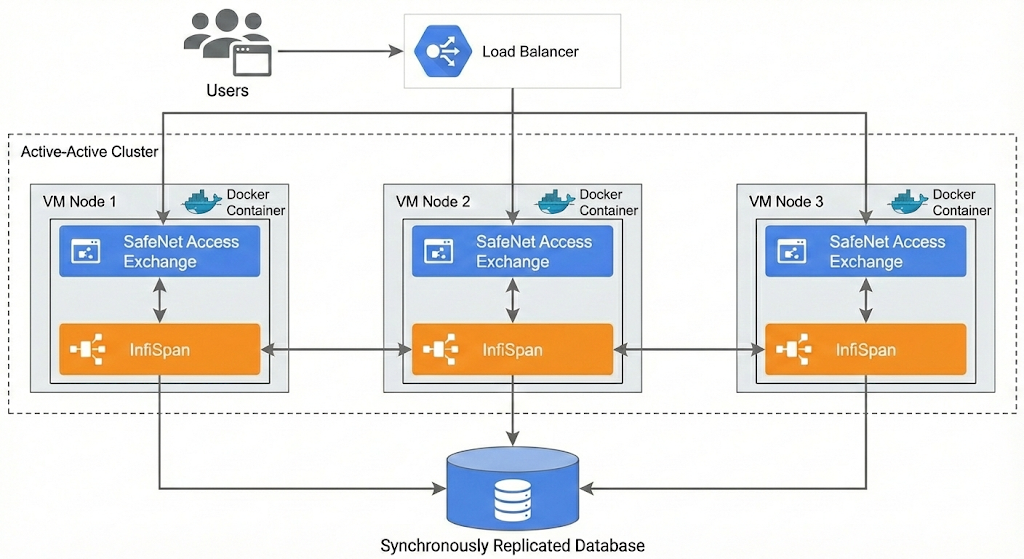
- Active–Active Load Balancing: Incoming user requests are distributed across all application nodes through a load balancer, enabling high availability and improved performance.
- Containerized Application Instances: Each VM node hosts a Docker container running SafeNet Access Exchange, ensuring consistent and isolated application environments across the cluster.
- Distributed Infinispan Cache: Every node includes a local Infinispan instance. These cache instances synchronize in real time to maintain consistent session data and reduce latency across the cluster.
- Synchronous Database Replication: All application nodes connect to a shared backend database configured with synchronous replication. This ensures strong data consistency and fault tolerance.
- Recommended Production Topology: A minimum of three nodes is recommended for production environments to achieve optimal resilience, load distribution, and failover capability.
For a High-Availability (HA) Cluster deployment instructions, refer to Podman (HA Cluster Deployment), Docker (HA Cluster Deployment), or SAS PCE Enterprise Virtual Appliance (High Availability) depending on your preferred deployment configuration.
Upgrade SafeNet Access Exchange
To upgrade SafeNet Access Exchange:
- Create a backup copy of your current SafeNet Access Exchange configuration before upgrading.
- Edit your podman-compose.yml or docker-compose.yml file.
- Replace the old SafeNet Access Exchange image with the latest SafeNet Access Exchange version.
- Ensure the updated container points to the same database as your previous setup.
- Run the upgraded container using podman-compose up -d or docker-compose up -d.
Security Considerations
Important
-
Protection of .env Files: Protection of .env files is the sole responsibility of the customer. This includes, but is not limited to, secure storage, strict access control, appropriate file permissions, and prevention of unauthorized access or disclosure. Thales provides no guarantees regarding the security of customer-managed environment files.
-
Customer Responsibility for Environmental Security: The overall security of the deployment environment remains the exclusive responsibility of the customer. This includes infrastructure security, secrets management, runtime configurations, operating system hardening, and access controls. Thales is not responsible for security incidents resulting from customer-managed environments or configurations.
Warning
Privileged Mode Container Execution Prohibited: The container(s) must not be executed in privileged mode. Running the container(s) with elevated or privileged permissions, or in privileged mode (-p option), can introduce significant security risks, including the generation of container heap dumps and unintended exposure of sensitive data. Any deployment in privileged mode is considered insecure and unsupported.

