



White Paper
Introduction
Uses of IDPrime Virtual
-
Simplifies deployment of certificate-based security.
-
Broadens use of CBA smart card security by overcoming key pain points.
-
Enables easy provisioning of temporary PKI credential in lost/forgotten/stolen card scenarios.
-
Single universal credential supported on multiple devices.
-
Reduces TCO around hardware provisioning for temporary employees.
-
Deploys into existing CMS environments.
-
-
Enables new use cases.
-
Enhanced PKI security by HSMs for private key operations and storage.
- FIPS140-2 compliant HSM is used. FIPS mode can be enabled on HSM for regulatory compliance.
-
High assurance for remote employees via laptop, PCs or mobile devices.
-
Integrates with OIDC enabled IDPs.
-
Extends high assurance PKI security to VDI environments.
-
Example Workflow of IDPrime Virtual
Application such as outlook or Acrobat requires a PKI workflow (For example signing an email).
- The ID Prime Virtual starts up in the tray icon and user clicks on the connect card option.
- User authenticates to IDP, virtual token of the user gets loaded in SAC (MW).
- The user opens any application, which needs to do cryptographic operation on the card.
- The application (Outlook or Acrobat) calls PKCS11 or MSCAPI based interface on SAC to invoke the cryptographic (sign) operation on the smart card, passing the document hash.
- SAC (MW) communicates with the virtual card, already loaded by the client.
- Sign operation is invoked on the IDPrime Virtual server.
- The IDPrime Virtual server fetches the wrapped key for the user from the database.
- The wrapped key is unwrapped in HSM,
- Sign operation is performed on the data, using the private key of the user.
- The key is deleted after performing the operation and result returned though the same path.
- The result is returned back from SAC to the end user application.
Security Features
Overview
IDPrime Virtual security design ensures high-level security on all IDPrime Virtual solution’s components (including the server and the client) in order to assure that no vulnerability exists.

In this section, the following IDPrime Virtual security features are covered:
- MFA Access Control: Two separate authentication levels using two different authentication credentials.
- Authentication from Identity Provider: Standard OIDC authorization mechanism used for API access.
- Virtual smart card user PIN validation: Man-in-the-Middle attack prevention.
- User’s Private Key protection:
- Storage: User’s wrapped private keys are stored in IDPrime Virtual database.
- Non-Repudiation: Usage of 2FA + Login PIN on the token enables exclusive access to one’s private key.
- Protection from Cloning: Secured from cloning of HSMs or memory.
- End-to-End Security: Client – Server – Database – HSM.
- Data in Motion: Data is secured during transmission using TLS.
- Data at Rest: Stored data is protected by encrypting it before storing in the database.
- Data in processing: All the sensitive cryptographic operations are performed inside the HSM.
- Data Integrity Checks: The values stored in the database are protected with signature to avoid any data tampering.
- Secure Deployment: Deployment with Kubernetes (Hardened container deployment, secrets).
- HSM Crypto Officer Credentials Ownership: HSM crypto officer credentials’ ownership taken by IDPrime Virtual server.
MFA Access Control
In IDPrime Virtual solution, there are two levels of authentication and authorization:
- Identity Provider (IDP): For non-sensitive information (a.k.a. OIDC access token).
- PIN + IDP: For private key operations (a.k.a. Login session token).
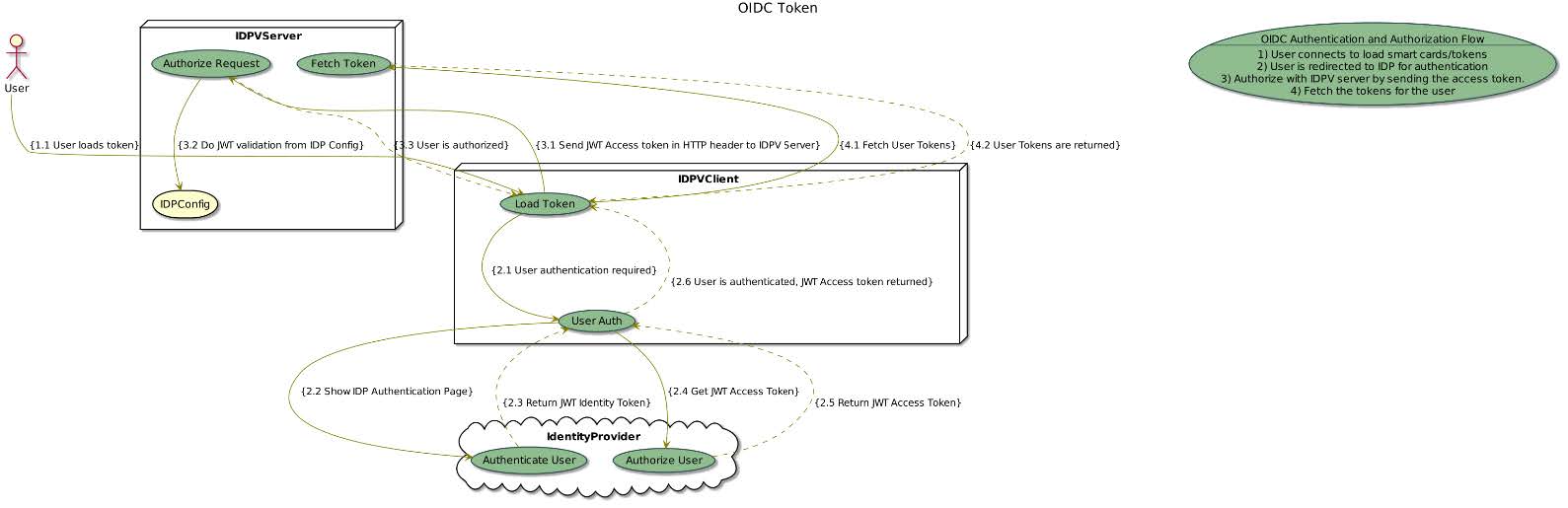
OIDC Access Token Validation
The OIDC token allows non-sensitive information retrieval from the server.
- JWT (OIDC Access Token) is retrieved from an OIDC identity provider (e.g. SafeNet Trusted Access) – where user authentication can be user name & password, OTP, mobile push etc.
- This token is used on the server to fetch information from the server.
Login Session Token (IDPV Pin validation)
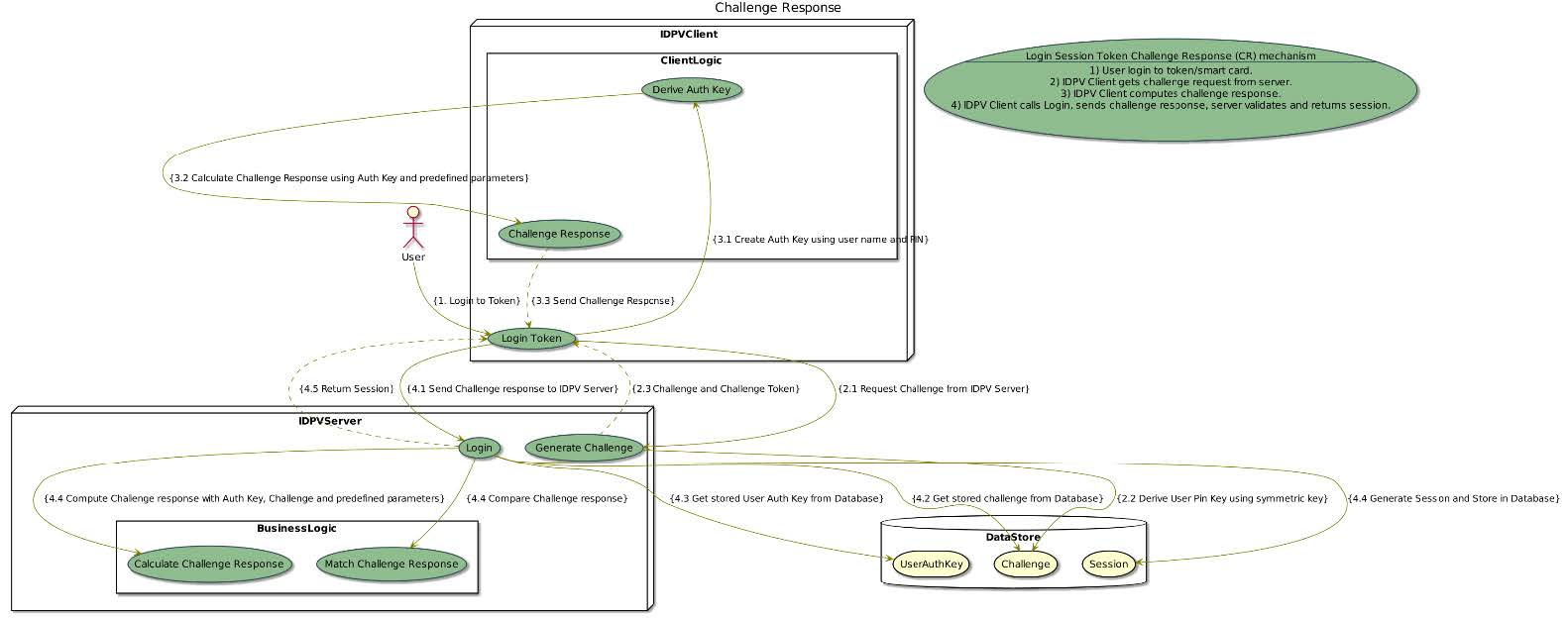
The Login Session token allows sensitive Information retrieval from the server.
- User PIN validation is done via a challenge response protocol between the IDPrime Virtual client and the IDPrime Virtual server for a secure session management.
- The IDPrime server sends a challenge request to IDPrime client as the first step of validation. This challenge is valid for limited configurable amount of time.
- On the IDPrime client the user PIN is used for deriving a user pin key (symmetric key), which is used for calculating response to server challenge.
- User pin key is stored securely on the server side, and calculated at runtime from the user PIN on the client side.
- Some client and server specific parameters are also included in the challenge response calculation, which ensures prevention of man-in-the-middle attack.
- Login session token is obtained after the PIN validation is successful.
- The login session token is exchanged for all requests, which involves the usage/access of the user private key.
- Challenge response error counter is managed on the server side.
Therefore, in order to perform any private key operation on the server, both JWT and login session token should be provided. Meaning that the user must prove his identity to an Identity provider server and provide a virtual token’s user PIN.
The virtual token’s PIN is never transferred across the network.
User’s Private Key Protection
User’s private key is the resource, which needs to be safeguarded in all scenarios.
- In order to allow unlimited number of user private keys handled by IDPrime Virtual, the user’s private keys are stored wrapped in database.
- The option of choosing storage as database or HSM is configurable. In case of HSM storage, the user keys are limited to capacity of the HSM.
- All operations of wrapping / unwrapping keys are performed inside HSM.
- The private key is never exposed unencrypted outside HSM.
- Protection against cloning:
- The user keys are stored on HSM (HSM HA/DR mode): The keys cannot be exported in this mode and will remain inside the HSM. Keys are replicated only for HA / DR.
- The user keys stored in the database wrapped by tenant key (HSM export mode):
- A tenant key is stored inside the HSM.
- User keys are wrapped with tenant key to be stored in the database.
- For using the user keys for sign or decrypt operations, these need to be unwrapped inside the HSM.
- If the database is cloned, the keys cannot be used directly and need to be unwrapped inside HSM.
- Non-Repudiation: The user is required to get authenticated from IDP and needs to login on the token using the CR mechanism to be able to get access to his/her private key for the sign operation. The secure access of the private key of virtual smartcard is ensured this way.
There are two modes for keys storage in IDPrime Virtual solution – wrapped private keys in the database or inside the HSM.

End to End Security
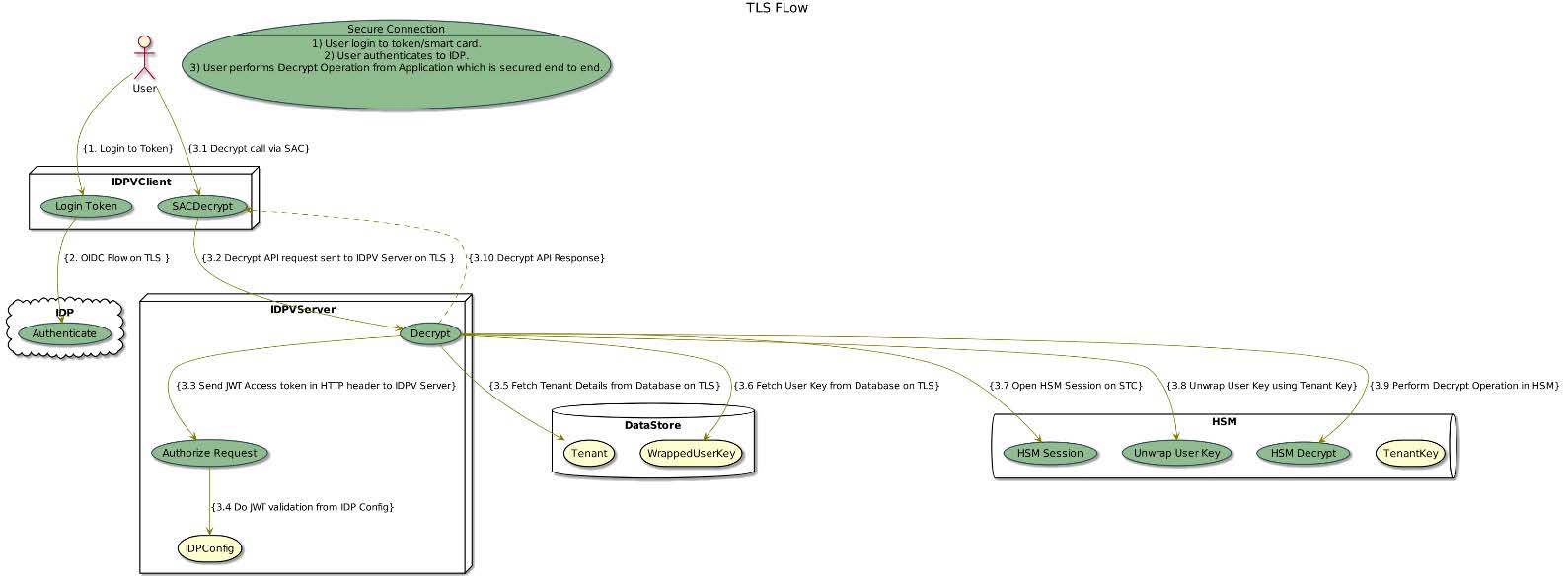
The connection between all the modules interacting in the system is secured.
- Data in Motion: All the transport channels to endpoints are secured with TLS
- IDPV client, IDP, IDPV server, database.
- IDPV client, IDP, IDPV server, HSM.
- User Private key exchange is wrapped /encrypted with transport keys during API calls.
- Data at Rest:
- User private key are stored in encrypted or wrapped form in database.
- All other forms of data is protected with integrity checks.
- Data in Processing:
- Operations on private keys are done inside the HSM.
- API calls accessing user private keys are protected with secure session handling.
Data Integrity Checks
The data integrity for the data stored inside the database is ensured so that any unauthorized changes are detected.
- All database records are signed with a dedicated signature key.
- The signature key is stored HSM.
- The sign operation is done in HSM and the verify operation is done in IDPV server.

Secure Deployment
Solution is securely deployed and is protected from any malicious attacks.
- IDPV server is a docker container, so making use of orchestration like Kubernetes is possible.
- With Kubernetes secure deployment practices and Pod Security Policies (PSPs) such as hardened container deployment and secrets, enhanced security is achievable.
- Regular security updates are available.

HSM Crypto Officer Credentials Ownership
The HSM partition credentials can be owned by the IDPV if required for enhanced security.
- During IDPrime Virtual server (docker) first run, the server changes the password of the HSM partition and keeps password in server memory.
- This ensures that only IDPrime Virtual server can access its HSM partition. The partition is inaccessible from any other HSM client.
- HSM credentials ownership feature gives complete ownership of the HSM partition to IDPV.
This feature is optional only and not available in High availability mode (with multiple HSMs).
Offline Mode Feature
Overview
IDPrime Virtual offline mode enables private key usage while no network is available. In order to achieve this flow, the keys have to be transferred from the server’s HSM to the client side. Therefore, the security design is essential.
The main goals of the IDPrime Virtual offline-mode security design are:
- Protecting the private keys transfer from within the HSM to the IDPrime Virtual client that imports the private keys to the TPM.
- Protect the private keys within the TPM from unauthorized usage.
Supported Platform and TPM
IDPrime Virtual Offline-Mode is supported only on Windows 10 and TPM 2.0.
Use Cases
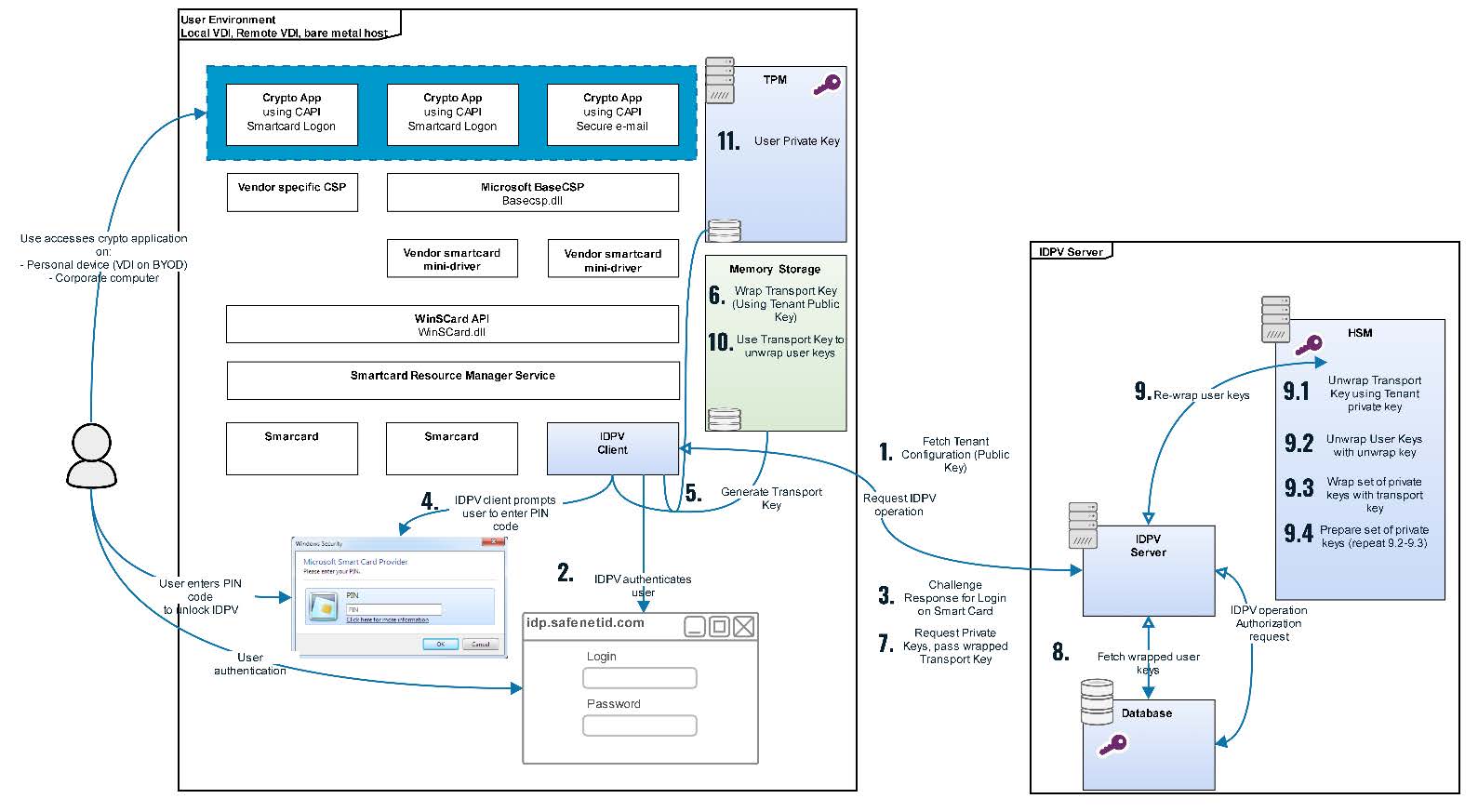
The following description provides a high level overview of key Material Retrieval flow. The key Material is referred to as TPM Bundle in the description and diagram below.
Key Material Retrieval Flow
- The IDPrime Virtual desktop client application fetches the tenant details from IDPrime Virtual server by passing the tenant ID configured in the registry. The tenant details contains the tenant exchange public key.
- The IDPrime Virtual identifies if the current user is allowed to use his private keys in Offline-Mode and is authorized to access TPM Bundle during JWT validation. The client platform runs Win10 with TPM-2.0 and thus there is a need to retrieve the TPM Bundle from the IDPrime Virtual server and store it locally (keys within the TPM).
- The IDPrime Virtual desktop client requests login operation on the server. The server generates challenge response for secure PIN exchange.
- User verifies his Virtual Token PIN successfully via the secure PIN validation.
- The IDPrime Virtual client generates a transport key.
- The IDPrime Virtual client wraps transport key (Symmetric Key) with the tenant public key (exchanged during initialization as per step 1).
- The IDPrime Virtual client requests the TPM Bundle from server by passing the wrapped transport key.
- The IDPrime Virtual server fetches the wrapped user private keys from database.
- The IDPrime Virtual server transfers the wrapped user keys to HSM:
- Unwraps the transport key with the tenant exchange private key in HSM.
- Unwraps user key with the tenant user wrap private key.
- Wrap user key with transport key.
- Repeat steps 2 and 3 till all the user keys are wrapped and prepare the bundle
- The IDPrime Virtual client unwraps the TPM bundle containing wrapped user private keys
- The IDPrime Virtual client stores the private keys in the TPM.
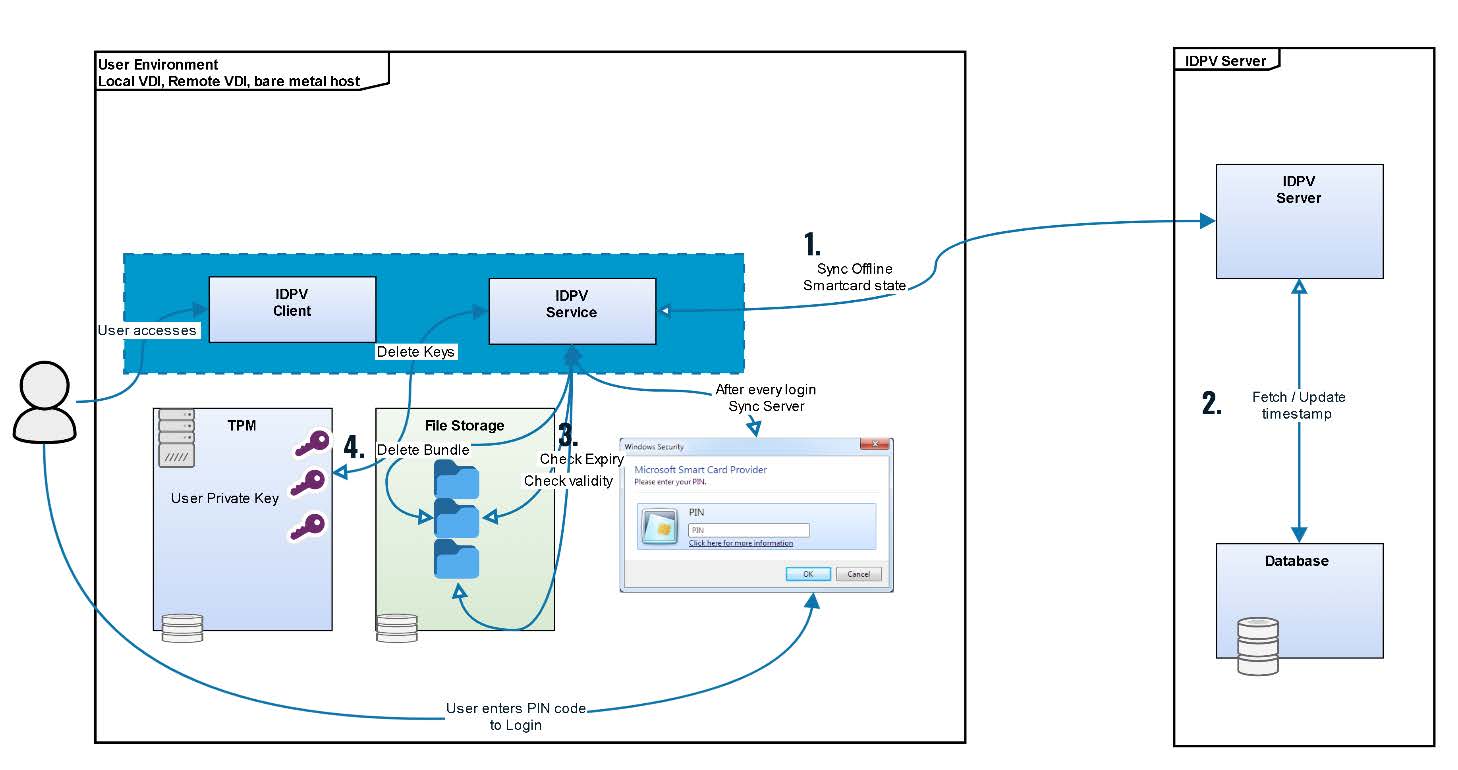
TPM User Key Expiry
User keys are expired from TPM in the following scenarios (Step 1 &2 in the above diagram)
- Offline Expiry per smart card is configured at tenant level
- During the offline bundle download, the offline keys expiry for the user is calculated (Current Timestamp + Offline Expiry) and stored on disk (as part of offline smartcard metadata).
- When the user login to the smart card in online mode, the expiry time is re-calculated and expiry timestamp is updated.
- The user can continue to work with the offline keys in the TPM and must log in once on the smart card in online mode before the expiry in order to renew the time of expiry.
TPM User Key Deletion
User keys deletion workflow (Refer above diagram)
- Offline smartcard state is synced during offline bundle download or after every user login in online mode.
- The smartcard timestamp is updated on the server ( if needed )
- If offline bundle is expired or not valid anymore ( obsolete ) then it is removed.
- Corresponding keys are removed from TPM.
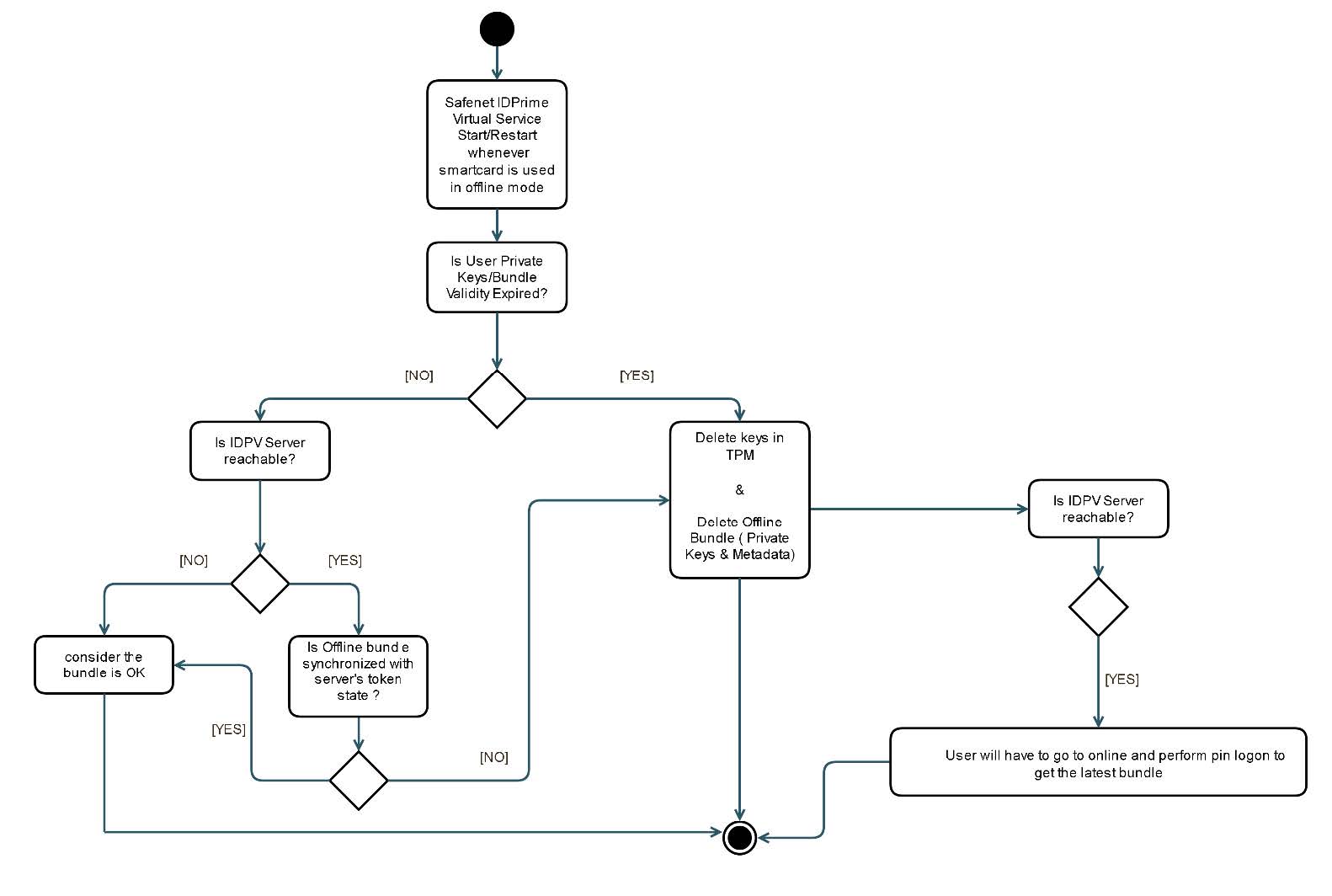
User keys from TPM are deleted in the following scenarios
- When the offline timestamp expires, the user keys are deleted from TPM and metadata (on disk) is deleted.
- When a newer version of the user smart card is available for download, then the existing keys are deleted and new ones are added.
- After exit from IDPV Client during user authentication if different user id is provided for log in into IDPV Client, previous user offline artifacts are removed.
- During offline access, if user smart card is locked due to max no of attempts exceeded, the user keys are deleted from TPM
- In case the token Metadata (on disk) is tampered or deleted by external user, the keys in the TPM are considered as orphaned and deleted.
- IDPV Client uninstallation also deletes user keys in the TPM.
User PIN Storage in Offline Mode
For offline mode the IDPV Client requires to store PIN locally for performing authentication. While the IDPV client is working in online mode after PIN authentication is done with the server. it stores the PIN(provided by user) offline along with the user private key returned by the IDPV server. The steps are shared below:
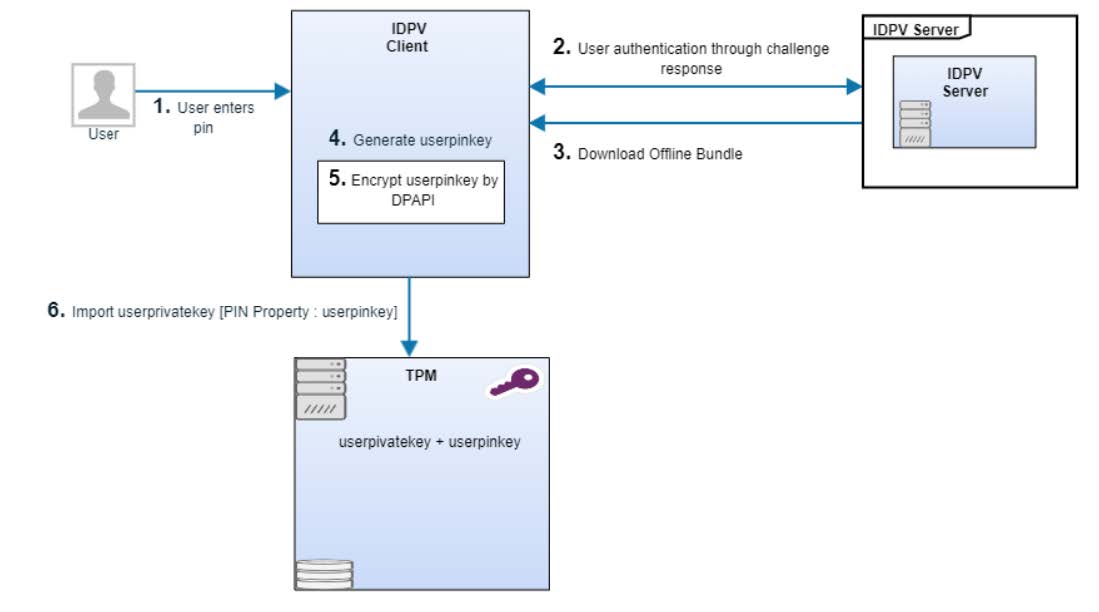
- User enters PIN.
- User authentication is performed with the server through challenge response mechanism.
- After successful authentication and authorization, offline bundle is downloaded from the server.
- IDPV client creates a key aka userpinkey using PBKDF2 function from user pin and using some user specific details. This userpinkey is different from the key being used for the server authentication.
- This userpinkey is encrypted by DPAPI (windows library).
- IDPV Client set encrypted userpinkey as pin property while saving userprivatekey in the TPM.
User PIN Authentication in Offline Mode
When IDPV Client is working in offline mode, it performs below steps to perform user pin authentication:
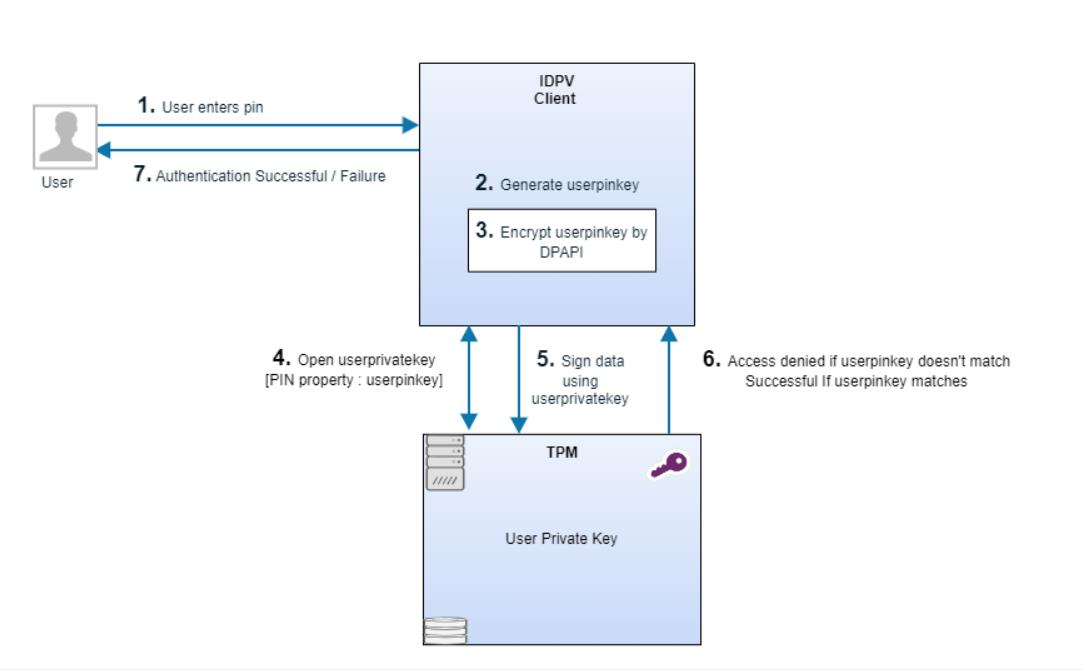
- User enters PIN.
- IDPV client creates a key aka userpinkey using PBKDF2 function from user pin and using some user specific details.
- This userpinkey is encrypted by DPAPI (windows library).
- IDPV Client opens userprivatekey in the TPM & pass userpinkey(created above) as userprivatekey pin property.
- IDPV Client performs signhash operation using userprivatekey.
- Signhash function returns Access denied if encrypted userpinkey is different from the stored pin for the userprivatekey in the TPM.
- Authentication will fail if the signing fails & successful if the user pin is valid.
Error Counter Handling
- Keys in TPM are protected via Windows user authorization failures mechanism. Its control mechanism is defined in this section.
- In parallel to Windows user authorization failures mechanism, the IDPV client handles an independent error counter.
- When error counter hit max value in TPM, IDPrime Virtual client removes the key and erases the TPM Bundle and the virtual card enters a blocked state.
- When IDPrime Virtual client goes online and connects to the IDPrime Virtual server, makes sure to synchronize the error counter with the server so that the Virtual Token gets blocked on backend.
Secure Product Development
Overview
To guarantee the fundamental security properties of the systems we deliver to customers, Thales has a Software Security Assurance Plan also known as Security Plan or secplan for short. It contains security activities for all projects in Thales. CPL has adopted the corporate security plan and designed a process for implementation. The CPL security plan process contains the follow 15 activities:
- Awareness training.
- Provide an architecture description.
- Implement security baseline requirements.
- Perform Information Security Risk Assessment (ISRA).
- Detect flaws in source code via peer review.
- Detect flaws in source code via a SAST.
- Scan the delivery with a DAST tool or pentest.
- Define hardening guidelines.
- Third party vulnerability scan.
- Manage vulnerabilities
- Integrity control.
- Virus check.
- Vulnerability scan of the integration environment.
For each product release, the project team reviews and decides the security activities to implement based on the security needs of the release. The security activities must be implemented before the release review. Otherwise, a security waiver is required to make a release.
Pass Awareness Trainings
All employees need to attend the security trainings, which includes the following courses:
- The security context.
- The classification rules.
- The information system.
- Employee behaviour.
Members of product teams should attend the following software security awareness trainings:
- Security Generalities.
- Introduction to Attack Models.
- Introduction to Security Components.
DoD (Definition of Done): The whole development team has attended and successfully passed the trainings and quizzes related to the Security Awareness trainings.
Provide Architecture Description
Following activities are included as part of this process:
- Identify and rank risks in order to make treatment decisions.
- Risk assessment considers Assets, Threats, Vulnerabilities, and Risks analysis.
- Up to date attack models are considered.
- Vulnerability analysis is performed for inherent risks with value > Medium.
- Perform Threat Modelling Analysis.
- Fill ISRA template that contains at least: business and supporting assets; identified risks, scored and ranked.
- A vulnerability scoring is performed for all risks with inherent value Critical or High.
- Record the treatment decisions.
DoD: Risk assessment is done and reviewed with PO. Risk treatment decisions are made.
Implement Security Baseline Requirements
Apply Security Baseline Requirements, so that the application complies with the by default protection level.
Fill Data Protection Evidence Template
Identify personal data, flows and repositories. Ensure personal data protection by design, rights of individuals, and the product’s compliance to data privacy laws. Fill DPE template.
DoD: DPE filled and reviewed by the operation team.
Perform ISRA
Following activities are included as part of this process:
- Identify and rank risks in order to make treatment decisions.
- Risk assessment considers Assets, Threats, Vulnerabilities, and Risks analysis.
- Up to date attack models are considered.
- Vulnerability analysis is performed for inherent risks with value > Medium. Perform Threat Modelling Analysis.
- Fill ISRA template that contains at least: business and supporting assets; identified risks, scored and ranked.
- A vulnerability scoring is performed for all risks with inherent value Critical or High.
- Record the treatment decisions.
DoD: Risk assessment is done and reviewed with PO. Risk treatment decisions are made.
Peer Security Code Review
Perform peer security code review. The peer review may be done following a defined checklist of what to be checked. The checklist can be used as the peer review report. The peer review report is shared and reviewed with the PO, who defines bugs and flaws fix priorities if they exist.
DoD: Peer security code review performed.
Detect Flaws in Source Code via SAST
Perform automated static code analysis (using a SAST tool) at each major release with rules defined by Development Leader (source code coverage, tool settings). The results are qualified by the Development Leader. Available tools include Coverity and HP Fortify.
DoD: A SAST report is available and Reviewed with the PO, who can define bugs and flaws fix priorities.
Scan Delivery with DAST
Perform a dynamic scan using a Dynamic Application Security Testing (DAST) tool on the most representative environment (integration, test). PO uses the scan report to provide a status to Operation team. Available tools include WebInspect, BurpSuite and OWASP ZAP.
DoD: Dynamic scan report is available and reviewed by SSC. All vulnerabilities logged in defect tracking tool.
Define Hardening Guidelines
Provide guidance on installation and hardening rules, so the product can be setup in a secure environment.
DoD: Installation and hardening rules are defined and added inside Integration Guide (or admin guide), or in the SDK Guide client applications. The Guide is reviewed by Support / Operations teams.
Describe Security Error Messages
Provide guidance for the Operations team on errors and alerts so that the team can detect security incidents. The Administration and Maintenance Guide of the product or the SDK Guide for client applications contain guidance to properly understand the security error messages and alerts.
DoD: The above mentioned guide(s) contains a chapter with the required guidance, reviewed by Support / Operations teams.
Integrity control
Make sure that the delivery has received an integrity control to protect the integrity of the delivery. Each delivery package (binary, script, configuration file) has a hash value or a digital signature. This hash value or signature is stored properly and available in order to control what is in Operations or in customer side is what we have delivered. For hash, SHA-2 is the minimum requirement. For firmware, a digital signature is required.
DoD: The fingerprint (hash or signature) of the delivery package is recorded.
Virus Scan
The delivery must be virus free to ensure our delivery is safe. Each delivery package is scanned by an updated antivirus software. This scan shall be demonstrated to a customer to ensure that Thales has provided a virus free product. Available tools include McAfee and ClamAV.
DoD: A virus scan report is available and archived.
Third Party License and Security Vulnerability Scan
Provide a list of the delivered software, so support teams can retrieve this information to react to a known vulnerability. All the delivered software (including at least the 3rd parties components) are listed with the inimum information (file name, version). This list is stored in the defined repository. Available tools include Blackduck, Sonatype Nexus IQ server, and OWASP dependency check.
DoD: The list is archived and contains at least all the 3rd parties components.
Vulnerability Scan
Perform a platform vulnerability scan of the integration environment. It includes at minimum OS, AppServer, WebServer, database. Formalize the report.
DoD: Vulnerability report reviewed by SSC. All vulnerabilities logged in defect tracking tool.
Manage Risks
Following activities are included as part of this process: 1. Fix all product vulnerabilities of critical or high risks. 2. Vulnerabilities of medium risks should be planned to be fixed. 3. Vulnerabilities are recorded in the bug management system. 4. A security waiver is required if the product has critical or high risks but must release due to business needs.
DoD: Test reports must have evidence that vulnerabilities of critical or high risks are fixed. Vulnerabilities of medium risks are planned in product roadmap.
Security Waiver
Thales has security waiver process is to manage and control anomalous situations linked to a product or service delivered by Thales. A security waiver requires two approvers from business and security, respectively, depending on the risk level of the security issue.
Glossary
2FA: Two factor authentication
API: Application Programming Interface
CMS: Certificate Management System
DAST: Dynamic Application Security Testing
DR: Disaster Recovery
DPE: Data Protection Evidence
FIPS: Federal Information Processing Standards
IDP: Identity Provider
IDPV: IDPrime Virtual
ISRA: Information Security Risk Assessment
JWT: JSON Web Token
HA: High Availability
HSM: Hardware Security Module
MD: Mini Driver
MSCAPI: Microsoft CryptoAPI
MFA: Multi Factor Authentication
MW: Middleware
OIDC: OpenID Connect
PKCS: Public-Key Cryptography Standards
PKI: Public Key Infrastructure
SAST: Static Application Security Testing
STA: Safenet Trusted Access
SAC: Safenet Authentication Client (Middleware)
TCO: Total Cost of Ownership
TPM: Trusted Platform Module
VDI: Virtual Desktop Infrastructure
-->

