



Event Logs
To access this page, navigate to Overview > Event Logs.
Event Logs display a list of events generated by the Thales Authenticator Lifecycle Service. These event logs are essential for auditing and troubleshooting, and are retained within the database for a limited time period.
Event Log Views
The Event Logs window provides two types of views to help users access event log details.
-
Summary View: Displays event logs in a compact format for quick identification and action.
-
Expanded View: Provides complete information on event logs for in-depth auditing and troubleshooting.
Summary View
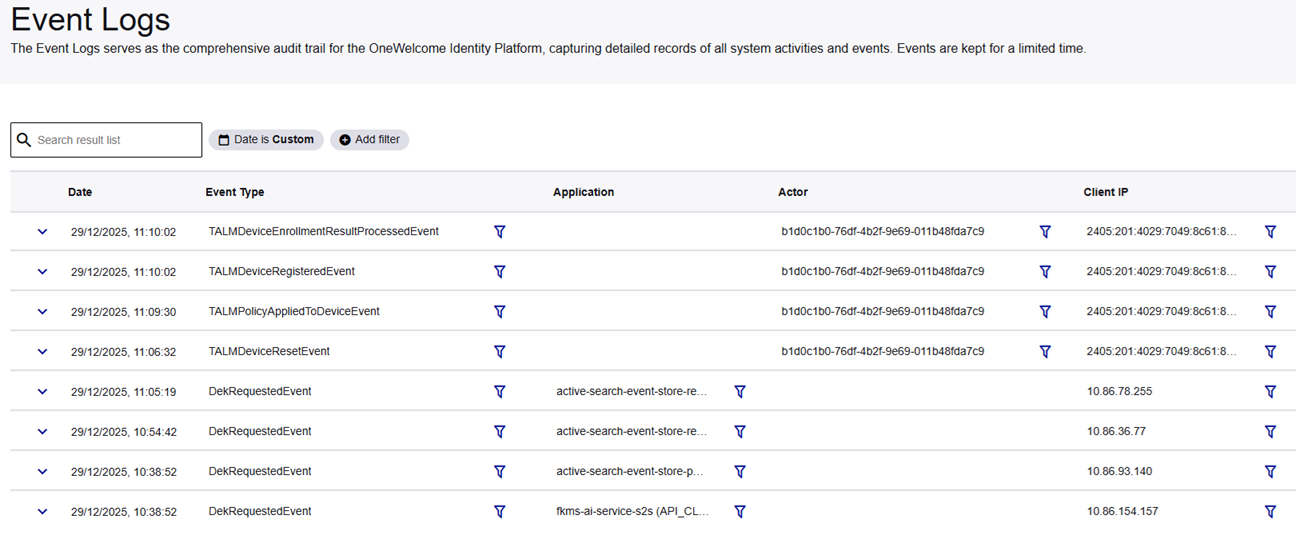
| Column Header | Description |
|---|---|
| Date | The timestamp indicating when the event triggered. |
| Event Type | The name of the specific event. |
| Application | The service or application that generated the event log. |
| Actor | The identity or system component that initiated the action that triggered an event. |
| Client IP | The IP address from which the request or action originated. |
Expanded View
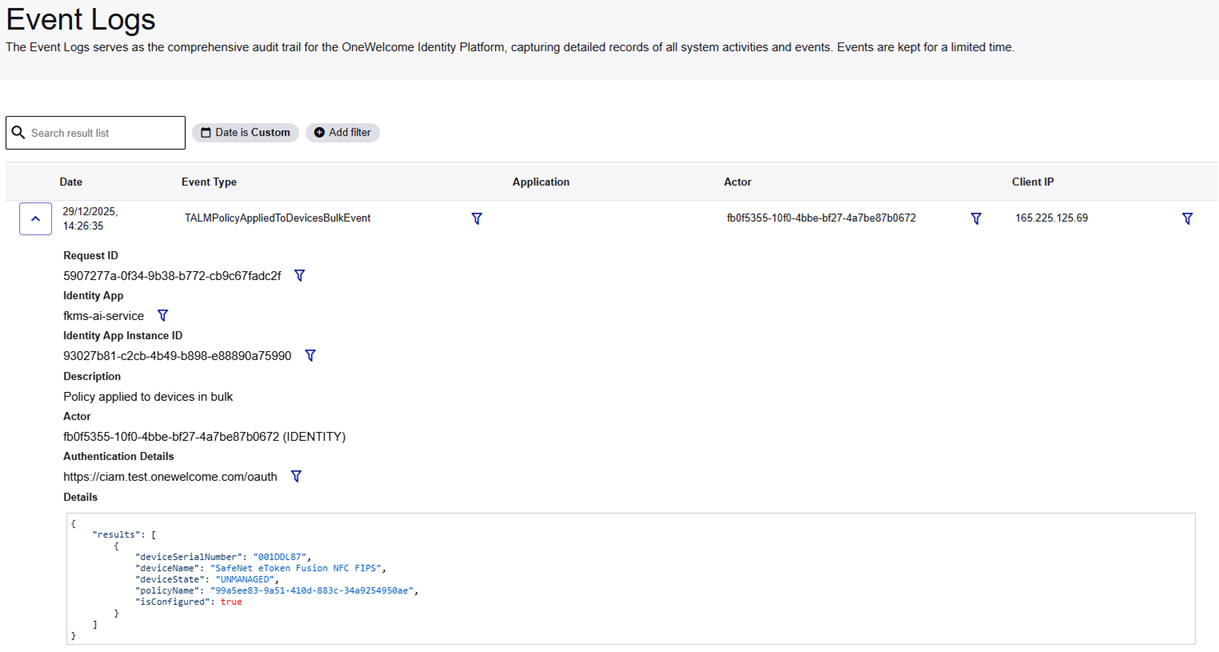
In addition to the information available in the Summary view, the Expanded view provides more event-specific details that are required for in-depth auditing and troubleshooting.
To view these additional details, click on the Expand Row  icon for the desired event.
| Field | Description |
|---|---|
| Request ID | A unique identifier assigned to the specific request that triggered the event. Helps trace and correlate logs for troubleshooting or auditing. |
| Identity App | The application or service within Thales Authenticator Lifecycle Manager that triggered the event. For example, talm-service. Indicates which component of the system performed the action. |
| Identity App Instance ID | A unique identifier for the running instance of the Identity App. |
| Description | A user-readable explanation of the event that occurred. For example, Policy applied to a selected device. Provides quick context for administrators without needing to parse raw data. |
| Actor | The identity (user or system) that initiated the action. For example, 64ab3d4e-f9a2-4f2f-99ce-e09381a28969 (IDENTITY). If you have the required permission, a Show user info button appears next to the actor ID for IDENTITY actors. Click Show user info to display the user's email address. |
| Authentication Details | The authentication endpoint or method used during the request. For example, https://cam.test.onewelcome.com/oauth. |
| Details | The raw data payload associated with the event, typically in JSON format. Provides complete details for auditing or troubleshooting. For example,  |
Search and Filter Event Logs
You can search or filter event logs using the Date and Time, Add Filter, or Search options.
Date and Time Option
You can search and view relevant event logs based on specific date and time ranges.
-
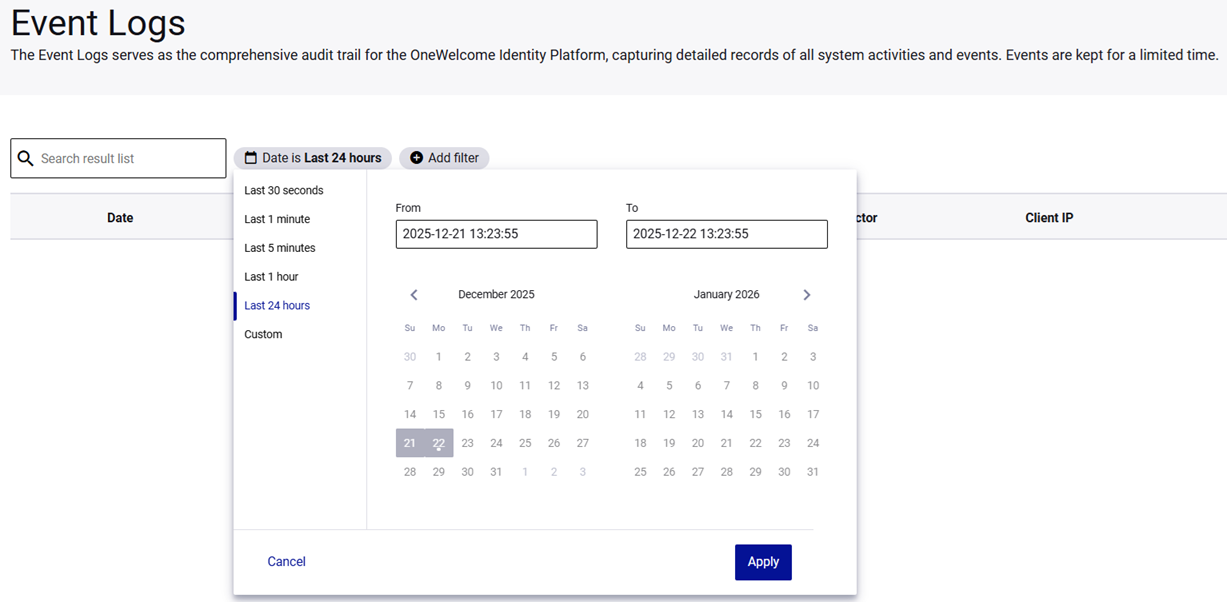
On the Event Logs window, click the Date is dropdown menu.

-
Select either a predefined time range or a Custom filter.
-
Last 30 seconds
-
Last 1 minute
-
Last 5 minutes
-
Last 1 hour
-
Last 24 hours
-
Custom: Used to retrieve event logs for a specific period, using the From and To fields and the calendar picker.
-
-
Click Apply to view the result.
Result
Add Filter Option
Use specific attributes to narrow down the search criteria to view the relevant event logs.
-
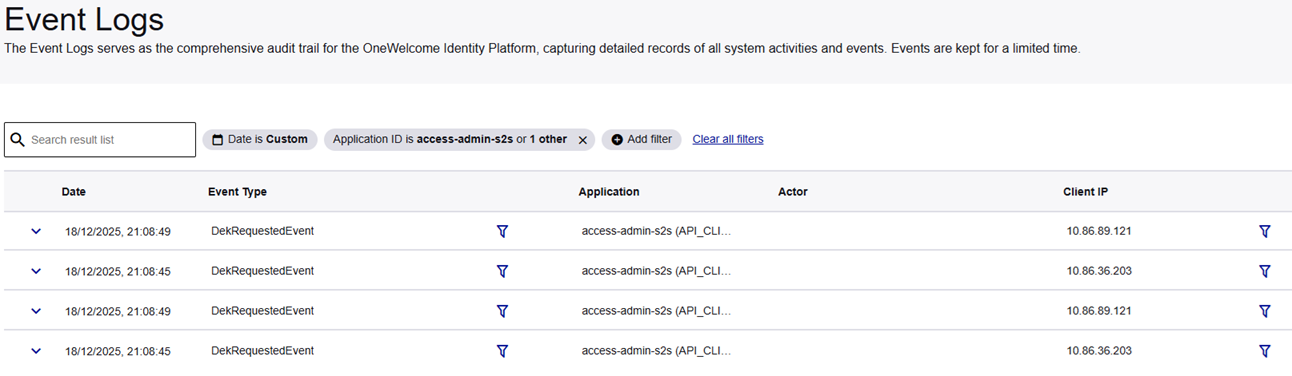
On the Event Logs window, Click Add filter.

-
In the Filter by dropdown, select or search for a parameter.
Parameter Description Application ID The unique ID of the application. Application Type The type of the application. Actor ID The unique ID of the entity that performed the action. Actor Type The type of the entity (for example, Identity). IdP Type The type of identity provider. IdP ID The unique ID of the identity provider. Auth Details - Issuer The issuer of the authentication token. Description A user-readable description of the event. Client IP The IP address from which the request originated. Identity App The service name (for example, talm-ai-service).Identity App Instance ID The specific instance ID of the service. Subject ID The ID of the subject affected by the event. Subject Type The type of the subject. Tags Metadata tags associated with the event. Request ID The unique ID of the request. Event Type The specific name of the event (for example, TALMPolicyAppliedToDeviceEvent).User Agent The browser or client string used during the request. -
Select a search Operator (for example, is).
-
In the Value field, enter or select the required value.

Result
Note
-
If multiple filters are applied, the system returns results that meet all the specified criteria.
-
To further refine the event log results, select the Add Filter icon
 next to a parameter value in the event log results table.
Search Option
Use the Search option to quickly view specific event logs based on a parameter value. For example, enter a Client IP address it into the Search result list field to display event logs related to that IP.

Result

Event Types
Thales Authenticator Lifecycle Service generates event logs for the following events:
Device Lifecycle Events
-
TALMDeviceRegisteredEvent: A device was successfully registered to an Identity Provider.
Example Payload
{ "username": "john.doe@example.com", "idpConfigName": "Corporate Okta IDP" } -
TALMDeviceEnrollmentResultProcessedEvent: Results of a device enrollment operation have been processed.
Example Payload
{ "results": [ { "deviceSerialNumber": "SN-ENROLLED", "deviceName": "YubiKey 5C NFC", "username": "john.doe@example.com", "idpConfigName": "Corporate Okta IDP", "isEnrolled": true }, { "deviceSerialNumber": "SN-FAILED", "deviceName": "YubiKey 5C NFC", "username": "john.doe@example.com", "idpConfigName": "Corporate Okta IDP", "isEnrolled": false } ] } -
TALMDeviceRevokedFromIdentityProviderEvent: A device was revoked from an Identity Provider.
Example Payload
{ "deviceSerialNumber": "SN-ABC123", "deviceName": "YubiKey 5C NFC", "username": "john.doe@example.com", "idpConfigName": "Corporate Okta IDP" } -
TALMDeviceResetEvent: A device reset operation was completed.
Example Payload
{
"deviceSerialNumber": "SN-XYZ987"
}
Identity Provider Configuration Events
-
TALMIdentityProviderConfigCreatedEvent: A new Identity Provider configuration was created.
Example Payload
{ "name": "Corporate Okta IDP", "type": "okta", "isActive": true, "communicationType": "ClientCredential" } -
TALMIdentityProviderConfigDeletedEvent: An Identity Provider configuration was deleted.
Example Payload
{ "name": "Corporate Okta IDP" } -
TALMIdentityProviderConfigUpdatedEvent: An existing Identity Provider configuration was updated.
Example Payload
{
"name": "Corporate Okta IDP",
"type": "okta",
"isActive": false,
"communicationType": "ApiKey"
}
Policy Management Events
-
TALMPolicyCreatedEvent: A new policy was created.
Example Payload
{ "policyName": "Standard FIDO2 Policy", "policyType": "MANAGED", "description": "Managed policy for trusted devices" } -
TALMPolicyDeletedEvent: A policy was deleted.
Example Payload
{ "policyName": "Obsolete Policy" } -
TALMPolicyUpdatedEvent: An existing policy was updated.
Example Payload
{ "policyName": "Updated FIDO2 Policy", "policyType": "GENERIC", "description": "Updated description for policy" } -
TALMPolicyAppliedToDeviceEvent: A policy was applied to a selected device.
Example Payload
{ "results": [ { "deviceSerialNumber": "SN-AAA111", "deviceName": "YubiKey 5C NFC", "deviceState": "ACTIVE", "policyName": "789a0123-b456-78c9-d012-345678901234", "isConfigured": true } ] } -
TALMPolicyAppliedToDevicesBulkEvent: A policy was applied to multiple devices in a bulk operation.
Example Payload
{
"results": [
    {
    "deviceSerialNumber": "SN-BBB222",
    "deviceName": "YubiKey 5C NFC",
    "deviceState": "CONFIGURED",
    "policyName": "789a0123-b456-78c9-d012-345678901234",
    "isConfigured": true
    },
    {
    "deviceSerialNumber": "SN-CCC333",
    "deviceName": "YubiKey 5 NFC",
    "deviceState": "CONFIGURED",
    "policyName": "789a0123-b456-78c9-d012-345678901234",
    "isConfigured": true
    }
]
}

