



BIND DNSSEC
This guide explains how to install, configure, and integrate ISC BIND with Thales Luna HSM for secure DNSSEC operations. ISC BIND is a widely used DNS server that supports full DNSSEC standards, enabling authentication and integrity of DNS data. Because DNSSEC relies on private signing keys to establish trust, protecting those keys is critical. Thales Luna HSM provides a hardened, tamper-resistant environment for generating, storing, and using DNSSEC private keys, ensuring that all signing operations occur inside a secure boundary and that keys cannot be extracted or misused—even if the DNS server itself is compromised.
The key benefits of this integration are:
-
Secure generation, storage, and protection of the identity signing private keys using either FIPS 140-2 or FIPS 140-3 Level 3 validated hardware.
-
Full life cycle management of the keys to ensure their integrity and reliability throughout their usage.
-
Maintenance of a comprehensive HSM audit trail for transparency and accountability in key operations. It's important to note that Luna Cloud HSM service does not have access to this secure audit trail.
-
Significant performance enhancements by offloading cryptographic operations from application servers.
Supported platforms
The following Luna HSM platforms are certified for integrating ISC BIND with Luna HSM:
| HSM Type | BIND Version | PKCS#11 Provider | OpenSSL Version | Operating System |
|---|---|---|---|---|
| Luna HSM | 9.21.12 | 1.1.0 | 3.5.1 | RHEL 9 |
| Luna HSM | 9.20.12 | 1.1.0 | 3.2.2 | RHEL 9 |
Prerequisites
Before integrating ISC BIND with Thales Luna HSM for DNSSEC operations, ensure that the following prerequisites are completed:
Set up Luna HSM
To configure Luna HSM for use with ISC BIND and DNSSEC, you must prepare the HSM, its partitions, and client access so that BIND can securely generate, store, and use DNSSEC signing keys.
Set up and initialize the Luna HSM according to the Luna HSM documentation, and ensure that it is provisioned and reachable from the system running BIND.
Create a dedicated partition on the Luna HSM that will be used by ISC BIND to store DNSSEC private keys.
If you are using a Luna Network HSM, create and exchange certificates between the HSM and the BIND system, register the BIND host as a client, and assign it to the BIND partition to establish an NTLS connection. Initialize the Crypto Officer (CO) and Crypto User (CU) roles for the partition.
Run the following command from the BIND system to verify that the Luna client is connected and that the assigned HSM slot is visible:
/usr/safenet/lunaclient/bin/lunacm
When the connection is successful, the Luna client displays the available HSM slots and partition information. The following is an example of the output you should see:
lunacm (64-bit) v10.7.2-16. Copyright (c) 2024 Thales Group. All rights reserved.

Available HSMs:

Slot Id ->                           0
Label ->                             TPA01
Serial Number ->                     1280780175918
Model ->                             LunaSA 7.8.4
Firmware Version ->                  7.8.4
Bootloader Version ->                1.1.5
Configuration ->                     Luna User Partition With SO (PW) Key
                                      Export With Cloning Mode
Slot Description ->                  Net Token Slot
FM HW Status ->                      Non-FM

Current Slot Id:                     0
Confirm that the assigned partition appears in the slot list and can be accessed using the Crypto User credentials.
If you are using a PED-authenticated Luna HSM, enable partition policies 22 and 23 to allow activation and auto-activation of the BIND partition.
Refer to the Luna HSM documentation on thalesdocs.com for detailed procedures on NTLS setup, partition creation, and user role management.
Manage User Access to Your HSM
Initially, only the root user can access the Hardware Security Module (HSM). However, you can grant access to specific non-root users by including them in the hsmusers group. This group is automatically created when you install the client software. Even if you later uninstall the client software, the hsmusers group remains intact, ensuring you can upgrade your software without losing your user access settings.
Add users to the hsmusers group
If you wish to permit non-root users or applications to interact with the HSM device, you must assign these users to the hsmusers group. Make sure that the users you intend to add to the hsmusers group are already established on the client workstation. Only users added to the hsmusers group will be granted access to the HSM device. Follow these steps to add a user to the hsmusers group:
Ensure that you possess sudo privileges on the client workstation.
Add a user to the hsmusers group using the command:
sudo gpasswd --add [username] hsmusers
Replace username with the actual username you want to include in the hsmusers group.
Remove users from the hsmusers group
If you need to withdraw a user's authorization to access the HSM device, you can remove them from the hsmusers group. Carry out the following steps to remove a user from the hsmusers group:
Confirm that you hold sudo privileges on the client workstation.
Eliminate a user from the hsmusers group using the command:
sudo gpasswd --add [username] hsmusers
Replace username with the specific username you want to exclude from the hsmusers group. To observe the changes, you will need to log in again.
Any user you remove will retain access to the HSM device until the client workstation is rebooted.
Set up Luna HSM High-Availability Group
Refer to Luna HSM documentation for HA steps and details regarding configuring and setting up two or more HSM boxes on host systems. You must enable the HAOnly setting in HA for failover to work so that if the primary goes down due to any reason, all calls get automatically routed to the secondary until the primary recovers and starts up.
Configure OpenSSL to use the PKCS#11 provider
This procedure installs OpenSSL 3.x (if required), installs the OpenSSL PKCS#11 provider, configures OpenSSL to load the provider, and verifies that OpenSSL can access the Luna HSM through PKCS#11.
Ensure that OpenSSL version 3.x is available on the system. If OpenSSL 3.x is not installed, download it from the official OpenSSL repository:
wget https://github.com/openssl/openssl/releases/download/openssl-3.2.2/openssl-3.2.2.tar.gz
Extract the archive, build, and install OpenSSL:
tar -zxf openssl-3.2.2.tar.gz
cd openssl-3.2.2/
./Configure --prefix=/usr/local
make
make install
Download the OpenSSL PKCS#11 provider from the official GitHub repository:
wget https://github.com/latchset/pkcs11-provider/releases/download/v1.1.0/pkcs11-provider-1.1.tar.xz
Extract the archive and prepare the build directory:
tar -xf pkcs11-provider-1.1.tar.xz
cd pkcs11-provider-1.1/
meson setup builddir
If OpenSSL is installed in a non-default location, set the PKG_CONFIG_PATH environment variable and re-run the Meson setup:
PKG_CONFIG_PATH="/usr/local/lib64/pkgconfig" meson setup builddir
Build, test, and install the PKCS#11 provider:
meson compile -C builddir
meson test -C builddir
meson install -C builddir
Verify that the PKCS#11 provider module has been installed:
ls -ltr /usr/local/lib64/ossl-modules/pkcs11.so

Locate the OpenSSL configuration directory:
openssl version -d

Edit the openssl.cnf file in the displayed directory and add the following configuration entries:
openssl_conf = openssl_init

[openssl_init]
providers = provider_sect

[provider_sect]
default = default_sect
pkcs11 = pkcs11_sect

[default_sect]
activate = 1

[pkcs11_sect]
pkcs11-module-path = /usr/safenet/lunaclient/lib/libCryptoki2_64.so
pkcs11-module-quirks = no-operation-state
activate = 1
Verify that OpenSSL successfully loads the PKCS#11 provider:
openssl list -provider pkcs11 -providers
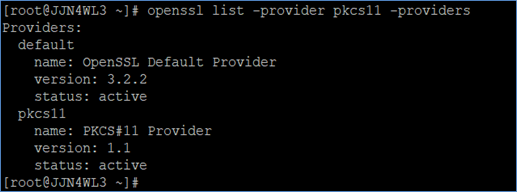
Ensure that the OpenSSL binary used at runtime matches the OpenSSL configuration file you modified. Use which openssl to confirm the correct binary is being used.
Install and configure ISC BIND
This procedure installs ISC BIND, creates a basic authoritative DNS zone, and verifies that the DNS service is functioning correctly before DNSSEC is enabled. Establishing a working, unsigned DNS configuration first ensures that any issues encountered later during DNSSEC integration are isolated to key management and signing rather than basic DNS functionality.
Obtain the required ISC BIND packages from the official ISC repository.
Review the official ISC BIND documentation for detailed build and configuration guidance.
Install the required build dependencies:
dnf install perl pkgconfig libxml2 userspace-rcu-devel libuv-devel libcap-devel jemalloc-devel libnghttp2-devel
Download the ISC BIND source package:
wget https://downloads.isc.org/isc/bind9/9.20.12/bind-9.20.12.tar.xz
Extract the archive and change to the source directory:
tar -xf bind-9.20.12.tar.xz
cd bind-9.20.12/
Configure, build, and install ISC BIND:
./configure --prefix=/usr/local --sysconfdir=/etc --localstatedir=/var --with-openssl=/usr/local
make
make install
Verify that ISC BIND was installed successfully:
named -v
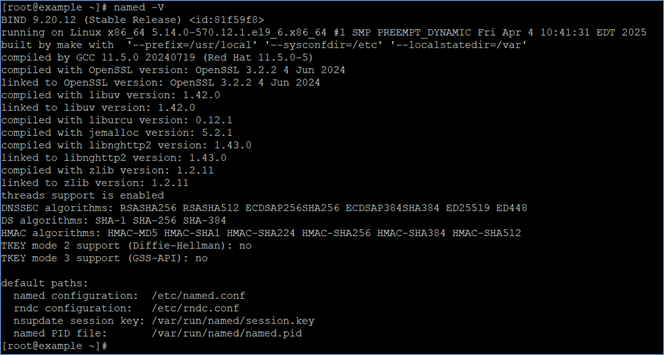
Navigate to the BIND working directory:
cd /var/named
Create a sample authoritative DNS zone file named master.luna-bind-example.com:
$TTL 1d
$ORIGIN luna-bind-example.com.
@       IN      SOA     ns1.luna-bind-example.com. root.luna-bind-example.com. (
        2002022401
        3H
        15M
        1W
        2h30M
        )
@       IN      NS      ns1.luna-bind-example.com.
@       IN      A       127.0.0.1
ns1     IN      A       127.0.0.1
www     IN      A       127.0.0.1
Edit the BIND configuration file located at /etc/named.conf and add the zone definition:
options {
        listen-on port 53 { 127.0.0.1; };
        listen-on-v6 port 53 { ::1; };
        directory       "/var/named";
        dump-file       "/var/named/data/cache_dump.db";
        statistics-file "/var/named/data/named_stats.txt";
        memstatistics-file "/var/named/data/named_mem_stats.txt";
        secroots-file   "/var/named/data/named.secroots";
        recursing-file  "/var/named/data/named.recursing";
        allow-query     { localhost; };

        recursion yes;
        dnssec-validation yes;
        managed-keys-directory "/var/named/dynamic";
        pid-file "/run/named/named.pid";
        session-keyfile "/run/named/session.key";

        include "/etc/crypto-policies/back-ends/bind.config";
};

zone "." IN {
        type hint;
        file "named.ca";
};

zone "luna-bind-example.com" IN {
        type master;
        file "master.luna-bind-example.com";
};

include "/etc/named.rfc1912.zones";
include "/etc/named.root.key";
Validate the BIND configuration:
named-checkconf /etc/named.conf
Start the BIND service:
named -u named -c /etc/named.conf
Verify that BIND is running:
tail /var/named/data/named.run
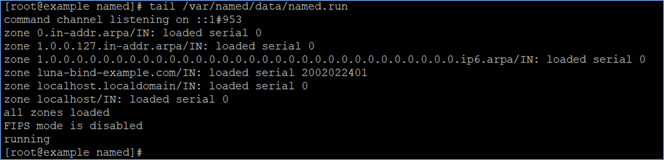
Confirm that BIND is listening on port 53:
netstat -natp | grep named

Verify DNS resolution before enabling DNSSEC:
dig +dnssec +multiline ns1.luna-bind-example.com @<IP address>
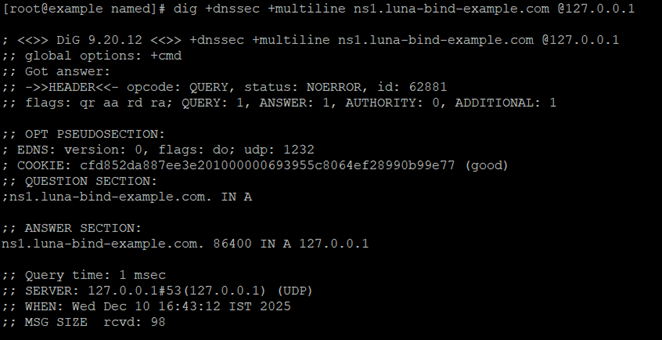
The example configuration enables recursion for demonstration purposes. In production authoritative DNS deployments, recursion should typically be disabled. Verify that no RRSIG records appear in the dig output, confirming that the zone is unsigned and functioning correctly prior to DNSSEC signing.
Integrate ISC BIND with Thales Luna HSM
Integrating ISC BIND with Thales Luna HSM involves generating DNSSEC signing keys directly on the HSM and using those keys to sign DNS zones. This ensures that DNSSEC private keys never leave the secure boundary of the HSM. The following procedure generates the Zone Signing Key (ZSK) and Key Signing Key (KSK) on the Luna HSM, creates BIND-compatible key reference files, signs the DNS zone, and verifies DNSSEC operation.
Download the luna-openssl-provider package from the Thales GitHub repository. This package includes the sautil utility, which is used to generate cryptographic keys directly on the Luna HSM.
wget https://github.com/ThalesGroup/luna-openssl-provider/releases/download/v1.0.0/luna-openssl-provider-ubi-amd64-openssl3.4.1-liboqs0.12.0.tar
Extract the downloaded archive.
tar -xvf luna-openssl-provider-ubi-amd64-openssl3.4.1-liboqs0.12.0.tar
Copy the sautil binary to a directory in your PATH.
cp builds/linux/rhel/64/3.2/sautil /usr/local/bin/
The archive includes a prebuilt sautil binary for Linux. For other distributions, build sautil from source as described in the OpenSSL Integration Guide.
Navigate to the BIND working directory.
cd /var/named
Generate the Zone Signing Key (ZSK) on the Luna HSM.
- For RSA keys:
sautil -v -s 0 -g 2048 -f rsa-zsk-ref.pem -l ZSK-example.com -o -c -q
- For ECDSA keys:
sautil -v -s 0 -m OID_X9_62_prime256v1 -f ec-zsk-ref.pem -l ZSK-example.com -o -c -q
Generate the Key Signing Key (KSK) on the Luna HSM.
- For RSA keys:
sautil -v -s 0 -g 2048 -f rsa-ksk-ref.pem -l KSK-example.com -o -c -q
- For ECDSA keys:
sautil -v -s 0 -m OID_X9_62_prime256v1 -f ec-ksk-ref.pem -l KSK-example.com -o -c -q
The -s 0 option specifies the HSM slot. Verify the correct slot using lunacm if required. The -l option defines the key label stored on the HSM. You will be prompted for the partition password during key generation.
Verify that both ZSK and KSK key pairs have been created on the Luna HSM.
/usr/safenet/lunaclient/bin/cmu list

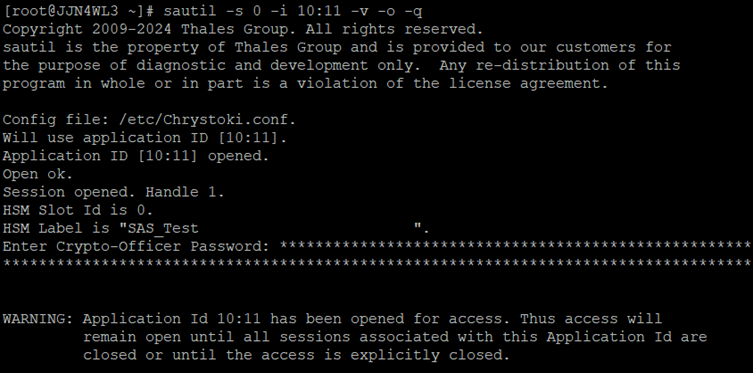
The next step applies only if you are using a PED-authenticated Luna HSM. If you are using a password-authenticated (PWD) Luna HSM, skip the next step and continue with creating BIND-compatible key reference files for the ZSK and KSK.
If you are using a PED-authenticated Luna HSM, complete the following actions to establish an authenticated session for DNSSEC operations. If you are using a PWD-based HSM, do not perform this step.
- Edit
/etc/Chrystoki.confand add the following under the Misc section:
AppIdMajor = 10;
AppIdMinor = 11;
FinalizeOnClose = 1;
- Open an authenticated session using sautil:
sautil -s 0 -i 10:11 -v -o -q
Create BIND-compatible key reference files for the ZSK using the keys stored on the Luna HSM.
- For RSA keys:
mkdir RSA-Keys
dnssec-keyfromlabel -a RSASHA256 -l "pkcs11:token=TPA01;object=ZSK-example.com;pin-value=userpin1" -K RSA-Keys/ luna-bind-example.com
- For ECDSA keys:
mkdir EC-Keys
dnssec-keyfromlabel -a ECDSAP256SHA256 -l "pkcs11:token=TPA01;object=ZSK-example.com;pin-value=userpin1" -K EC-Keys/ luna-bind-example.com
The commands above generate BIND-compatible public key files and reference files that point to the private ZSK stored on the Luna HSM; the private key material remains securely within the HSM and is never exported. Separate directories for RSA and ECDSA keys are used for clarity; if the -K option is omitted, the key files are created in the current working directory. In the dnssec-keyfromlabel command, -a specifies the DNSSEC signing algorithm, -l specifies the PKCS#11 URI identifying the key stored on the Luna HSM in the format pkcs11:token=<partition_label>;object=<key_label>;pin-value=<partition_password>, -K specifies the directory where the generated key files are written, and luna-bind-example.com is the DNS zone name.
The pin-value parameter is required only for password-authenticated (PWD) HSMs. For PED-authenticated HSMs, this value is ignored.
Create BIND-compatible key reference files for the KSK.
- For RSA keys:
dnssec-keyfromlabel -a RSASHA256 -l "pkcs11:token=TPA01;object=KSK-example.com;pin-value=userpin1" -K RSA-Keys/ -f KSK luna-bind-example.com
- For ECDSA keys:
dnssec-keyfromlabel -a ECDSAP256SHA256 -l "pkcs11:token=TPA01;object=KSK-example.com;pin-value=userpin1" -K EC-Keys/ -f KSK luna-bind-example.com
The commands above generate BIND-compatible public key files and reference files that point to the private KSK stored on the Luna HSM; the private key material remains securely within the HSM and is never exported. Separate directories for RSA and ECDSA keys are used for clarity; if the -K option is omitted, the key files are created in the current working directory. In the dnssec-keyfromlabel command, -a specifies the DNSSEC signing algorithm, -l specifies the PKCS#11 URI identifying the key stored on the Luna HSM in the format pkcs11:token=<partition_label>;object=<key_label>;pin-value=<partition_password>, -K specifies the directory where the generated key files are written, -f KSK marks the key as a Key Signing Key, and luna-bind-example.com is the DNS zone name.
The pin-value parameter is required only for password-authenticated (PWD) HSMs. For PED-authenticated HSMs, this value is ignored.
Verify that the ZSK and KSK files were created successfully.
ls -ltr RSA-Keys/

or
ls -ltr EC-Keys/

Sign the DNS zone file using the generated keys. All signing operations are performed on the Luna HSM.
- For RSA keys:
dnssec-signzone -S -o luna-bind-example.com -K RSA-Keys/ -a master.luna-bind-example.com

- For ECDSA keys:
dnssec-signzone -S -o luna-bind-example.com -K EC-Keys/ -a master.luna-bind-example.com

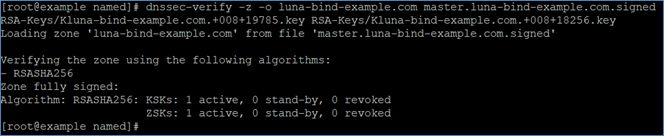
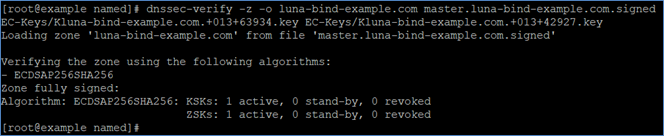
Verify the signed zone file using the public key files generated by BIND. Replace <KSK>.key and <ZSK>.key with the actual .key filenames created in the key directory.
- Using RSA keys:
dnssec-verify -z -o luna-bind-example.com master.luna-bind-example.com.signed RSA-Keys/.key RSA-Keys/ .key
- Using ECDSA keys:
dnssec-verify -z -o luna-bind-example.com master.luna-bind-example.com.signed EC-Keys/.key EC-Keys/ .key
Edit the /etc/named.conf file to ensure DNSSEC validation is enabled and update the zone definition to use the signed zone file.
dnssec-validation yes;

zone "luna-bind-example.com" IN {
        type master;
        file "master.luna-bind-example.com.signed";
};
Restart BIND to apply the updated configuration.
killall named
named -u named -c /etc/named.conf
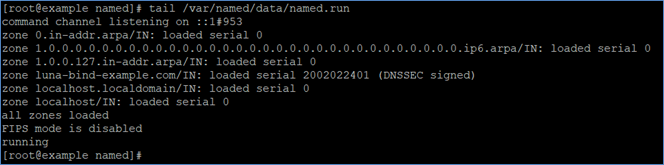
Verify that BIND has started successfully and is running without errors.
tail /var/named/data/named.run
Use the dig utility to confirm that DNSSEC is enabled and that signed records are returned.
dig +dnssec +multiline ns1.luna-bind-example.com @<IP address>
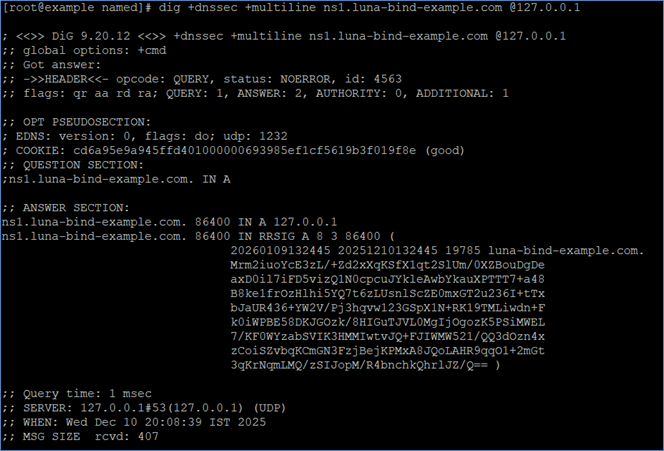
Confirm that RRSIG records appear in the response. The presence of RRSIG records indicates that the zone is signed and that DNSSEC is active.
This completes the integration of ISC BIND with Thales Luna HSM. DNSSEC signing keys are securely generated and stored on the Luna HSM, and zone signing operations can be performed only when the HSM is accessible.

