



Quick Start
Use CipherTrust Batch Data Transformation (BDT) to transform your data through encryption and tokenization. This section describes how to run BDT in its simplest form, that is, performing a file-to-file transformation through encryption.
BDT supports various other transformations, but the scope of this section is limited to file encryption (file-to-file transformation) only.
Prerequisites
To perform tokenization, a compatible version (2.2 or higher) of Vormetric Tokenization Server (now renamed as CipherTrust Vaultless Tokenization (CT-VL)) is up and running. Refer to the CT-VL Quick Start document for details.
A CipherTrust Manager version compatible with the installed CT-VL/CADP for Java version is up and running. Refer to the CipherTrust Manager Getting Started document for details.
Encrypting Files
Commands to encrypt files on Linux and Windows are detailed below. Click the desired tab for details.
Installation
Download the BDT distribution file. You can use
wgetat a terminal prompt.wget https://<path to download site>/bdt-x.x.x.tar.gzCreate a BDT home directory at a convenient location.
sudomay be required.cd /usr/local/bin sudo mkdir bdtExtract the distribution to the BDT home directory.
sudo tar -xzvf <filename.tgz> -C /usr/local/bin/bdtAdd the Java bin directory path to the PATH environment variable. Edit the
.bashrcfile (or equivalent for other shells) for the admin user and add the following lines:export JAVA_HOME=/usr/lib/java/jre export PATH=$JAVA_HOME/bin:$PATHVerify the installation by ensuring the following directory structure is created in the installation directory.
Directory Description bin Contains executable scripts for validating configuration, testing, and execution. conf Contains configuration files such as bdt.config,logging properties,bdt.properties, andbdt.mv.db(H2 database file).
Note: H2 database is upgraded from1.4.199to2.1.212for the backup of old version file. Refer to Backup using the Script Tool and Restore from a Script for details.lib Contains required JAVA library dependencies. log Contains log file directory. samples Contains sample policy and configuration files. Configure at least the following properties in the BDT properties file:
NAE_IP.1= CM_IP
NAE_Port= TCP_PORT
Protocol= tcp
Download the BDT distribution file.
Create a BDT home directory at a convenient location. You can use the File Explorer's New Folder option to create a new folder named BDT under the folder C:\Program Files, for example.
Extract the distribution to the BDT home directory. Use your favorite file compression/extraction utility (winzip, pkzip, or 7zip etc).
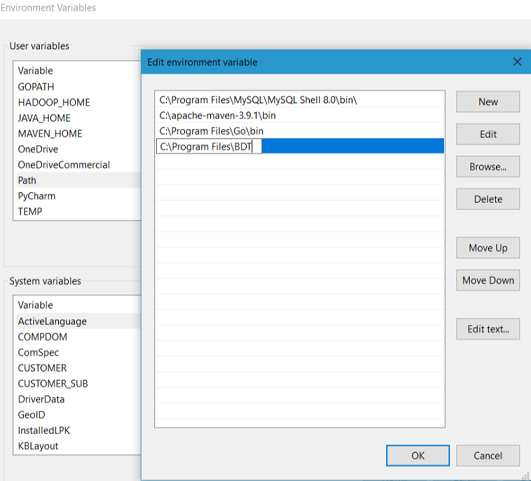
Add the Java bin directory path to the PATH environment variable:
Open the Control Panel.
Click System.
Click Advanced System Settings.
Click the Environment Variables button.
Under System Variables, select Path and then click Edit.
Note
Do not delete any of the existing text here.
Append the following to whatever you already have:
;C:\Program Files\BDTClick OK.
Verify the installation by ensuring the following directory structure is created in the installation directory.
Directory Description bin Contains executable scripts for validating configuration, testing, and execution. conf Contains configuration files such as bdt.config,logging properties,bdt.properties, andbdt.mv.db(H2 database file).
Note: H2 database is upgraded from1.4.199to2.1.212for the backup of old version file. Refer to Backup using the Script Tool and Restore from a Script for details.lib Contains required JAVA library dependencies. log Contains log file directory. samples Contains sample policy and configuration files. Configure at least the following properties in the BDT properties file:
NAE_IP.1= CM_IP
NAE_Port= TCP_PORT
Protocol= tcp
File-to-File Transformation
Create a user
test_userand a keytest_keyfor this user on the CipherTrust Manager.On the CipherTrust Manager, configure the NAE interface to work with
No TLS, allow anonymous logins.Download and copy the QuickStartEncryptInput.csv and QuickStartEncrypt.config files to the
$BDT_HOME/conf/directory. TheContactDetailscolumn of theQuickStartEncryptInput.csvfile will get encrypted using these steps.Download and copy the QuickStartEncrypt.policy file to
$BDT_HOME/samples/.Configure properties of default crypto library. Open command prompt from
$BDT_HOME/bin/and run the following command:bdt.sh -fEnter values as per the prompt messages and you are all set to run BDT.
Run the following command to write encrypted NAE user
test_userpassword inQuickStartEncrypt.configfile:bdt.sh -e -c ../conf/QuickStartEncrypt.configRun the following command:
bdt.sh -t -c ../conf/QuickStartEncrypt.config -p ../samples/QuickStartEncrypt.policyCheck the QuickStartEncryptOutput csv file created in
$BDT_HOME/conf/.
Create a user
test_userand a keytest_keyfor this user on the CipherTrust Manager.On the CipherTrust Manager, configure the NAE interface to work with
No TLS, allow anonymous logins.Download and copy the QuickStartEncryptInput.csv and QuickStartEncrypt.config files to the
$BDT_HOME/conf/directory. TheContactDetailscolumn of theQuickStartEncryptInput.csvfile will get encrypted using these steps.Download and copy the QuickStartEncrypt.policy file to
$BDT_HOME/samples/.Configure properties of default crypto library. Open command prompt from
$BDT_HOME/bin/and run the following command:bdt.bat -fEnter values as per the prompt messages and you are all set to run BDT.
Run the following command to write encrypted NAE user
test_userpassword inQuickStartEncrypt.configfile:bdt.bat -e -c ../conf/QuickStartEncrypt.configRun the following command:
bdt.bat -t -c ../conf/QuickStartEncrypt.config -p ../samples/QuickStartEncrypt.policyCheck the QuickStartEncryptOutput csv file created in
$BDT_HOME/conf/.
Tip
Your demo of the file-to-file transformation using encryption is complete. Now, you can explore all the supported transformations and the transformation process. Also, you can explore the tasks that you can perform using BDT, advanced topics, samples, best practices, and troubleshooting information. Use the left pane to navigate to the desired sections.

