



External FIDO management
If you manage FIDO authenticators in an external Credential Management System (CMS), you can use the SAS Management API to export those authenticators into SAS PCE Enterprise Virtual Appliance.
Using SAS PCE Enterprise Virtual Appliance with an external CMS (such as vSEC:CMS from Versasec or TALM (Thales Authenticator Lifecycle Manager)) lets you manage the FIDO authenticator lifecycle in the CMS while providing strong user authentication via SAS PCE Enterprise Virtual Appliance. You retain control over enrollment and can follow your approved security procedures.
After export, authenticators are in the pending state. Once the user confirms their identity and activates their assigned authenticator, the state changes to active.
Note
- The authenticator management APIs for managing FIDO tokens are enabled by default on the SAS PCE Enterprise Virtual Appliance.
- To restrict access, edit the
ApiWhitelist.Endpointsarray in/home/ubuntu/appliance/sas-mgmt-api/config/appsettings.Production.jsonon the appliance. - Back up the file and delete the lines for the endpoints to disable (watch trailing commas).
- Apply the change by running
sudo docker compose restart sas-mgmt-apifrom/home/ubuntu/appliance. Disabled endpoints return 404; kept endpoints are unchanged. - The first-boot wizard leaves
ApiWhitelistuntouched, soconfigure-sae --forcewill not overwrite the edits.
FIDO activation for users
The activation flow for imported FIDO authenticators is triggered only if the user has a pending FIDO authenticator. During activation, a separate additional identification factor is validated to confirm the user possesses the authenticator.
Pending authenticators
When an authenticator was imported via the API but the user has not yet confirmed their identity, they must activate it before logging in:
-
The user tries to access a resource protected with a FIDO policy.
-
SAS PCE Enterprise detects at least one pending FIDO authenticator associated with this user.
-
The login page prompts the user to activate a pending authenticator.
-
The user follows the browser instructions for their FIDO authenticator.
-
The user logs in with their activated FIDO authenticator.
Authenticator activation flow
Users activate their externally managed FIDO authenticators and then use them to log in. After activation, the authenticator's status changes from pending to active.
-
The user accesses a login page and enters their Username.
-
The user follows the browser instructions for their FIDO authenticator (for example, entering the security key PIN and touching the authenticator).
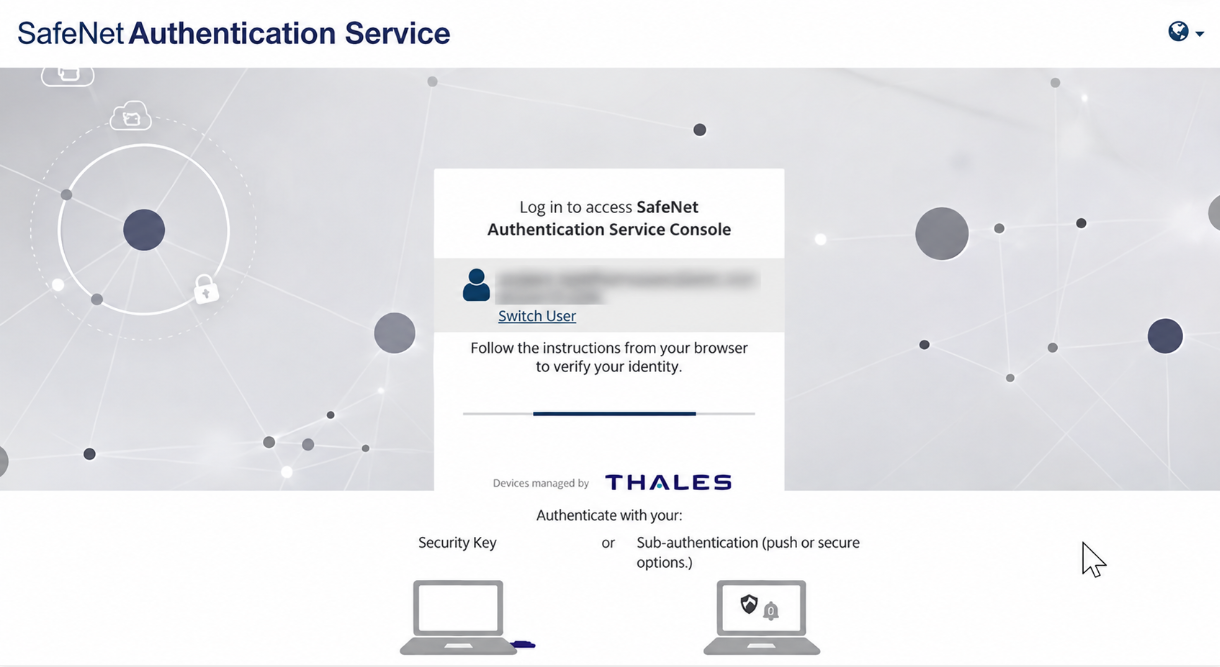
-
The user follows browser instructions to log in with their activated FIDO authenticator.

