



iOS Certificate Pinning For Release Configuration
You can configure the OIP Risk Management SDK backend and application server URLs in the ATS configuration of Info.plist.
OIP Risk Management SDK established its HTTPS connection over TLS with Risk Engine backend to get the visitID. To protect from man-in-the-middle attack, it rejects hostname-mismatch, self-signed certificate and accepts only root CA trusted certificate. In addition, OIP Risk Management SDK also uses strong cipher suites.
As ATS is part of the application's configuration, the following settings are to be added to the application's plist file via Key > App Transport Security Settings.
-
In the application’s Info.plist file, add a dictionary with App Transport Security Settings.
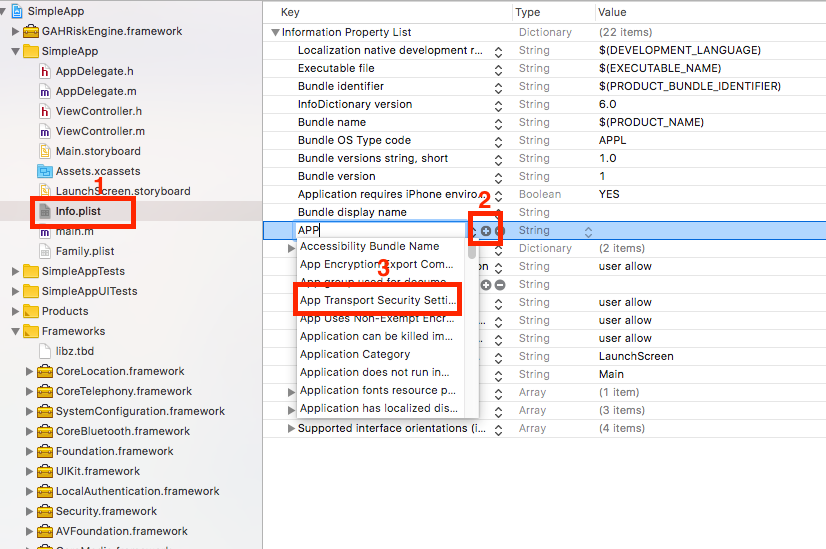
-
In Application Transport Security Settings (ATS), configure the parameters for Exception Domains based on the GAH backend URL.

Recommendations for host application
-
NSAllowArbitaryLoads key is set to
NOby default. Setting the key toYESindicates that it will be opted out of ATS and from its associated security benefits. -
NSExceptionDomains dictionary sets name specific domains for which exceptions need to be set. Currently no exceptions are required, only adding domain names is required for Certificate Pinning.

