Migrating Keys to Your New Luna USB HSM 7
If your Luna USB HSM 7 is replacing an older Luna USB HSM, this page provides information on migrating your keys securely to the new HSM. The partitions on both HSMs must be initialized with the same authentication method (password or iKey) and cloning domain, and they must be connected to the same Luna HSM Client computer. You can migrate objects using direct slot-to-slot cloning, or set up an HA group to synchronize your partition contents between the two HSMs.
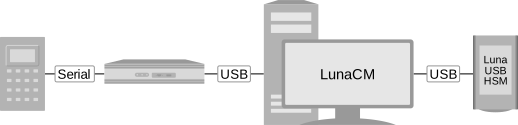
Refer to the following sections for preparation and procedures:
>Domain Planning and Key Cloning -- the Luna USB HSM 7 partition must be initialized with the same domain as the Luna USB HSM G5 partition.
>Cloning Keys Between Luna 6, Luna 7, and Luna Cloud HSM -- consider some possible restrictions on cloning from older to newer Luna firmware.
>Configuring a High-Availability Group -- instructions on setting up the Luna USB HSM G5 and Luna USB HSM 7 in an HA group to be synchronized automatically.
>Migration Using Slot-to-Slot Cloning -- instructions on direct slot-to-slot cloning from Luna USB HSM G5 to Luna USB HSM 7.
Migration Using Slot-to-Slot Cloning
You can back up partition objects from an application partition to any other partition that shares its cloning domain. The Crypto Officer of both partitions can perform this operation using LunaCM.
Prerequisites
>You require Luna HSM Client 10.4.0 or newer.
>Partition policy 0: Allow private key cloning must be set to 1 (ON) on both the source and target partitions.
>The target partition must be initialized with the same cloning domain as the source partition.
>You require the Crypto Officer credential for both the source and the target partition.
>Both partitions must be visible as slots in LunaCM.
>[Remote PED] This procedure is simpler when both partitions are activated (see Activation on Multifactor Quorum-Authenticated Partitions). If the partitions are not activated, you must connect the source partition to PEDserver before logging in.
lunacm:> ped connect [-ip <IP>] [-port <port>]
To clone partition objects to another application partition
1.In LunaCM, set the active slot to the Luna USB HSM G5 partition and log in as Crypto Officer.
lunacm:> slot set -slot <slotnum>
•If your Luna USB HSM G5 firmware is 6.21.2 or older:
lunacm:> partition login
•If your Luna USB HSM G5 firmware is 6.22.0 or newer:
lunacm:> role login -name Crypto Officer
2.[Optional] View the partition objects and their object handles.
lunacm:> partition contents
3.Clone objects on the partition to the Luna USB HSM 7 partition by specifying the target slot. You can choose which objects to clone by specifying a comma-separated list of object handles, or specify all to clone all objects on the partition. Present the target partition's Crypto Officer credential when prompted.
lunacm:> partition clone -slot <slotnum> -objects <comma-separated_list/all>
The specified objects are cloned to the target partition.
