Luna PCIe HSM 7 Onboard LEDs
In normal operation the HSM card is inside a host computer's sealed enclosure and not visible, but if you have it running while exposed, the four LEDs near the fan-power sockets are as follows:
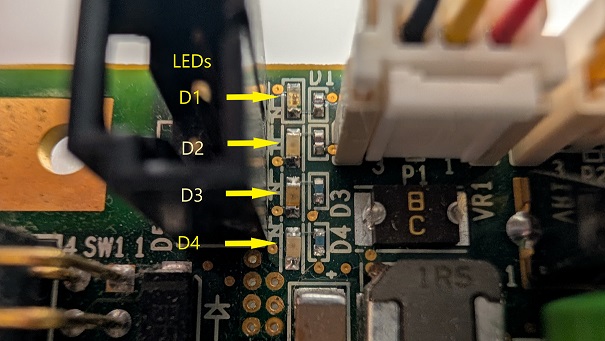
| Reference | Usage | Color | Behavior |
|---|---|---|---|
| D1 | Indicates that a tamper occurred and has not been reset | Red |
On if a tamper event is detected and not yet acknowledged/cleared. Off during normal HSM operation. |
| D2 | GPIO01 startup Thales debug |
Green |
Reserved for Thales use. |
| D3 | GPIO00 boot progress Thales debug |
Blue |
Reserved for Thales use. |
| D4 | Alternate battery source | Green |
Indicates that an alternate battery has been detected and replacement of the onboard battery can proceed. Off during normal HSM operation. |
